Create Person Accounts for Individual Clients
Learning Objectives
After completing this unit, you’ll be able to:
- Explain how person accounts store information about individual clients.
- Create a person account.
How Person Accounts Work
Person accounts take fields from two Salesforce objects—Account and Contact—and combine them into one object that represents a person. Person accounts use fields from the Contact object to track details about an individual, such as their first name, last name, and gender identity. As an admin, you turn on person accounts for your Salesforce org. Person accounts are simple to turn on, but once they are turned on, they can't be turned off again.
If users create a person account, they create two records at the same time: an account and a contact. Both exist in Salesforce and, depending on your configuration, an individual can appear in Account and Contact list views. When you edit a person account, both the person account and contact records are updated. A person account record, though, is the only record visible in Salesforce for all of the information about each client's financial situation and other information.
You can create different record types for person accounts. Record types can use different fields and page layouts for different types of clients, such as specific layouts for ultrahigh-net-worth individuals. For a full list of a person account’s capabilities, read Considerations for Using Person Accounts in Salesforce Help.
Person accounts can connect to the organization the person works for, their household, and other person accounts or contacts—like spouses, friends, and other connections using the relationship records you learned about in the last unit.
In this unit, you go step-by-step creating a person account manually, but that’s not the only way that person accounts can be created. They can be created during a flow or automated process used during onboarding or another financial services process. These can also be created via API.
Want to Get Hands-On with Agentforce Financial Services?
In this module, we show you the steps to manage clients and their relationships in Agentforce Financial Services. We don’t have any hands-on challenges in this module, but if you want to practice and try out the steps, you can register for a free Agentforce Financial Services trial with sample data. A Trailhead Playground doesn’t have Agentforce Financial Services. Here’s how to get the free trial edition now.
- Sign up for a free 30-day Agentforce Financial Services trial.
- Fill out the form completely.
- After you fill out the form, click Start my free trial. A confirmation message appears.
- When you receive the activation email (this might take a few minutes), open it and click Verify Account.
- Complete your registration by setting your password and challenge question. Tip: Save your username, password, and login URL in a secure place—such as a password manager—for easy access later.
You’re logged in to your trial org. Now turn on Group Membership.
- From Setup, in the Quick Find box, enter
Group Membership Settingsand select it.
- Turn on Create and manage households and groups if it isn’t already enabled.
You’re now ready to follow along with the steps in this module.
Manually Create a Person Account
Imagine your team is working with a new client named Abigail Moss. They start by creating a person account for Abigail to track their relationship.

- From the App Launcher (
 ), find and select Retail Banking.
- Select Accounts from navigation.
- Select New.
- Select Person Account and select Next.
- Specify these details.
- Salutation: Ms.
- First Name:
Abigail - Last Name:
Moss - Type: Customer
- Salutation: Ms.
- Save your work.
You can add other details to a person account, such as the individual’s phone number, email address, physical address, salutation, and gender identity. By default, you must enter at least a last name for a new person account. The person’s name becomes the name of the account.
On the record in your trial org, there are details about the person and related records. You can find many of the elements and related lists you need for managing this relationship and its financial accounts. You can customize this page for your organization and specify different page layouts for different apps.
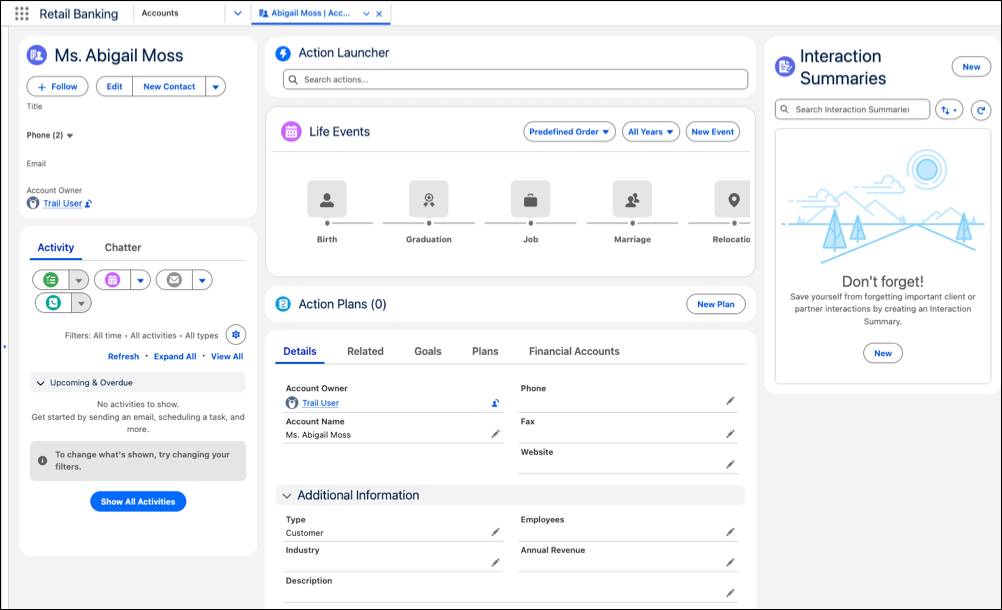
For example, you can reorder components so your team can use the related lists to create financial accounts, add important life events, or take notes using interaction summaries. You can also select which actions to highlight in action launchers.
You now have a person account for Abigail, but what about the people who are important to her? For many clients, it’s critical to track their spouses, children, and other connections. In the next unit, explore how to define relationships in Agentforce Financial Services.