Fundamentals of Digital Origination for Lending
Learning Objectives
After completing this unit, you’ll be able to:
- Define Digital Origination for Lending and describe how it simplifies loan origination.
- Identify the stages in Digital Origination for Lending.
- Describe how loan products are defined and organized in Digital Origination for Lending.
Before You Start
Before you start this badge, consider completing this recommended content.

Overcome Challenges in the Lending Landscape
Customers always want a smooth experience with lenders, and expect the loan process to be digital, easy, and fast.
Unfortunately, many lenders’ systems don’t provide that ease and speed. Siloed data and process inefficiencies often lead to longer cycle times, or the time from when a loan application is submitted until a final underwriting decision is made. If you’re a lender, now is the time to modernize and simplify how you work with loan applicants and borrowers to meet their expectations for an easy and fast digital lending experience.
Digital Origination for Lending is here to help.
In this badge, you learn about Digital Origination for Lending and how it simplifies and improves the loan origination process. In this unit, you start with the basics before exploring the tools that can help you improve each lending stage.
Explore Digital Origination for Lending
Digital Origination for Lending provides tools to manage the lending lifecycle directly in Salesforce. You can use the platform to:
- Simplify loan origination from intake to closing.
- Reduce the number of manual tasks.
- Lower cycle time.
- Accelerate decision making.
With Digital Origination for Lending, you can reduce days or weeks of work on an application to just hours or minutes.
The modern Digital Lending API connects customer-facing application forms to a data model built specifically for lending. That data model captures applicant, application, collateral, and due diligence information, such as identification verification and required documents.
With this data in Salesforce, you use built-in automation tools to customize Digital Origination for Lending to your process. Straight-through processing tools can even evaluate and instantly approve applications that meet your loan eligibility criteria.
Digital Origination for Lending helps both internal users, such as loan officers, underwriters, product admins, and account managers, and external users, such as loan applicants and brokers. When all these users use the same system, loan origination becomes easier and faster.
Explore the Stages of Digital Origination for Lending
Loan origination, and how you work with Digital Origination for Lending, includes three stages: product definition, application intake, and post-intake processing.

Here’s a brief explanation of each stage.
-
Product definition: You use Product Catalog Management to set up your products for applicants, brokers, and your team. You use other tools to set list prices and fees to calculate final loan prices and interest rates.
-
Application intake: Potential loan applicants use self-service tools to find the best loan for them, and then use guided, Omnistudio-powered forms to submit their applications. Your loan officers and brokers can use these same tools to complete applications on behalf of applicants. These guided application forms minimize the work to collect necessary information directly in Salesforce.
-
Post-intake processing: Your underwriters review the applications and decide about approving loans. Included tools and integrations help your underwriters review applications, verify details, collect information about collateral, and close applications. When an applicant accepts a final offer, integrations can ensure that the relevant details are automatically sent to your core banking system to track data in all of your systems.
You learn more about each stage in detail throughout this badge. First, explore how to define your loan products.
Organize and Define Your Loan Products
You can make it easy for potential applicants, brokers, and your team to find your loan products by using Digital Origination to organize your products into catalogs, categories, and subcategories. To present your products in this structure, you can use the included Experience Cloud site template, which provides options to present products as listings and detail pages.
You design, set up, and bring your products to market by using Product Catalog Management, a feature that provides a single source of truth for product information. You define each product and its attributes, plus configure rules to govern product visibility. Complete the Product Catalog Management: Quick Look badge in Trailhead for details about this feature.
By using Product Catalog Management’s Product Configurator feature, you can save time when you define loan offerings with reusable product templates and configurable dynamic attributes. Those attributes include minimum and maximum loan amounts, and loan terms. Here are the options in Product Catalog Management for setting up catalogs, products, and attributes.
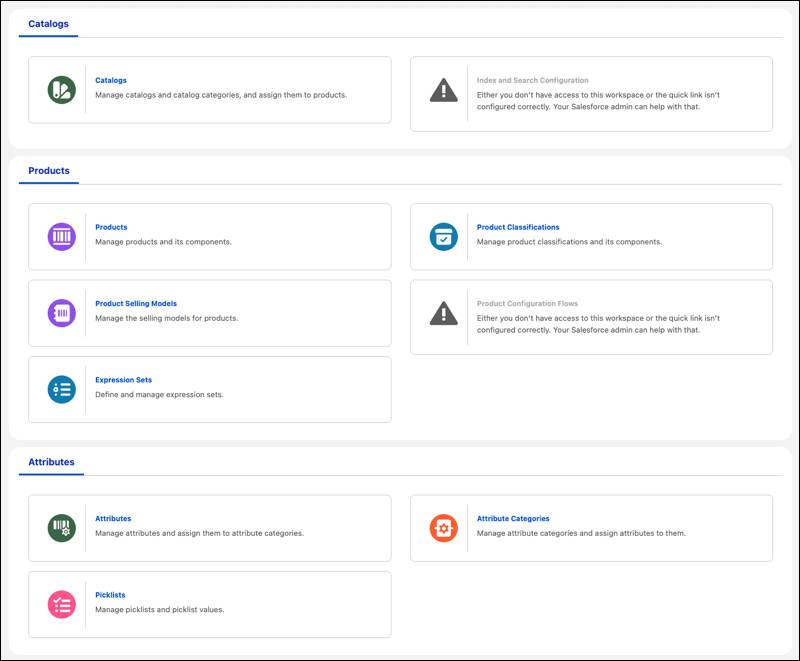
You then set rules to determine which products users can see and apply for, because not all loan products are for every potential applicant. To hide and show products to potential applicants, use qualification rules in Business Rules Engine to set criteria that qualify and disqualify products and product categories for potential applicants. For example, create qualification rules to view mortgage products that require an applicant to have a minimum credit score, minimum monthly income, and an address in a particular geographic area.
Then use Product Configurator along with Pricing Procedures to customize loan product pricing attributes and dynamically adjust them to show offers to applicants in real time. Alternatively, you can use Salesforce Pricing to customize pricing attributes and return offers. See the Pricing topic in Salesforce Help for details.
What’s Next
In this unit, you learned that Digital Origination for Lending simplifies loan origination and provides tools to manage the lending lifecycle directly in Salesforce. You also learned the basics of defining and organizing your products.
Using Digital Origination for Lending involves three stages: product definition, application intake, and post-intake processing. You define loan products in Product Catalog Management and then create qualification rules in the Business Rules Engine to determine product visibility.
You understand the basics of Digital Origination for Lending and how to configure products. In the next unit, learn how customers discover products.
Resources
- Trailhead: Agentforce Financial Services Basics
- Trailhead: Agentforce Financial Services Data Modeling
- Salesforce Website: Digital Origination
- Salesforce Help: Set Up and Manage Digital Lending
- Trailhead: Omnistudio Basics
- Salesforce Help: Create Catalogs and Products for Digital Lending
- Trailhead: Business Rules Engine
- Salesforce Help: Pricing for Digital Lending