Deliver Intelligent Omni-Channel Service
Learning Objectives
After completing this module, you'll be able to:
- Describe the shift to a truly unified, omnichannel service experience.
- Explain how Enhanced Omni-Channel and flows automate intelligent case routing.
- Summarize the real-time operational intelligence provided by Command Center for Service.
Evolved Routing Everywhere
In the age of Agentforce Service, simply offering multiple channels isn’t enough. Customers expect a seamless, unified experience no matter how they reach out—phone, email, text, or social media. That’s the power of true omnichannel.
Agentforce Service doesn't just connect channels; it unifies your entire service experience onto a single suite. This ensures your human reps have a simple interface and a complete, 360-degree customer view to work from, allowing them to deliver service that is personal, proactive, and consistent across every touchpoint.
AI-Powered Case Routing with Enhanced Omni-Channel and Flows
To deliver world-class service, the right service rep or AI agent must connect with the right customer at the right time. This is where intelligent routing tools transform your contact center from reactive to predictive. This strategy is key to scaling service operations by uniting humans and AI agents to surface the right solutions for your customers.
Enhanced Omni-Channel is the engine of intelligent service delivery. It removes the guesswork from case assignment by automatically assigning work items based on the precise skills needed to solve the customer’s issue, for example, “Billing Expert” or “Spanish-Speaking.” Omni-channel pushes cases to service reps only when they’re available and balances workloads so no single rep is overwhelmed. It also ensures high-priority cases, like those from VIP customers or urgent issues, jump to the front of the queue automatically.
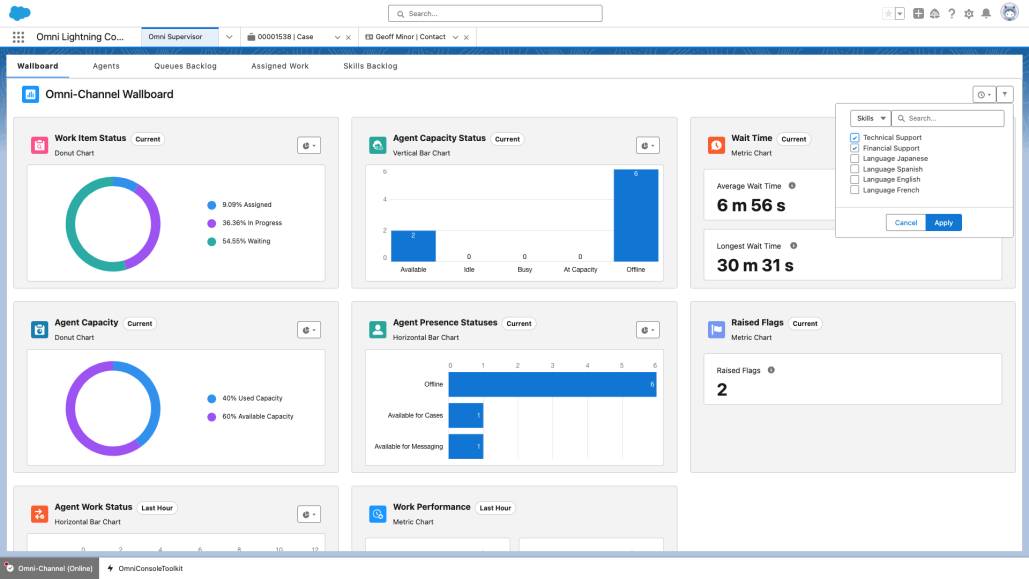
Flows take this automation a step further. Flows are powerful, low-code tools that allow you to build custom, automated service and case management processes. They’re used to intelligently route cases by running an initial check—for example, a flow can check if the customer is a VIP and route them to a specialized queue, or if the issue is a common one, route it directly to an AI agent for instant, autonomous resolution.
Beyond routing, flows can automate case prep by automatically updating the case record, sending a confirmation email to the customer, and even looking up relevant Knowledge articles before a human rep ever sees it, to save time.

Intelligent routing ensures service reps only handle the complex, high-value interactions, freeing them up for relationship building. AI agents manage routine inquiries, autonomously resolving issues and allowing you to scale high-quality support without expanding your human team.
Reps and experts can also collaborate in real-time by starting a Slack swarm directly from the Service Console. The entire team benefits from balanced workloads and higher first-contact resolution rates, which translates to a happier company bottom line.
The Supervisor’s Command Center for Service
Command Center for Service gives service leaders operational intelligence—all in one handy tab within the Service Console. It provides a centralized view to manage service rep and AI agents across all channels.
Command Center includes Customer Signals Intelligence, which streams data on customer sentiment and interactions to deliver a complete, real-time pulse on customer satisfaction. You can see open work, customer wait times, service rep performance, and even track the resolution rate and efficiency of your autonomous AI agents. Beyond performance, it helps you detect Knowledge gaps in your service content, allowing you to quickly generate new articles to improve both self-service and human-agent resolution.

The best part? You never have to leave your console to see a complete picture of your service operations. All of this real-time data helps you proactively manage your team and service content.
Connect Everywhere Service Is Needed
Your customers, field technicians, employees, HR and IT teams expect to get help when and where they need it. Agentforce Service is built for flexibility, seamlessly connecting you with anyone who needs help across any channel they choose.
No matter which channel your customers choose, they’re matched with an expert—either a human rep or an AI agent—armed with the skills and tools to solve their issues quickly, ensuring a consistent and personalized experience every time.
Get Started with Salesforce Go
Ready to get started with Agentforce Service? Whether you want to set up your customer service, contact center, field service, or employee service, Salesforce Go helps you do so quickly. Deploy features for all types of service with just a few clicks.

To get started, click  and select Salesforce Go from the dropdown menu.
Get ready to join the new era of Agentforce Service where siloed service teams with fragmented data are a thing of the past, replaced by a continuously improving unified suite providing efficiency, intelligence, and proactive service for everyone.
Resources
- Trailhead: Enhanced Omni-Channel: Quick Look
- Trailhead: Flow Builder Basics
- Trailhead: Salesforce Go
- Salesforce Help: Route Work with Omni-Channel
- Salesforce Help: Set Up Command Center for Service