Get Started with Knowledge
Learning Objectives
After completing this unit, you’ll be able to:
- Describe a knowledge base.
- Explain the benefits of a knowledge base.
- Explore Knowledge in a trial org.
Before You Start
Before you start this badge, consider completing this recommended content.
A Knowledge Base in Salesforce
Every service leader appreciates the power of knowledge. After all, your knowledge base is the trusted data foundation that powers successful AI in service. Service reps know a lot, but to scale service and ensure consistency, you need a comprehensive knowledge base.
Knowledge is the foundation for successful AI. Think of it as a giant library with the most helpful librarian possible—a librarian who can quickly answer everyone’s questions—from customers to service reps to AI agents. Your best answers form the basis of your knowledge base.
Question |
Where It’s Answered |
|---|---|
What are the benefits of using our product and services? |
In a frequently asked questions (FAQ) article |
What happens when a technician installs our products? |
In a step-by-step article that explains the process for the technician to follow |
What’s the best way to deal with an angry caller? |
In an article that provides guidelines for good customer service |
A service rep's notes cover these questions and more. Most reps want to turn their notes into knowledge articles so they can easily share them with anyone who needs the information. Who can view these articles? Other reps, customers in self-service sites, or AI agents—like Agentforce Service Agent or Einstein Service Replies—that ground their responses in your trusted data.
Help Customers Answer Their Own Questions
Often, many customers call in with simple questions. But without a knowledge base, customers can’t find a simple answer and service reps spend most of their day answering the same questions over and over. Even worse, sometimes customers have to wait to get those answers. The longer they wait, the more resolution times go up and customer satisfaction (CSAT) scores go down.
After you set up a knowledge base on your website and other channels, customers can quickly find answers to their simple questions. Plus, most customers prefer to answer questions themselves instead of contacting customer support. Quick answers make customers happy, reduce resolution times, and boost CSAT scores.
If basic information is easy to find, then your service reps and AI agents are free to spend more time helping customers with more challenging, difficult problems. As a result, those customers are happier, too.
Increase Rep Productivity with Knowledge
Modern service relies on two core pillars: maximizing agent productivity and making AI more trusted and accurate. An experienced service rep knows there’s a lot to learn. Your company handles complex products or services, and it’s tough to keep everything straight. Sure, the rep has their own notes, but they’re not easy for anyone else—or AI—to find and use.
If the only way new hires can learn is by asking an experienced teammate, it will take a while for them to be productive. But a knowledge base puts that organizational knowledge into a repository. New reps have a place to go to learn on their own. An up-to-date repository helps you to train new reps quickly and lower the training burden for existing reps, too. Everyone’s productivity increases.
With a knowledge base, reps don’t have to research every question from scratch, every time it’s asked. Instead, the first time a question is asked, a rep records the answer in an article. The next time a customer asks the same question, any other rep can find the article in the knowledge base and provide a ready answer. Even better? Knowledge often suggests the article most relevant to a case so reps don’t even need to search for it. It also grounds generative AI features like Einstein Service Replies and Einstein Search Answers, which ensures the AI responses are trusted and accurate.
Get to Know Salesforce Knowledge
Knowledge is the foundation for successful AI and centralized, multisource data. Sure, it stores information in one place so reps and customers alike can access it, depending on permissions. It can make your reps more productive and your customers happier.
Even better, from an admin’s point of view, Knowledge is part of Salesforce. Because Knowledge is integrated with Salesforce rules, permissions, and administration tools, you can manage everything in one place.
Ready to install a trial version of Knowledge to try it out? If you want to practice and explore the steps in this module, you can register for a free Agentforce Service trial with sample data. Here’s how to get the free trial edition.
- Sign up for a free 30-day Agentforce Service trial.
- Click Try for Free.
- Complete the form. For Email, enter an active email address that’s unknown to Salesforce. The email address you provide becomes the username in this new trial org. Usernames must be globally unique across all instances of Salesforce, so you must use an email account that is unknown to Salesforce or your installation won’t work.
- After you fill out the form, a confirmation message appears, which asks you to check your email.
- When you receive the activation email (this might take a few minutes), open it and click Verify Account.
- Set your password and challenge question to complete your registration.
Tip: Write down your username, password, and login URL for easy access later.
You're logged in to your trial org and ready to take a tour!
From the Explore Salesforce walkthrough, click Answer Customers with Articles to experience Knowledge as a service rep.
To learn what your reps can do, click a sample case in the trial version of the knowledge base. To open your own case, do the following.
- In the Service Console, click Cases.
- From the dropdown, select All Open Cases.
- Click a case number.
The page displays something similar to this.
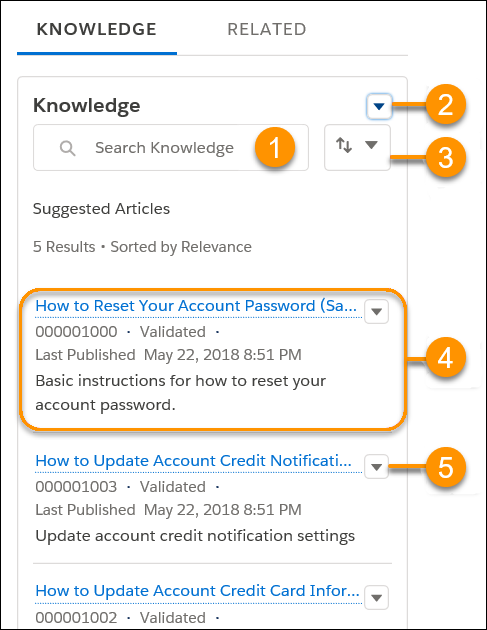
Refer to the numbered labels in the Knowledge pane image to learn about the following tools.
Search for articles (1): Type in the search field to find articles in your knowledge base. For example, type password to find articles about how to reset a user password. When you start typing in the search field, a menu pops up. Use it to view recent searches or create an advanced search with filters such as language or publication status.
Create an article dropdown (2): If an answer isn’t in your knowledge base, create an article to add it.
Sort your search results (3): Click to sort your results alphabetically from A to Z or by publication date. Suggested articles are already sorted by relevance.
Access details about each article (4): Read the article’s title, summary, and properties. In this case, the article is titled, How to Reset Your Account Password.
Work with the article (5): Click this menu to interact with the article. Depending on the article’s permissions, you can do a lot. You can edit, publish, archive, attach, detach, follow, or insert the article into an email.
Wrap It Up
In this unit, you learned Salesforce Knowledge basics and what it can do. Knowledge can really help your service reps and customers—and it’s the trusted data layer for your AI. Ready to put it to work? Your next step is to plan your knowledge base.
Resources
- Salesforce Help: Create a Knowledge Base with Salesforce Knowledge
- Salesforce Help: Salesforce Knowledge Help and Resources