Explore the Pillars of a Data 360 Foundation
Learning Objectives
After completing this unit, you’ll be able to:
- Define the pillars of a solid Data 360 foundation.
- Explain how Data 360 provides a scalable and flexible data architecture.
- Describe how Data 360 ensures ethical and secure data use.
- Outline how Data 360 supports extensibility and testing.

Before You Start
This badge is part of the Data 360: Unlock the Value of Your Data trail. The trail explains the strategic importance and benefits of Salesforce Data 360. In this badge, you learn how to build a strong foundation in Data 360 through three pillars: scalable and flexible architecture, ethical and secure data, and extensibility and testing. When you establish this groundwork, you can confidently deliver trusted customer experiences.
Pillar 1: Scalable and Flexible Architecture
The first pillar of a Data 360 foundation is scalable and flexible architecture that can expand as your business grows. Data 360 supports your business’ data strategy as it develops into different sectors, regions, and industries.
Explore Data Cloud One
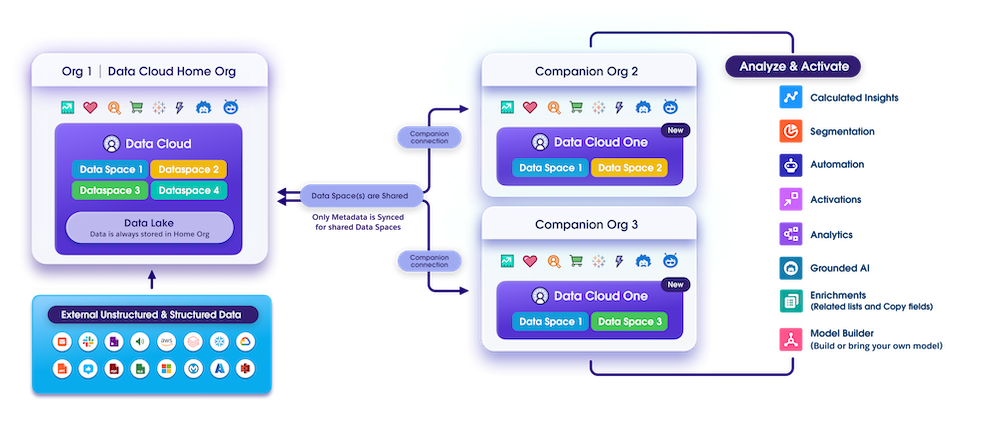
In today’s complex business environments, data often lives across multiple Salesforce organizations. By connecting orgs with a Data Cloud One connection, you can share Data 360 unified data, objects, features, and insights from one Data 360 instance across multiple orgs.
The home org is the org that has Data 360 provisioned. Companion orgs are connected to the home org with a Data Cloud One connection.
With standard CRM connections, connected orgs can’t access unified data. But with Data Cloud One connections, they can access unified data and other Data 360-powered features from the home org, such as segments and AI models, directly in their org. Companion org users can see a complete view of their customers with unified profiles, build custom flows on unified data, directly build and access calculated insights, and optimize business processes for their use case.
Consider Architectural Factors
Use data spaces and Data Cloud One together to develop an architectural strategy for your organization. A consistent strategy helps you keep track of data residency, maintain compliance and control, and plan out data processing costs. Keep these considerations in mind as you plan out your architectural strategy.
-
Data Residency and Compliance
- Identify where your data resides.
- Review residency policies, regional hosting requirements, and cross-border processing implications.
- Identify where your data resides.
-
Single vs. Multiple Data 360 Instances
- Use a single Data 360 instance for centralized control and unified customer data.
- Deploy multiple Data 360 instances to meet regional, legal, or business unit separation needs.
- Use a single Data 360 instance for centralized control and unified customer data.
-
Data Processing and Access
- Identify where data is processed and accessed.
- Evaluate consumption estimates based on data processing usage. Note that for Data Cloud One, data processing in companion orgs impacts overall usage in the home org, which consumes Data 360 credits in the home org.
- Identify where data is processed and accessed.
-
Administration and Control
- Decide between a centralized control center or org-specific controls.
- Plan out admin roles in each Salesforce org
- Decide between a centralized control center or org-specific controls.
Learn more in Data 360 Architecture in the Data 360 Developer Guide.
Pillar 2: Ethical and Secure Data
The second pillar of a Data 360 foundation is ethical and secure data. This means following best practices in cybersecurity and data management to build trust with your customers and respect their privacy and preferences. It’s about being responsible with the valuable information you collect. When you prioritize ethical data, you’re not just complying with regulations, you’re fostering loyalty and credibility.
Learn more on Trailhead in Ethical Data Use Best Practices: Quick Look.
Use Data Spaces
Data spaces segregate data, metadata, and processes and provide a separate unit within a single Data 360 instance. You can strategically create data spaces for different brands or regions within your business.
You can manage user access to data spaces with permission sets. This enables you to restrict users to the data from the region or brand they work on. You also use data spaces to share metadata between Data Cloud One home and companion orgs. Data spaces keep your Data 360 instance organized and secure.
Implement Data 360 Governance
Data 360 Governance is your central control system for data governance. It helps you govern data and metadata consistently across every area of Data 360.
Data 360 Governance also supports the previous pillar, scalable and flexible architecture. You can apply a unified set of rules to all your data, ensuring consistency and compliance.
Data 360 Governance includes the following features.
-
Policy-Based Governance: Establish access policies that control if a user can view or interact with specific data.
-
AI Tagging and Classification: Automatically label and classify records to ensure consistent data management and protection.
-
Dynamic Masking Policies: Automatically hide or show data based on user access permissions.
Apply Platform Encryption
When you're dealing with sensitive customer information, security is nonnegotiable. Platform Encryption allows you to add an extra layer of security for your sensitive Data 360 data. Understand data classification, apply encryption keys, and regularly review your encryption strategy to adapt to the evolving security landscape.
Pillar 3: Extensibility and Testing
The third pillar of a Data 360 foundation is extensibility and testing. Extensibility means that Data 360 was designed to adapt to new capabilities and functionality. Test new functionality in low-stakes environments before deploying them to production.
Use Packaging and Data Kits
After you’re done building new Data 360 components and functionality, you can share it with packages and data kits. A package can contain small individual components or a large set of related apps. You create a data kit with the packageable features and add the data kit to a package.
Once you’ve created a package, install it into a test environment like a scratch or sandbox org. From there, you can make changes and have people test it out. When you’re happy with the result, you can deploy it to your production org or even share it with the world on AgentExchange.
Learn more on Trailhead in Packaging and Data Kits in Data 360.
Provision Data 360 Sandboxes
A sandbox is a copy of your Salesforce org for development, testing, and training without impacting the data and applications in your production org. You can provision Data 360 in a sandbox to develop and train Data 360 features and test packages before deploying them to a production environment.
Learn more in the help article, Data 360 in a Sandbox.
Next Up
You're well on your way to building a trusted Data 360 foundation. You know how Data 360 supports a scalable and flexible data architecture, ethical data use and governance, and testing.
Interested in seeing Data 360 in action? Follow along in Data 360: Transform Customer Experiences as Sunshine Trails uses Data 360 with Agentforce to deliver personalized guest experiences from property search to check-in.