Get to Know Agentforce Lead Nurturing
Learning Objectives
After completing this unit, you’ll be able to:
- Describe how to engage leads with Agentforce.
- Use Salesforce Go to enable Agentforce.
Engage Customers Like Never Before
Built on the trusted Salesforce AI platform, Agentforce helps your sales team scale by engaging leads, contacts, and person accounts across every channel to drive powerful outcomes across your entire customer lifecycle. It can serve as the first point of contact for inbound leads, conduct personalized outreach, answer customer questions, and even book meetings on your sellers’ behalf. Beyond new business, Agentforce helps sellers engage customers across the entire lifecycle, assisting with onboarding, renewals, and the reengagement of stale opportunities.
While your agent works in the background, your sales team can stay focused on targeted accounts and building stronger customer relationships to close deals faster. At the same time, they can track agent activity and effectiveness through the Control Center and the dedicated Agent Analytics dashboard.
Engage Leads with Agentforce
Agentforce comes with prebuilt, out-of-the-box subagents, instructions, actions, and prompt templates to engage leads. Review each of the features before moving on.
Term |
Definition |
|---|---|
Subagents |
A way to group actions together into functional jobs to be done. This helps limit the agent to use only relevant actions for the topic at hand. |
Actions |
Each subagent includes a specific set of actions an agent can complete. To customize an action, you need to include natural language instructions. These instructions help guide the agent on which actions to take or what questions to ask for clarification. |
Instructions |
These are used to describe what your action does and when to use it in a conversation. |
Prompt |
A natural language query that tells the large language model (LLM) what you want to do. It can be a question, statement, response, or a detailed set of instructions. |
Prompt Template |
This is a reusable prompt. |
Prompt Builder |
The tool you use to create and manage prompts that integrate generative AI into workflows, particularly within CRM systems. |
Setting Up with Salesforce Go
Getting started is easy with Salesforce Go. Think of Salesforce Go as your step-by-step coach that walks you through what’s happening, what to do next, and how to do it, all in one place. Check out this resource if you want to learn more about Salesforce Go.
Before we jump into Salesforce Go, let’s take a look at the steps you take to get your agent up and running.

Here’s a closer look at each step in the process and what it means.
- Turn on Agentforce to enable the platform your AI agents run on. This step is required before you can build, customize, test, and launch agents.
- Enable the Engagement agent to start setting it up. Agentforce automates outreach, helps qualify prospects, and builds pipelines. It works with features like Einstein Activity Capture, Salesforce Inbox, and Data 360. Enabling it makes sure those features are turned on and ready to support your sales process.
- Assign user access and permissions so the right people can create, edit, and manage the agent.
- Set up the agent user in Salesforce. The agent runs as a Salesforce user, which gives it the secure access it needs to work with your data and complete tasks that regular users may not have permission to do.
- Configure a Data 360 data library to give the agent a trusted source of information about your business. This helps it deliver accurate answers and more personalized responses.
- Build, test, and activate the agent in Sales Agent Configuration, a guided process that makes it easy to customize, test, and launch AI agents.
Although the steps may look like a lot, Salesforce Go makes most of them quick and easy to complete with just a few clicks. Now that you have the big picture of the setup journey, let’s roll up our sleeves and build it in real time.
Enable Agentforce and Kick Off Setup
The first step is to turn on Agentforce. This ensures all the setup options and functionality needed for the agent are available. Here’s how to do it.
- Click
 and select Salesforce Go. This opens the Salesforce Go home page in Setup. If you’re already in Setup, you can use Quick Find to search for and select Salesforce Go.
- In the Search features… textbox, enter and select Agentforce for Sales.
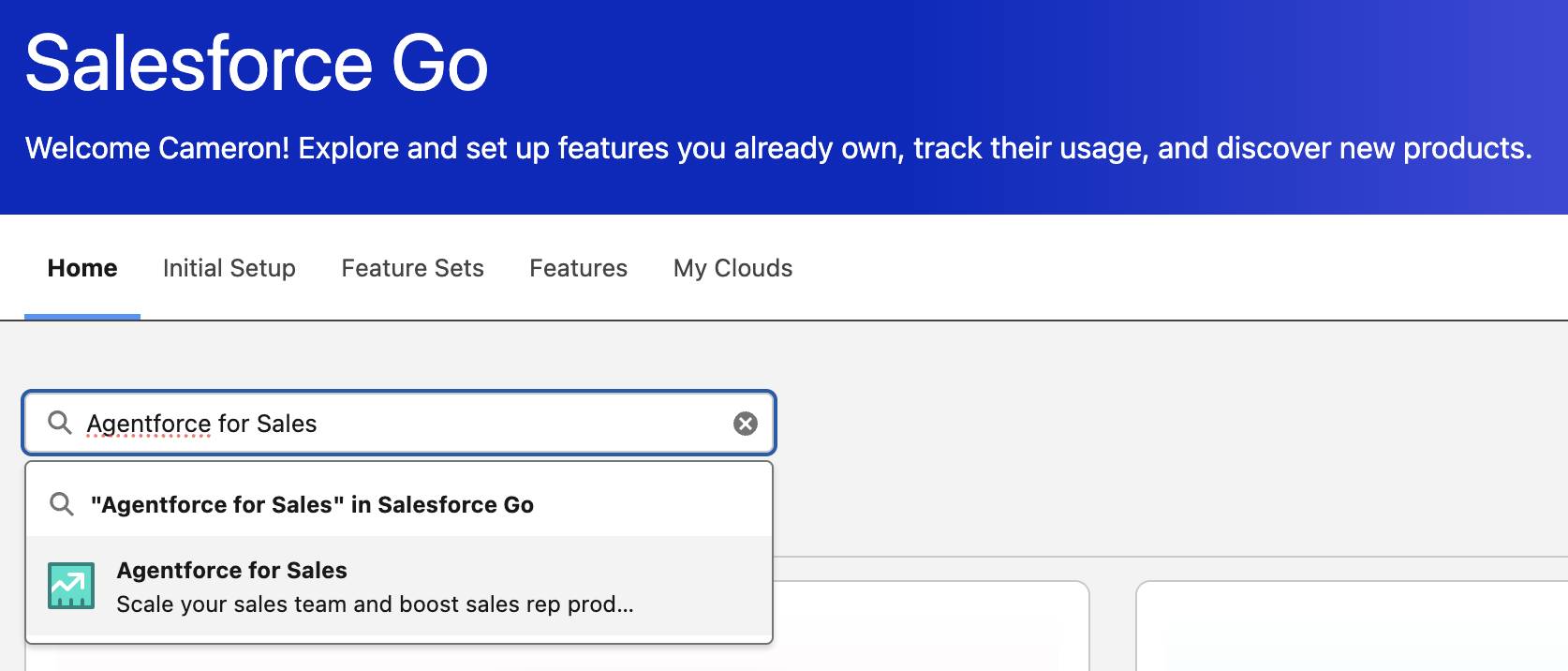
- On the Agentforce for Sales page, click Turn On in the Turn On Agentforce card.
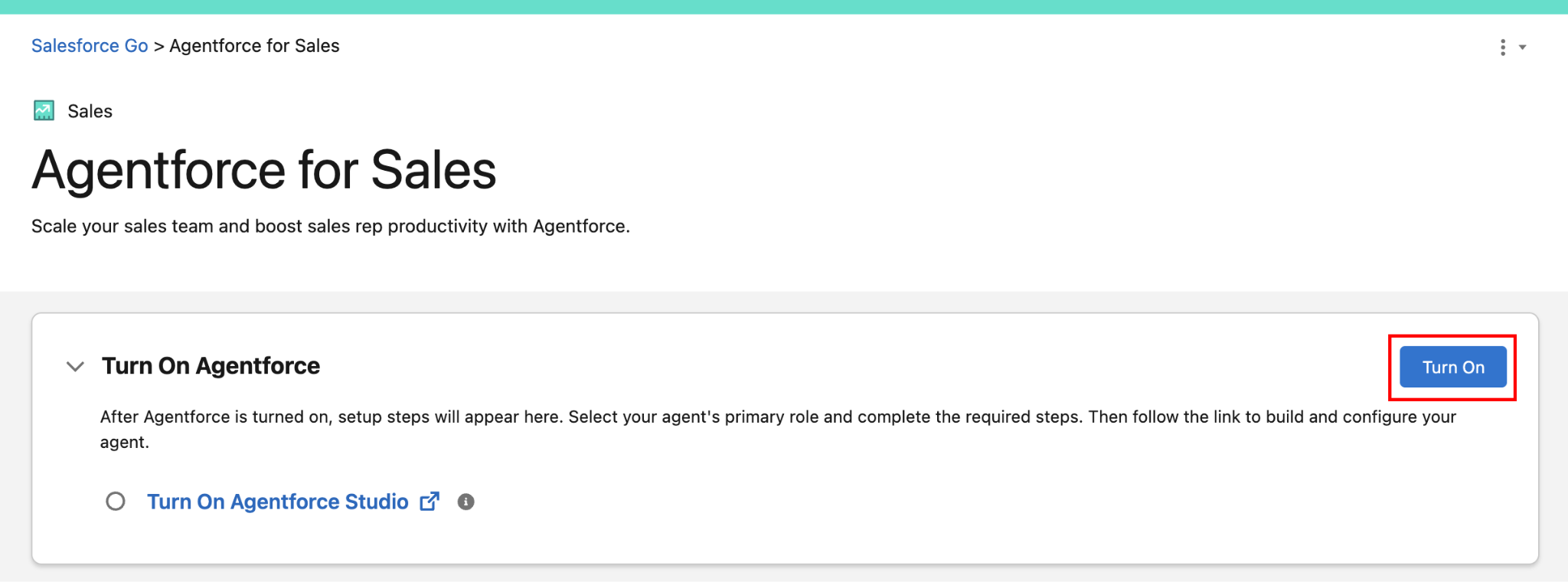
- Click Turn On.
And that’s it! With a few clicks, you’ve enabled Agentforce for Sales.
Behind the scenes, Salesforce activates the features and configurations Agentforce needs. With Agentforce turned on, you’re ready to set up the Engagement agent, which you’ll do in the next step.