Establish a Robust Support Model
Learning Objectives:
After completing this unit, you’ll be able to:
- Explain best practices for triaging support requests from end users.
- Describe a process flow for triaging user requests.
- Provide examples of successful support models that might benefit your client.
Get Started at the Governance Session
Here’s the scenario: you’re at the end of the design phase for a Slack Enterprise+ launch project. At this point, you’re preparing a governance session for your client. There are three main topics you need to cover in this session.
- Governance team
-
Support model
- Admin processes
In this module, you learn how to establish a robust, custom Slack support model for your client to help their end users with various types of requests. Let’s get started.
Explain the Importance of a Support Model
To effectively manage Slack adoption, your client needs to consider how users will get support for common questions and issues. Key areas to address during the Governance Session include:
- Where users can find answers to questions about channel management (for example, private versus public channels)
- How users can request new apps or resolve technical issues
- Whether these requests will go to a single point of contact or multiple resources
- Expected response times for user requests
Discuss these topics with your client to establish clear guidelines and support processes for their Slack workspace.
Follow Governance Best Practices
There are five core best practices that should inform the support model for all of your clients.
- Promote a search-first culture.
- Create support channels in Slack.
- Identify admins and champions to monitor help channels.
- Ensure the right expectations are set.
- Automate requests and responses where possible.
Help set up your clients for success by infusing these best practices into your recommendations for their Slack support model.
Define Support Categories
A robust user support model clearly defines for the end user exactly where to go for different types of support—for example, where to ask a question about how to use slash commands in Slack or how to add a new guest to a channel. Prepare to advise your client on several different categories of requests that they can expect from end users. For each category, recommend a tiered escalation process and discuss the necessary resources with your client.
During your initial client conversations about the categories or tiers of support, take into consideration their existing support processes. Consider how to use what the organization has already built to support the categories of requests. Slack user requests typically fall into three main categories.
-
Common Slack questions: General questions about using Slack.
-
Technical issues: Access problems, system bugs, and features that aren’t working properly.
-
Admin support requests: Actions in Slack that users need admin assistance to complete.
Let’s explore the details and tiers of support for each.
Using Slack: Common Questions

Description: These are general questions about using Slack, such as, “How do I create a new channel?”, “What is threading?”, or “How do I update my profile?”
Support tiers:
-
Tier 1: Encourage end users to search the Slack Help Center and pinned resources in the #help-slack channel to answer their questions. This helps reduce duplicate questions posed to the support team.
-
Tier 2: If searching doesn’t answer the question, direct users to post their questions in a dedicated channel like #help-slack. This allows admins or champions to respond to queries while creating a searchable knowledge base for future reference, reducing the need to answer duplicate questions.
-
Tier 3: Unresolved issues are directed to the IT help desk. If needed, the IT help desk can contact Slack's Customer Experience team directly by typing
/feedbackin any channel.
Best practices:
- Set up a #help-slack channel with pinned resources and guidance on how to use Slack.
- Populate this channel with Slack tips, guides, and best practices.
- Monitor this channel to respond to and resolve issues posted in the channel.
Technical Issues
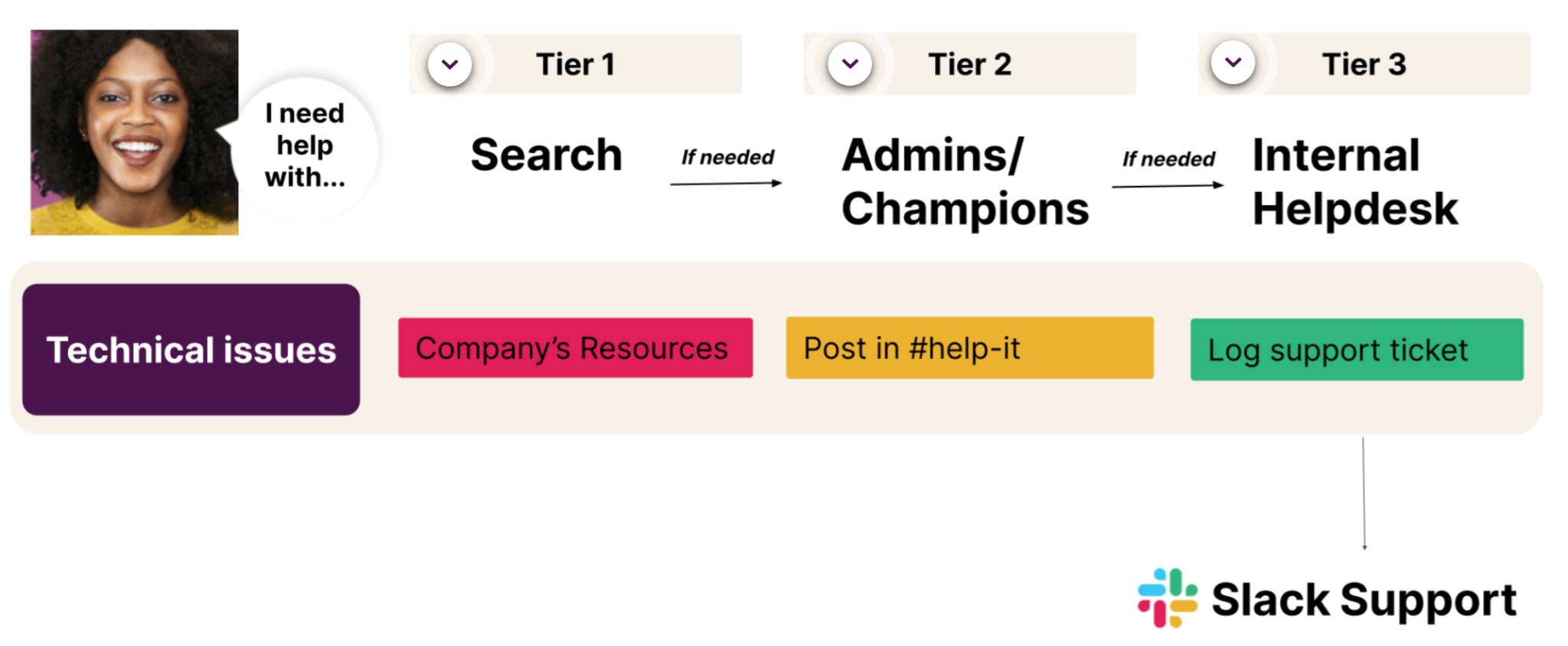
Description: These include user access problems, system bugs, and features working improperly.
Support tiers:
-
Tier 1: Before submitting a ticket in the channel, users should search the company IT resources first. If the IT help desk has shared troubleshooting instructions for accessing Slack, users should start there.
-
Tier 2: If they can't resolve the issue on their own, they should report the issue to the internal help desk via the help-it channel or the existing ticket reporting system.
-
Tier 3: If a resolution isn’t reached by the help desk, the help desk can escalate the issue to Slack's experience team by typing
/feedbackin the text box of any channel.
Best practices:
- Build a support process that uses your client’s existing IT help infrastructure.
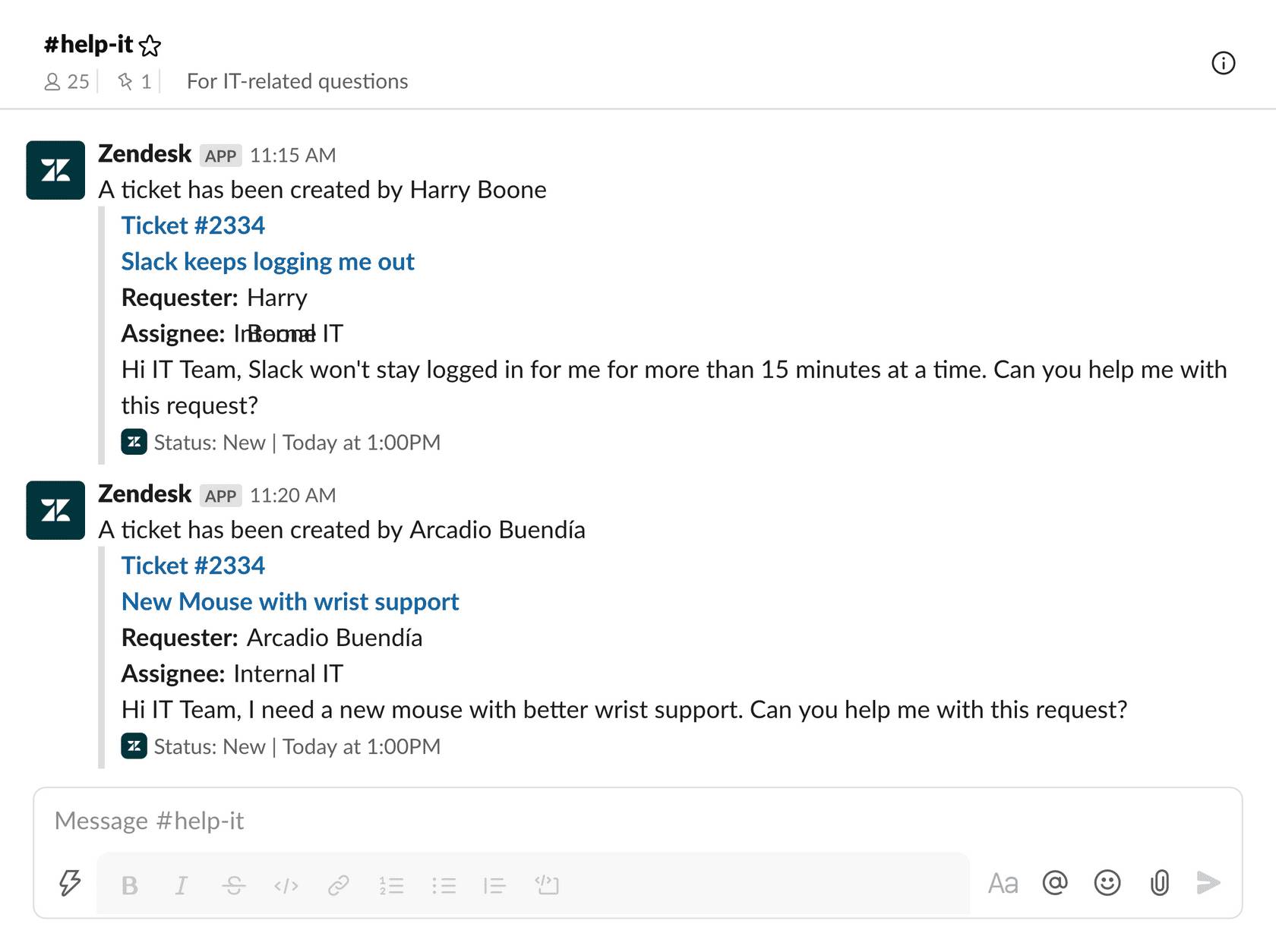
- Integrate your client’s existing IT ticketing system with Slack.
- Create a #help-it channel where end users have visibility into their submitted tickets in the channel.
Admin Support Requests
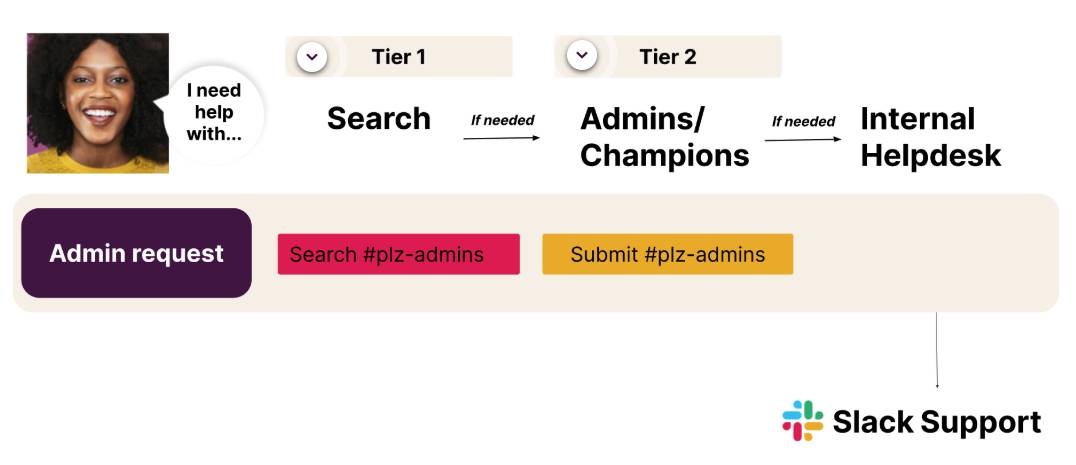
Description: These are actions in Slack that users need admin assistance to complete, such as creating private channels or adding guests.
Support tiers:
-
Tier 1: Before posting a request in channel, users should search #plz-admin channel to see if admins have posted instructions or guidance for different types of requests. For example, the channel may have different workflows to manage specific requests.
-
Tier 2: Admins should monitor and triage all requests that are submitted in #plz-admins. Because all requests submitted in the channel should be actions that the admins themselves can own, there shouldn’t be a need to escalate requests beyond this point. If there are any requests submitted that can't be managed by admins, they don’t belong in this channel. Admins should respond by instructing users where to submit the request instead.
Best practices:
- Clearly communicate the process for submitting admin requests to users.
- Automate where possible, such as using a #plz-admins channel for users to submit admin support requests.
Now that you know the core best practices for setting up a robust support model in Slack, let’s see these principles in action.
Put the Support Model into Action
Imagine that your client is a large online mental health provider. During your launch services, you recommend standing up the following channels at launch to support end users.
-
#help-slack: A channel to ask Slack-related questions and find Slack resources.
-
#help-it: A channel to submit requests to the organization’s IT help desk.
-
#plz-admins: A channel to submit requests for admin support in Slack.
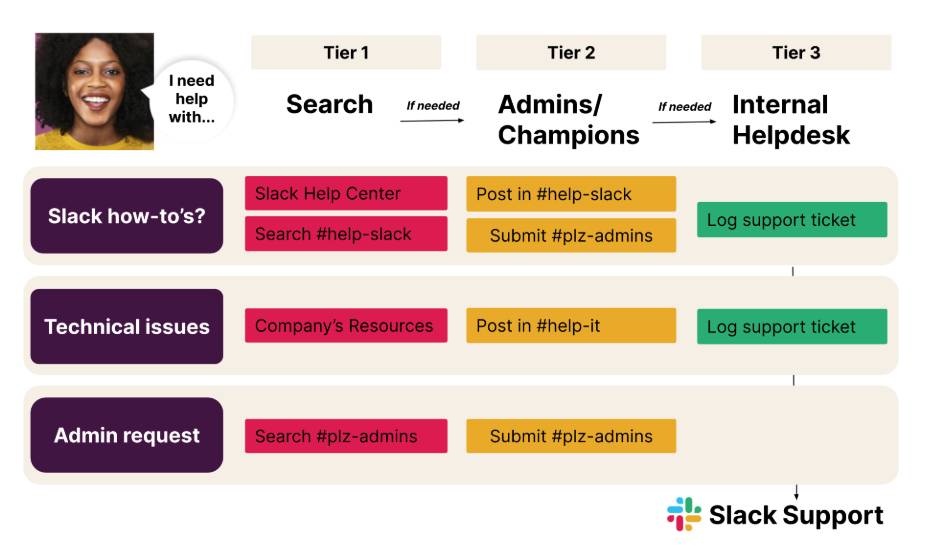
You advise the organization on how to properly resource each of these channels and how to set expectations in the channel descriptions around response times.
After your client launches Slack, an employee on the marketing team, Damien, needs support. Which channel should Damien use to answer each of his questions below?
Question: I need to post a video message in a companywide channel that is read-only. Can you post the message on my behalf?
Channel: #plz-admins
Question: How do I create a video message in Slack?
Channel: #help-slack
Question: I’ve followed all the instructions to post video messages in Slack, but my videos won’t load. Can you help?
Channel: #help-it
It’s incredibly important to clearly communicate the channels of support to end users. It's equally important to ensure that those who monitor and review requests are enabled on these different channels, so that they can reroute requests when necessary. If Damien asked his question about posting a clip to a read-only channel in #help-it, the help desk would need to know where to send Damien to get his question answered.
Summary
A successful support model provides users with clear guidance on where to seek help based on the issue or request. Always encourage your clients to promote a search-first culture by posting Slack training recordings, quick reference guides, and best practices in dedicated support channels. When your client establishes tiers of support with clear communication on how to use them, end users are empowered to freely work in Slack and feel guided throughout their Slack journey.