Model Insurance Products
Learning Objectives
After completing this unit, you’ll be able to:
- Explain the role of product modeling in insurance quoting and configuration.
- Identify the core components of the Digital Insurance product modeling framework.
- Describe how catalogs, categories, attributes, classifications, and products relate to one another.
Why Product Modeling Matters
Insurance products are complex by design. Whether a personal auto policy, a commercial package, or a group benefits plan, each offering involves layered components that must be defined clearly and configured accurately.
Behind every successful quote is a structured product model. It determines what can be sold, how it’s configured, and what data supports quoting, pricing, servicing, and compliance. Without it, launching or maintaining products becomes slow, error-prone, and costly.
Digital Insurance provides a declarative, modular framework for modeling products across lines of business. With it, insurers can:
- Organize offerings using catalogs and categories.
- Create reusable structures via classifications.
- Manage complexity with bundled and simple products.
- Control display and organization with component groups.
- Define quoting inputs with attributes and attribute categories.
The result is a scalable architecture that accelerates launches, supports omnichannel quoting, and simplifies updates.
Core Components of Product Models
Digital Insurance uses a set of modular components—products, attributes, and product classifications—to define product structure and logic. Let’s go over each component.
Products
At the core are the products themselves. These are defined as either:
-
Simple standalone products
-
Bundled structured products composed of related specifications (specs)
A bundle includes a root product with child specs that typically fall into one of three types.
Specification Type |
Purpose |
Examples |
|---|---|---|
Insured Item |
Defines the thing being insured |
A vehicle, a home, a business asset |
Insured Party |
Defines the person being insured |
A driver, policyholder, or employee |
Coverage |
Defines insurance benefits and terms |
Collision, Liability, Dental |
Products can be static or configurable, with components reused across offerings and flagged as required or optional.
Attributes
Attributes describe people, items, or terms of coverage, driving pricing, rules, and servicing. Here are some examples.
Attribute Function |
Purpose |
Examples |
|---|---|---|
Rating |
Drives pricing logic |
Driver age, mileage |
Rules |
Supports qualification, configuration, and underwriting |
Business type, location |
Identification |
Stores legal or operational identifiers |
Vehicle identification number, license number, address |
Term |
Captures the terms of a benefit |
Limit, deductible, copay |
Every attribute has a data type—such as text, number, currency, or picklist—and can include allowed and default values. Most are configurable during quoting. For example, a deductible might default to $500 but be changed by the user.
Extended attributes are special attributes that map directly to standard or custom Salesforce fields. For example, a Driver-insured party specification includes attributes for First Name, Last Name, and Birthdate. These values auto-populate during quoting, improving data integrity and eliminating reentry.
To promote reuse, attributes are grouped into Attribute Categories, modular sets of attributes shared across products and classifications.
Product Classifications
A product classification is a reusable template for products with shared characteristics and the primary tool for assigning attribute structure and logic.
For example, one classification can define common attributes for coverages like Bodily Injury & Property Damage (BIPD), Collision, and Comprehensive.

Products based on a classification inherit attributes automatically. This promotes consistency, speeds setup, and simplifies maintenance. Admins can override or extend these inherited attributes for variation. Product classifications include key details such as component groups, catalogs, and catalog categories.
Product Component Groups
Component groups define how products and classifications are organized within a bundled product. They define what’s grouped, how many instances are allowed, and how components behave at quote time.
You can group either:
- Multiple product specs (like BIPD, Collision, Comprehensive)
- A single classification, supporting multiple instances
For example, the Auto Gold product bundle includes a component group that holds multiple specific coverage specs, all based on the same classification.

If you group a classification inside a component group, you unlock support for multi-instance product structures.
In the Auto Gold product, a component group includes the Auto Vehicle classification, enabling multiple vehicle instances to be added to the quote, each with its own characteristics and coverage selections.
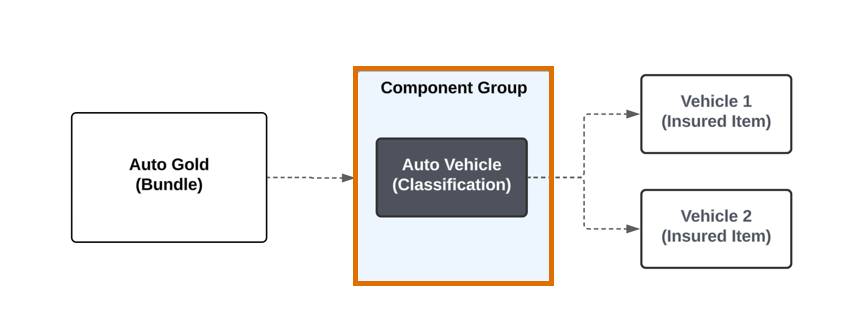
Grouping classifications allows flexible, repeatable structures—like multi-vehicle or multi-location policies—while keeping logic clean and reusable.
Catalogs and Categories
While groups structure what’s inside a bundle, catalogs and categories organize the broader portfolio.
- Catalogs house broad collections, such as all Property & Casualty products.
- Categories group related products for filtering and discovery within a catalog, such as Personal Auto and Commercial Package.
This layered setup makes it easy to manage product portfolios and ensures quick navigation and selection during quoting.
Product Modeling in Action
Let’s walk through how Justus, product admin at Cumulus Insurance, models Auto Gold. It’s a flexible personal auto product that must support:
- Multiple vehicles per policy
- Multiple drivers per vehicle
- Configurable coverages, some applied to the entire policy, others specific to each vehicle
Set Up a Catalog
Justus begins by setting up a new catalog to contain all property and casualty products.

Within the catalog, he adds an Auto Products category to organize personal and commercial auto offerings.
This structure helps users quickly find relevant products during quoting.
Define Attributes
Next, he builds attribute categories to organize related attributes for reuse across the portfolio. For the auto line, he creates attribute categories such as Auto Information, Driving History, and Auto Term. He also creates categories like Basic Information and Contact Information that apply across product lines.
Inside each category, he defines attributes, specifying data type, default and available values, and unique attribute codes.
Here’s the Driving History category, which includes attributes like Driver Accident Points and Age First Licensed.

For existing Salesforce data, he defines extended attributes. For example, First Name maps to Contact.FirstNameandBirthdate maps to Contact.Birthdate.
These values automatically pull from the related Contact record during quoting.
Create Classifications
Justus then builds product classifications, each serving as a reusable template for specific component types.
Classification Name |
Used For |
|---|---|
Auto Root |
Auto root products |
Driver |
Driver insured parties |
Vehicle |
Vehicle insured items |
Coverage |
Coverage components |
Each classification includes the relevant attribute categories. For example, Driver includes the Driving History, Contact Info, and Basic Info categories.

Adding a category brings its attributes automatically, though admins can also assign stand-alone attributes. This setup standardizes components for Auto Gold and other Cumulus products.
Define the Products
Using these classifications, Justus defines the individual products that make up Auto Gold.
Classification |
Product |
Product Type |
Specification Type |
|---|---|---|---|
Auto Root |
Auto Gold |
Bundle |
Root Product |
Driver |
Driver |
Simple |
Insured Party |
Vehicle |
Vehicle |
Bundle |
Insured Item |
Coverage |
|
Simple |
Coverage |
For some coverages, like Bodily Injury & Property Damage, Justus customizes the attributes inherited from the classification to match unique configuration needs.
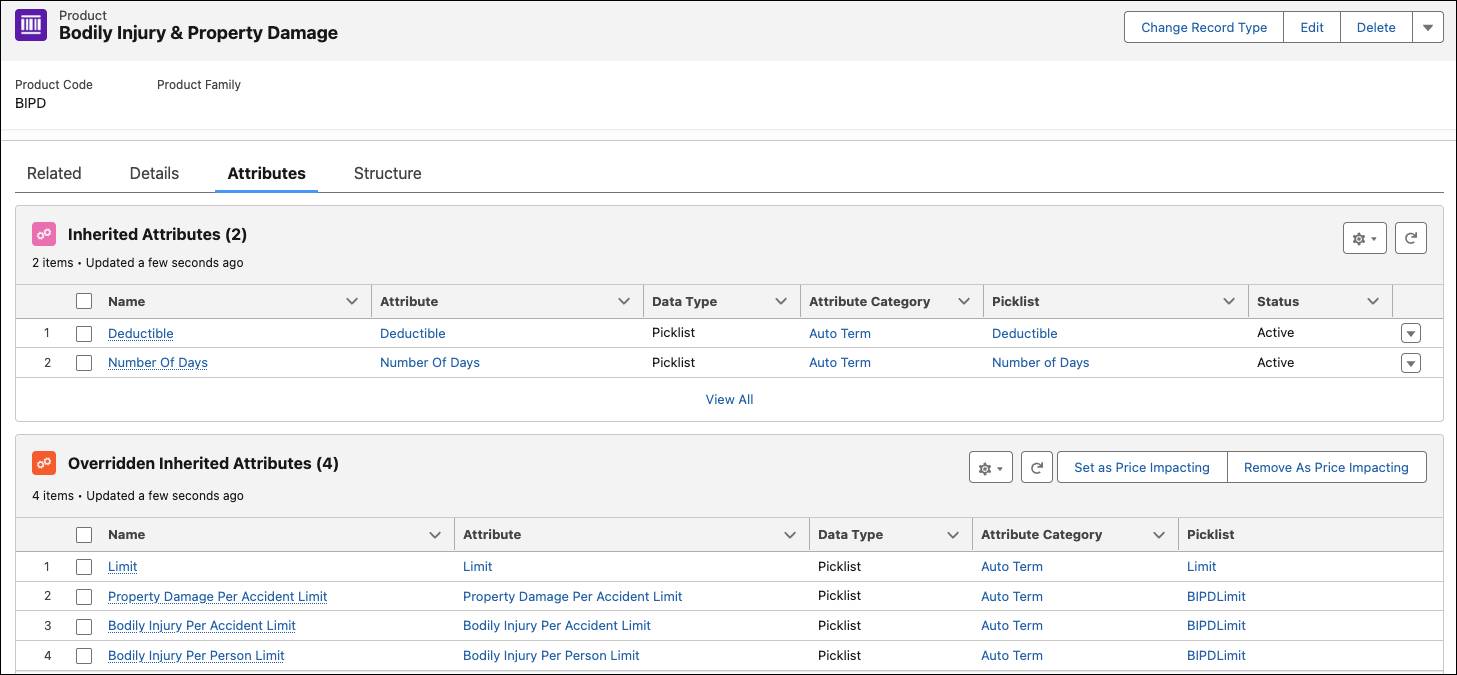
By defining products with shared classifications and selectively overriding attributes, Justus creates a flexible model that allows variation while preserving consistency.
Assemble the Product Structure
With classifications and products defined, Justus brings them together into bundled structures. Auto Gold requires two bundles, one at the policy level and one at the vehicle level.
Here’s the Auto Gold root bundle.

This bundle organizes the full policy. It includes a component group for all the insured vehicles and a component group for policy-level coverages.
Name |
Type |
Description |
|---|---|---|
Auto Gold (1) |
Bundle |
Root product for the full policy. |
Auto (2) |
Component Group |
Groups vehicles. |
Coverage (3) |
Component Group |
Groups policy-level coverages. |
Bodily Injury & Property Damage (4) and Medical Payments (5) |
Coverage |
Applies to the entire policy. |
Now here's the Vehicle bundle.

This bundle defines each insured vehicle. It groups drivers and coverages specific to that vehicle, allowing each instance to have its own configuration.
Name |
Type |
Description |
|---|---|---|
Vehicle (1) |
Bundle |
Represents a single insured vehicle |
Driver (2) |
Component Group |
Groups drivers assigned to this vehicle |
Coverages (3) |
Component Group |
Groups vehicle-specific coverages |
Collision (4), Comprehensive (5), Uninsured Motorist (6), Rental Auto Coverage (7) |
Coverage |
Options configured for each vehicle |
This dual-bundle design supports multiple vehicles on one policy, each with its own drivers and coverages, while maintaining policy-level coverages.
From Product Modeling to Product Rules
With the structure complete, Justus adds Auto Gold to the Auto Insurance category.
By this point, he’s built a reusable model that:
- Defines clear hierarchies for vehicles, drivers, and coverages.
- Inherits attributes via classifications for consistency and scale.
- Uses component groups for structured configuration.
- Integrates with catalogs and categories for intuitive discovery.
The result is a flexible, modular product model ready to support complex quoting, pricing, and servicing needs.
In the next unit, learn how Justus layers on product rules to govern eligibility, enforce business logic, and guide configuration.