Approve and Close Loan Applications
Learning Objectives
After completing this unit, you’ll be able to:
- Explain the decision-making process in Digital Origination for Lending.
- Identify the tools and processes used for compliance checks and risk assessment.
- Describe pre-disbursement and post-closing activities for loans in Salesforce.
Reviews and Decisions with Automated Tools
All the features in this badge prepare underwriters to review an application and make an informed decision.
When the time comes to decide on an application, your underwriters are already prepared, with detailed, verified application information to assess risk and decide on a loan that didn’t qualify for straight-through processing. For these processes, too, the Underwriter Console is helpful. Underwriters use the console to quickly review information and work through approval processes, including multi-level approvals when needed.
In this unit, you learn about how Digital Origination for Lending helps you assess risk, ensure compliance, close loans, and build relationships with applicants.
Risk Assessment
An underwriter’s first priority is to review an applicant’s risk analysis.
To assess risk, configure Salesforce automations to generate key ratio calculations such as loan-to-value and debt-to-income. Business Rules Engine can generate these ratios and other information, including risk categories based on variables such as credit score, employment, and income. Store these outputs in the risk category of the applicant’s party profile and party profile risk records.
You can also configure Business Rules Engine to automatically store details about ratios outside your recommended ranges in the Application Form Product Deviation object. The object tracks anomalies for a specific loan product's application form.
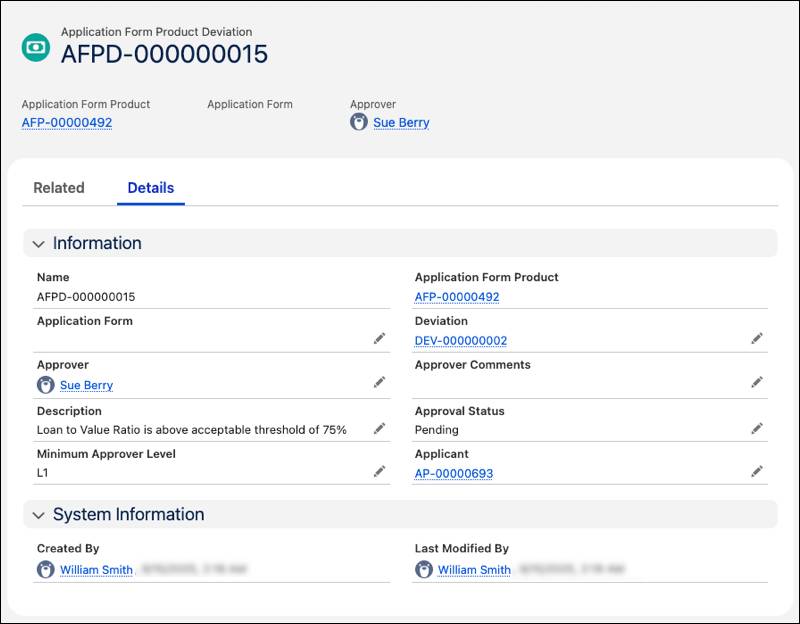
If your underwriter decides to take a calculated risk on a loan, they also use the Application Form Product Deviation object to track those exceptions and seek approval. For example, if an underwriter decides to approve a loan with a loan-to-value ratio over normally acceptable limits, they store the details of that decision in an application form product deviation. Your team then reviews that record for approval.
Underwriters then use Application Form Terms records to track conditions and expectations that borrowers fulfill during a loan’s tenure. For example, an underwriter uses application form terms for home loans that require borrowers to submit property tax certificates within a time frame.
While underwriters have tools to decide on a loan, they can’t approve loans that don’t follow your organizational rules and government regulations. Digital Origination for Lending has several tools to enforce compliance.
Process Control and Compliance Checks
Stage Management and Integration Orchestration manage your processes and external data callouts, plus they also help underwriters verify all previous work and stay compliant. Your underwriters can check the audit trail of all tasks and integrations that ran before an application came to their attention. Plus, underwriters can clearly see the steps to approve an application if you include those tasks and integrations in Stage Management.
Optionally, add Process Compliance Navigator to your Salesforce org for more detailed compliance checks and risk management. Process Compliance Navigator brings compliance and controls together in one integrated system, unlike traditional, disparate Governance, Risk, and Compliance (GRC) solutions that are separate from where your team does their work. See Process Compliance Navigator in Salesforce Help for details.
When an underwriter works out a final offer and an applicant accepts that offer, the final step is to close the application and book it to your core banking systems.
Documents and Closing
When it’s time to share information and collect final signatures, use Document Generation to create and share documents with applicants by using the template designer and merge fields to populate important loan information.
Document Generation uses templates that you configure to automatically generate loan approval letters, agreements, contracts, and amortization schedules when they are needed. The applicant can review and sign these documents to accept the loan offer by using integrations with DocuSign integrations and included contract management tools.
After your operations officers share closing documents and collect signatures, move the application form and application form product records to the Book to Core Stage. You can use Integration Definitions to book the loan to your core banking systems. With this integration, you can track details about the loan, such as repayment and autopay information, in both systems.
After Closing
By using Digital Origination for Lending and its features to manage applications, reviews, and approvals, you collect and store data to improve your processes and build a strong relationship with borrowers.
First, use your data to set up efficiency metrics so managers can adjust how your team works to speed up the process and avoid bottlenecks in your process.
Then, to build strong relationships, account managers use Salesforce and Agentforce Financial Services to manage loan accounts and service borrowers’ needs after closing. Digital Origination for Lending also works with the relationship and case management tools in Agentforce Financial Services, so you have a full tool box to work from.
Finally, for clients who can’t or won’t repay their loans, add Collections and Recovery features to reduce delinquencies and maintain positive customer relationships. Learn more about how Collections and Recovery works with Digital Origination for Lending and Agentforce Financial Services by exploring the links in the Resources section.
Wrap Up
In this badge, you learned how Digital Origination for Lending simplifies loan origination by reducing manual processes and speeding up decision making.
You explored how to configure products with Product Catalog Management and how Business Rules Engine enforces eligibility rules. You learned that applicants can find the best loan for their needs with the self-service Experience Cloud site and the AI-powered Loan Product Assistance agent in Agentforce. Plus, applicants can estimate payments and other details with the Loan Calculator tool.
You also discovered how to collect applications by using guided, Omniscript-powered forms. Straight-through processing can instantly approve those applications. For loans that require manual review, the Underwriter Console helps your team with verification, risk, and collateral management.
Finally, in this unit, you learned how to use automated reviews, compliance checks, and Document Generation for closing a loan. You can even integrate Salesforce with your core banking and loan management systems to book your loans. Then, your team can provide continued support for post-closing loan services directly from Salesforce.
Now that you understand the end-to-end capabilities of Digital Origination for Lending, apply this knowledge to your own organization and accelerate your application reviews and approvals.
Think about your financial institution's lending process. Where can Digital Origination for Lending reduce manual processes, lower decision times, and enhance the customer and employee experience?
Resources
- Salesforce Help: Underwriter Console for Digital Lending
- Salesforce Help: Stage Management for Digital Lending
- Salesforce Help: Set Up Decision Matrices to Determine the Risk Category for a Party Profile
- Salesforce Help: Validate Identity Verification and Risk Screening Status
- Salesforce Help: Process Compliance Navigator
- Salesforce Help: Collateral Management in Digital Lending
- Salesforce Help: Collections and Financial Recovery