Guide Data Management Decisions with Data Profiling
Learning Objectives
After completing this unit, you’ll be able to:
- Explain how data profiling supports later steps in Salesforce’s Data Quality Management framework.
- Connect data profiling insights to the decisions you make for cleaning, enriching, unifying, and monitoring data.
- Describe why data profiling is iterative (before and after changes), not a one-time activity.
Diagnose Data Quality with Data Profiling
Data profiling serves as the diagnostic step, helping you understand your data’s current state, establish a baseline, and identify the most significant reliability risks.
With this information, you can determine which data issues need attention and what actions to take next. For this reason, data profiling is more than a set of metrics—it provides the insight that guides every other data quality activity.
|
“Data profiling helps you get started by prioritizing your data quality efforts: Where are the biggest gaps, which ones are the easiest or the hardest. While the abstract question can be overwhelming, quantified insights from data profiling helps you get started.” —Caroline DeBattista, Data Strategy & Operations Director, Salesforce |
|---|
Guide Data Quality Management Decisions
Data profiling provides quantified evidence to help teams decide which actions to take and where to prioritize their efforts. By analyzing field population, value distribution, distinct values, and duplication patterns, teams can identify data reliability risks and determine the most effective remediation strategies.
Data Quality Management Action |
How Data Profiling Identifies the Need |
Example Mitigation or Remediation |
|---|---|---|
Clean Unused Fields |
Low field fill rate, especially over time, indicates fields that are rarely or never used. |
Review the field creation date to exclude newly created fields. Review dependencies to identify the level of effort for deprecation. Review the field business owner or creator's communication decisions. |
Clean Picklist Values |
Value frequency shows picklist values that are never or rarely used. |
Deactivate unused values to improve usability. Review the field's last modified date to determine when the picklist values were last updated. Retire unused values. |
Clean Default Value Rules |
Fields populated only by a default value can indicate unreliable data entry. |
Evaluate if the field is used in any reports or workflows, its necessity and whether it can be deprecated. If the field is necessary and the default value has caused data quality issues, deactivate the default value and consider a one-time clean-up. |
Clean/Archive Records |
Data profiling reveals historical versus recently created or updated record volumes. |
Create data profiling scenarios to simulate archiving policies to identify how many records can be archived and how many fields can be retired. Use evidence to guide archiving investments and test and monitor retention policy implementation. |
Clean/Standardize Field Values |
Value frequency highlights similar values with the same meaning (for example, US, USA, United States). |
In Salesforce CRM, use data cleanup tools to standardize values. Convert string fields to picklists when appropriate. In Data 360, use data transforms to standardize values within and across data lake objects (DLOs) before mapping them to a data model object (DMO). |
Enrich Data |
Data profiling highlights data gaps, such as missing values (completeness), unrealistic patterns (accuracy), or insufficient detail (granularity). |
Add trusted first- or third-party data sources to provide additional attributes such as company information, demographic indicators, or validated addresses. |
Unify Profiles |
Low uniqueness in contact fields (email, phone, address) indicates potential duplicates or fragmented customer records. |
Use field fill rate and distinct value ratios to quantify the risk and identify which fields are useful in match rules. Analyze match field value frequency to identify outliers, in case bad values (for example, na@na.com) or shared contact points (for example, corporate numbers) are in the fields that can cause false matching. Use insights in choosing the right technology solution and design the pipeline that acts on relevant fields and reliable field values. |
Data profiling insights are most useful when used together, not on their own. For example, you might first look at field fill rate to find fields that are consistently filled in. Then, use distinct value count to find fields with a manageable number of different values. Finally, use value frequency to see how often each value appears.
Together, these insights help you choose sample data for testing, spot unusual patterns, and decide where cleanup or standardization will have the greatest impact.
Monitor to Ensure Data Remains Reliable
Data profiling is most effective when you run it:
-
Before major initiatives to establish a baseline of your data’s current state.
-
During implementation to validate that changes are working as expected.
-
After rollout to monitor field usage and catch data quality or adoption issues early.
Data profiling should not be a one-time activity. It should create a repeatable feedback loop that helps keep your data reliable as business processes and system configurations change.
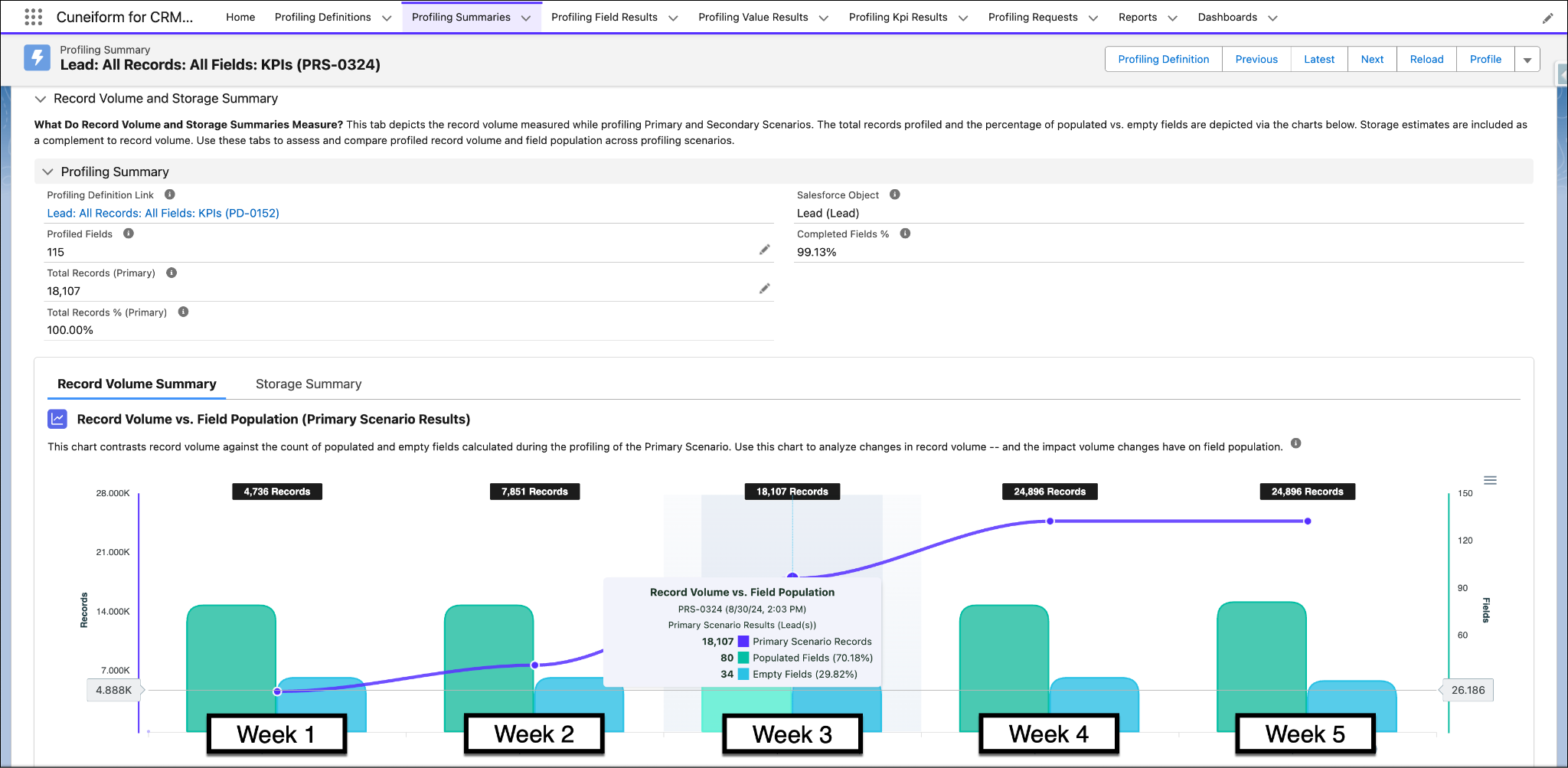
For example, if your system receives data from an external integration, monitoring record volume trends can help confirm that data is being added as expected and highlight unusual changes. In this example, user adoption of the application appears steady, but the number of Lead records did not increase during the most recent monitoring cycle. This suggests that something in the data flow or adoption process might have changed.
Data profiling tools store results over time, unlike one-time queries or spreadsheets. Because of this, they can detect changes in data patterns and trigger alerts when unusual activity occurs.