Explore Agents for Public Sector Solutions
Learning Objectives
After completing this unit, you’ll be able to:
- Summarize the steps for setting up agents in Public Sector.
- Describe the prebuilt Agentforce components you can use to configure your Public Sector agent.
Agent Configuration
So far, you’ve learned how you can use Agentforce to create and customize autonomous agents that harness Salesforce capabilities to assist with routine tasks. But why start from scratch? In this unit, you learn about the prebuilt agent templates, subagents, and actions included with Public Sector that you can use to quickly configure your own agents.
It all starts in Agentforce Builder, where you create an agent using a predefined Public Sector template. The Agentforce Employee Agent template is designed for internal-only agent use cases. It tailors its responses and actions based on the role, permissions, and tasks of the interacting user. Enter a name, description, and role for the agent that corresponds to its purpose and capabilities. Then, add one or more of the ready-made subagents to include agent actions for specific jobs. It’s that simple!

Now, explore the helpful agents you can create using the prebuilt Agentforce subagents and actions included with Public Sector.
Each prebuilt subagent is designed to help agency employees expedite essential services by handling common, time-consuming tasks. Start by checking out how Agentforce accelerates public sector talent recruitment.
The Candidate Sourcing Agent
While recruiting and hiring agency employees, HR staff sift through countless applications to identify candidates that are the best fit for a position. The Candidate Sourcing Agent speeds up the hiring process by surfacing qualified candidates.
With help from the Candidate Sourcing Agent, recruiters can quickly find and engage with qualified candidates for a job position. The agent can shortlist suitable candidates by filtering large volumes of past applications based on certain criteria, such as the application stage. It can also automatically create a lead for each qualified candidate to track outreach, and even email the candidates to encourage them to apply for the job opening.
For example, recruiters can ask the agent to find past application forms for a position, and filter the list to show candidates that have already completed the vetting stage. In this screenshot, a user asks the agent to find application forms that are in the Vetting Complete stage, and the agent returns a list of applicable forms.

Then, recruitment staff can instruct the agent to instantly create a lead for each candidate and send an invitation email.
The Application Screening Agent
The Application Screening Agent helps recruiters and HR specialists quickly screen job applications by summarizing key information from application forms and objects. With the ability to produce a shortlist of applications, HR staff can speed up their applicant evaluations and easily measure each candidate’s qualifications against the job requirements.
Each agent-created summary contains an applicant’s key skills, certifications, work experience, qualifications, assessments, and evaluations. The Application Screening Agent can also surface vetting information, including associated action plans and outcomes, and employment, education, criminal background, and reference checks.
The agent also makes it easy for recruiters and HR specialists to share the surfaced application forms with assigned hiring managers.
To learn how Public Sector accelerates agency hiring processes, visit the Talent Recruitment Management Data Model in Agentforce Public Sector Trailhead module.
The Complaint Resolution Agent
Government intake officers handle large volumes of complaints in their daily work. The Complaint Resolution Agent assists staff by handling repetitive, time-consuming complaint management tasks.
The agent summarizes complaint information so that intake officers can quickly review important information about issues or incidents reported by the constituent. When a complaint reaches a specified age, the agent asks the officer if they want to resolve the complaint without further investigation.
To help guide the officer’s resolution strategy, the agent can find and present similar past complaints, and recommend possible regulatory code violations to review and record.
The agent can also administer assessments for the intake officer to complete to ensure they follow all the necessary intake steps to meet compliance, and provide updates to complaint participants about the investigation results.
The Compliance Management Agent
Compliance officers and inspectors can use Agentforce to automate administrative tasks after inspection visits. This way, compliance officers can focus on resolving more complex cases.
The Compliance Management Agent helps you quickly compare the findings of an inspection visit to documented policy information and confirm violations that the inspector captured during their visit. The agent can also summarize and create records for each violation, along with follow-up enforcement actions and associated penalty fees.
For example, in this screenshot, the agent responds to a question about whether an inspection result constitutes a violation.
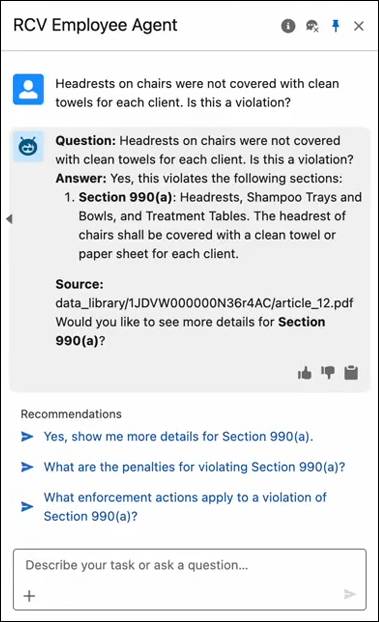
Notice that the agent not only confirms the violation, but also provides a link to source information and recommendations for follow-up questions.
Compliance officers can ask the agent questions about the inspection and quickly find relevant policy sections related to the violations identified during the visit, or use the agent to validate the accuracy of regulatory codes. From there, they can email a post-visit summary to business owners so they can take the necessary steps to get back in compliance.
To learn more about case and complaint management capabilities in Public Sector, complete the Investigative Case Management Data Model in Agentforce Public Sector and the Social Program Management Data Model in Agentforce Public Sector Trailhead modules.
Wrap Up
You now know how Agentforce works alongside agency employees to expedite everyday agency tasks and bring efficiency to government services. To learn more about each of these topics and discover the steps for creating your own Public Sector agents, visit the links in the Resources section.
Resources
- Salesforce Help: Agentforce for Public Sector
- Salesforce Help: Considerations for Agentforce for Public Sector
- Salesforce Help: Candidate Sourcing with Agentforce
- Salesforce Help: Application Screening with Agentforce
- Salesforce Help: Complaint Management with Agentforce
- Salesforce Help: Compliance Management with Agentforce
- Trailhead: Talent Recruitment Management Data Model in Agentforce Public Sector
- Trailhead: Investigative Case Management Data Model in Agentforce Public Sector
- Trailhead: Social Program Management Data Model in Agentforce Public Sector