Ingest Web Engagement Data
Learning Objectives
After completing this unit, you’ll be able to:
- Explain how to configure and ingest website data into Data 360.
- Establish data capture rules and event definitions.
- Add a JavaScript beacon to your website.
Meet the Web Engagement Team
In order to begin ingesting web engagement data in Data 360, NTO’s web developer and Data 360 architect are responsible for configuring the connection between the company website and Data 360.
As an enterprise architect, Pia Larson serves as NTO’s Data 360 architect and is responsible for assigning permissions, connecting data sources, creating data streams, and data management in Data 360. Prior to this implementation, it’s important for NTO to identify how it wants to act on its data and what elements and events can bring key insights about its customers.
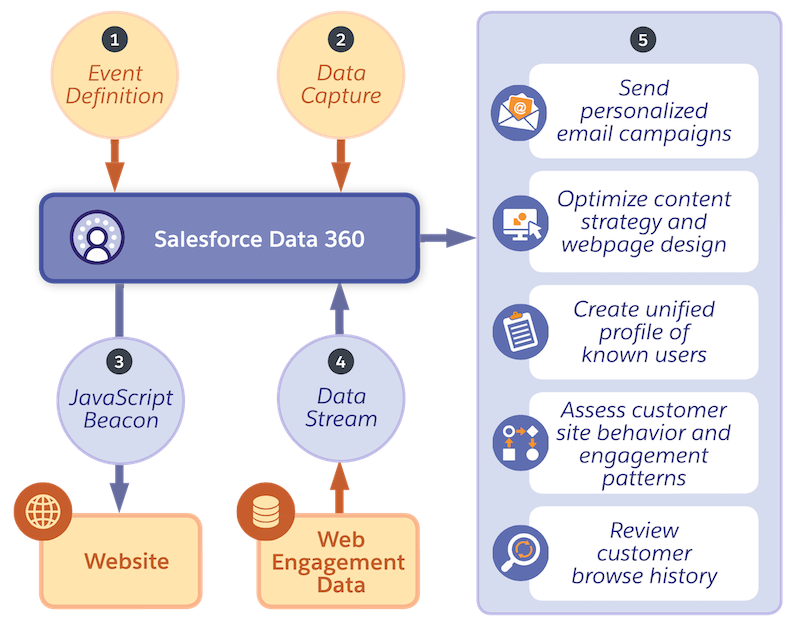
In order to do so, there are three important components to understanding how NTO’s website data gets processed in Data 360: data capture rules, event definitions, and a JavaScript beacon. NTO’s web developer Warren Mehta’s task is to create these aforementioned components. Once completed, he collaborates with Pia to configure the connection between the NTO website and Data 360.
Review Components
Let’s review the components needed to connect NTO’s website data to Data 360 in more detail.
Data Capture Rules
A data capture rule (sometimes referred to as a sitemap) is a fundamental tool for gathering and analyzing user behavior data. It’s a JavaScript snippet that includes event listeners and functions that track actions taken by users (such as selects on a certain element or page scrolls). Other relevant information such as user IDs, timestamps, and contextual details related to the user’s session are associated with data capture metadata. See an example of what this looks like in Sitemap in the Salesforce Interactions SDK guide. The code captures the event data during navigation which is transmitted to Data 360 for further processing and analysis.
Event Definitions
Event definitions (also referred to as a schema) describe how people interact with NTO’s website. They are a blueprint that outlines the rules, relationships, and attributes of NTO’s data stored in Data 360. Some common event definitions are page viewed, form submission, cart, cart item, or newsletter signup. These events fall under customer engagement categories and can offer NTO valuable information about the users on its site.
The event definition is defined through a JSON schema, a declarative language that specifies the required properties, data types, and constraints for given data. The schema ensures that the data conforms to expected formats and structures, making it useful for validating inputs. To check this out in action, review how engagement data is captured in the sample JSON schema located in the Mobile and Web SDK Schema Quick Guide for Data 360.
JavaScript Beacon
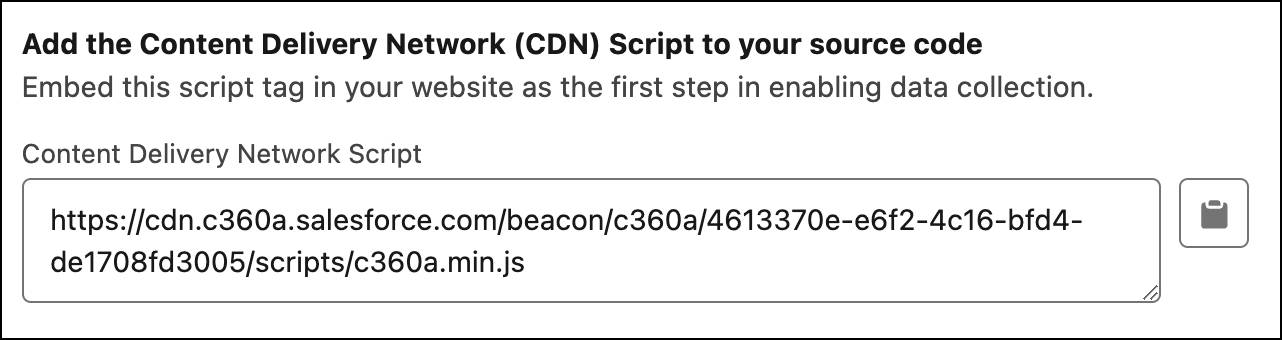
The JavaScript beacon script (also known as the content delivery network or CDN script) is a piece of code that needs to be added to the website pages where you are capturing events. This beacon allows engagement data to start flowing. The image below highlights a snippet of the script that is copied into a website’s content management system (CMS) or tag management solution.
Now that you are familiar with the components, review this diagram to learn how these pieces work together.
Let’s now check in with NTO to see how Pia and Warren work together to complete these tasks.
Configure and Connect NTO Website to Data 360
As the web developer, Warren is familiar with JSON, JavaScript, and NTO’s website. He works on creating a JSON file for the event definition and the JavaScript data capture script. He then works closely with Pia as she completes her steps in Data 360.
To ensure NTO’s website is properly connected to Data 360, Pia does the following in an org with Data 360 provisioned.
- In Data Cloud Setup, Pia selects Website & Mobile Apps.
- She selects New Connection in the Website and Mobile App configuration header.
- Pia names the connector, NTO Website, and selects A Custom Website for the connector type.
- Using the event definition JSON schema provided by Warren, she uploads the file, previews the information, and selects Save.
- Next Pia adds or uploads the data capture rules (the JavaScript schema) into the system and selects Save.
Add a JavaScript Beacon to NTO Website
Once Pia configures the data capture rules and event definitions in Data 360, she shares the JavaScript beacon with Warren. It’s now his turn to embed the JavaScript beacon into the NTO website as a <script> tag. This functions as the data collection component, and must be copied into every page of the website that NTO wants to track.
Create a Web Engagement Data Stream
After Warren adds the JavaScript beacon to the website pages and completes the website connection, Pia creates a new data stream to ingest the site’s website data. A data stream is a data source ingested into Data 360, in this case the source is NTO’s website. This data stream ensures that Data 360 users can access, unify, and make use of NTO’s website data. To learn more about how to create a data stream and harmonize Data 360, check out Explore Data 360 Core Functionality.
The marketing specialist, Paulo, is brought back into the picture and suggests creating additional data streams from Salesforce CRM and Agentforce Marketing. With NTO’s website engagement data + NTO’s Salesforce CRM data + NTO’s Agentforce Marketing data, the business is able to gather and unify data points from each data source as follows.
-
NTO website data: Engagement data on the website (selects, scrolls, abandoned cart)
-
NTO Salesforce CRM data: Information about the customer (name, email address, purchase history)
-
NTO Agentforce Marketing data: Email engagement data (customer email engagement and marketing data)
Deliver Value on Insights
Now that Warren and Pia have enabled the data connections from NTO’s website and additional data streams have been added, NTO can unlock valuable insights to address its abandoned cart issue. NTO realizes that a significant number of abandonments occur during the payment stage, indicating potential issues with the checkout process or payment options.
By combining these data sources, a unified view of customer behavior provides clarity and context to the overall case of the abandoned cart rate on NTO’s website. The business uses customer behavior insights to implement an automated email campaign that strategically reminds users about the items left behind in their shopping carts. The emails are crafted to be personalized offers related to the abandoned items, accompanied with NTO incentives of discounts or free shipping for the customer.
This strategy aims to entice NTO customers to revisit the website and complete their previously abandoned purchases, thereby fostering stronger customer engagement and loyalty over time. Following this implementation, NTO witnesses a decrease in the abandoned cart rate and an increase in sales, all made possible through the power of Data 360!
NTO is loving the insights the company is gaining from web engagement data, but what if NTO could gain these insights and deliver value even quicker? In the next unit, learn how Google Analytics 4 (GA4) for Data 360 Web SDK can automate the ingestion of web engagement data.