Review Conversation Intelligence Setup Requirements
Learning Objectives
After completing this unit, you’ll be able to:
- Explain the requirements for setting up Conversation Intelligence.
- Describe the limitations for setting up Conversation Intelligence.

Considerations for Setting Up Conversation Intelligence
In this module, we assume you’re a Salesforce admin or another role with the proper permissions to set up Conversation Intelligence (CI). If you’re not an administrator, that’s OK. Read along to learn how your administrator can set up Conversation Intelligence to empower your sales team. By understanding how to set up, use, and quickly scale Conversation Intelligence features, admins can support sales teams’ productivity and help them transition to data-driven selling.
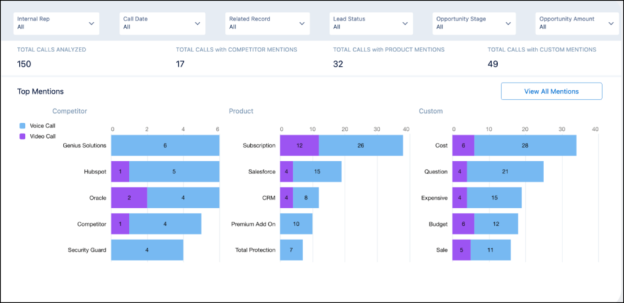
Conversation Intelligence is available in the following instances.
- Lightning Experience
- Sales Engagement
- Performance and Unlimited Editions and at an additional cost for Enterprise Editions
- Enablement, which is available for an additional cost in Enterprise, Performance, and Unlimited Editions
Note that Experience Cloud sites and Government Cloud don’t support Conversation Intelligence.
Before setting up Conversation Intelligence, consider the following requirements, nuances, and limitations.
Required User Permissions
|
Salesforce Admin or User Task
|
Preferences and Permissions Required
|
|---|---|
Set Up Conversation Intelligence |
Customize Application, Modify All Data, Assign Permission Sets, and Manage Users |
Use Conversation Intelligence for Sales |
Sales Engagement Conversation Intelligence, Sales Cloud Bundle Included, Conversation Intelligence Included, or Conversation Intelligence for Sales permission set |
Use Conversation Intelligence for Service |
Conversation Intelligence for Service permission set |
Use Dialer |
Dialer Inbound, Dialer Outbound, and Dialer Minutes permission sets |
Feature Availability
-
Dashboards: Conversation Intelligence refreshes dashboards every 8 hours. After enabling Conversation Intelligence, it can take up to 24 hours to create the dashboards. To create and use the Conversation Intelligence dashboards, at least two levels are required in the role hierarchy.
-
Recordings: Conversation Intelligence supports only one call per recording file. Recordings are available as soon as they’re uploaded to Salesforce. Processing begins immediately afterward. Usually, it takes 30 minutes or less to process and analyze recorded calls, depending on the size of the recording.
-
Call Highlight email: If there were at least three calls with relevant content and insights, Conversation Intelligence sends a Call Highlight email to Conversation Intelligence users.
-
Call processing: Conversation Intelligence processes voice calls that are at least 10 seconds long. Calls must include at least two participants (with one being external) to be processed.
-
Call collections: Call collections are limited to 100 items and 100 members for each call collection.
-
Creating a sandbox: If you’re creating a sandbox from an org that already has voice calls, voice call records and voice call recordings aren’t copied over. You must enable Conversation Intelligence from Setup again to use this feature in the sandbox.
Language Availability
Conversation Intelligence is available in over 15 languages and dialects. The automatic insights available (including Next Steps and objection-related insights) can vary widely by language. To see the full list of supported automatic insights by language, go to Call Insights under Conversation Intelligence in Setup and select the Automatic tab. We’re continually offering additional support, but make any usage decisions based on currently available insights. For a complete list of supported languages, review the Salesforce help article, Considerations for Setting Up Conversation Intelligence.
Subscription Considerations
Each Conversation Intelligence subscription includes up to 675 processed hours of calls per year per license. That means an org with 10 licenses can process 6,750 call hours across all Conversation Intelligence users over 12 months. Customers can purchase more hours if needed.
Call recordings are limited to 64 MB, and orgs can have up to 100 custom insights. Each insight can have a maximum of 25 keywords, with each keyword limited to 255 characters.
If an org is using the Unlimited or Performance Edition, each Conversation Intelligence license includes up to 120 processed hours of calls per year per license. Usage is calculated at the org level based on the total number of licenses. Unused hours roll over to the following year. The feature includes automatic insights for Sales only.
Conversation Intelligence is compatible with the following systems.
- Zoom Meetings
- Sales Dialer
- Dialpad
- RingCentral
- Aircall
- Amazon Connect
- Redbox
- Tenfold
- Fastcall
Other supported partners are available via the API. Integration work is required from the customer to add a new recording provider.
It also supports MP3, FLAC, WAV, MP4, and M4A file types. Sound eXchange is used to convert MP3, FLAC, and WAV files. FFmpeg is used to convert MP4 and M4A files. Shield Platform Encryption isn’t supported.
Other Considerations
We highlighted some of the things to take into consideration as you set up Conversation Intelligence. There are also a few things to keep in mind based on specific video and voice providers, and how Conversation Intelligence interacts with other features you may have enabled in Salesforce. Review the online help for more details.
You now know the basic requirements needed to use Conversation Intelligence and have reviewed the feature’s considerations. The next unit explores how to enable and quickly scale Conversation Intelligence to support sales teams’ productivity.
Resources
-
Salesforce Help: Set Up Conversation Intelligence
-
Salesforce Site: Readiness Assessment and ROI Estimation for your organization
-
Knowledge Article: Conversation Intelligence API Setup for Recording Providers