Collect Loan Applications
Learning Objectives
After completing this unit, you’ll be able to:
- Describe how to create guided application forms.
- Explain the role of Disclosure & Consent management in the application process.
- Describe how to provide dynamic offers and pricing to applicants.
- Identify how to determine the required documents for an application.
Loan Applications, Offers, and Document Collection
After potential loan applicants find their suitable product, they fill in and submit an online application form along with the required documents. Making this process easy is critical to growing your business. Applicants want a streamlined application form, quick offers, and easy ways to provide documents.
Your loan processors and underwriters, too, benefit from getting the required information quickly and accurately.
Digital Origination for Lending provides several tools to help you with this stage.
In this unit, you learn about these tools to create guided application forms, provide disclosures, collect consents, generate dynamic offers, and collect documents.
Simple, Guided Application Forms
To collect applications and manage the intake process, Digital Origination for Lending uses Discovery Framework or Omnistudio Omniscripts. Both tools help you efficiently create, publish, and manage guided digital application forms.
To get you started, Digital Origination for Lending includes two prebuilt loan application intake journeys to customize: one for unsecured personal loans and one for secured, collateral-dependent loans such as an auto loan or mortgage. Here’s an application in progress for a secured loan.
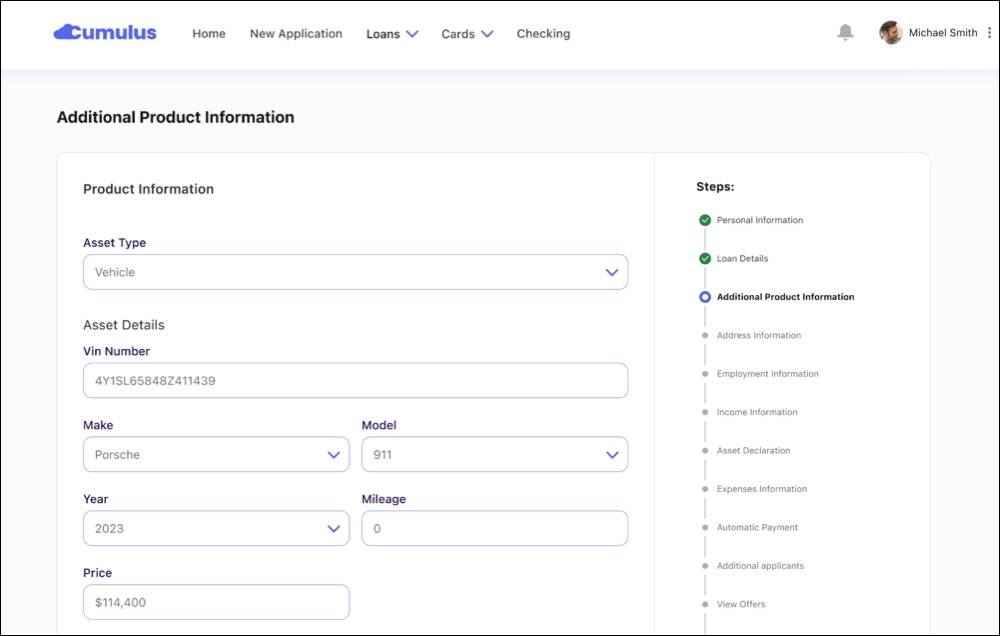
Both prebuilt loan application intake journeys securely collect applicant details, including personal information, employment, income, expenses, and—when needed—asset declarations. Applicants can use the same form to declare financial assets as collateral and any existing liens or security interests against them.
Applicants open the guided forms directly from the Experience Cloud self-service site. If an applicant is an existing customer, with minor configuration you can prefill form fields with details you already know, such as the applicant’s address. This feature makes the process easier for the applicant and lowers fallout rates.
Loan officers and relationship managers use the same form for assisted loan application processes. Loan officers can either fill out the entire application form on behalf of an applicant or help complete an application from the point where the applicant stopped. The option for your loan officers to finish an application is especially useful for applicants who need help with making sure that the application is complete and accurate.
What about other partners, such as brokers? They can use a version of these forms, too, on a partner Experience Cloud portal.
Salesforce stores the details entered in an application by using the Application Form object and related objects. Here are three of the critical objects to understand.
-
Application Form tracks the loan application form.
-
Applicant, a child object of Application Form, tracks who is applying and their relationship to the application, such as Primary Applicant, Co-Applicant, Guarantor, and Co-Signer.
-
Application Form Product, a child object of Application Form, tracks product-specific details related to the loan application, such as the requested tenure and loan amount.
Other objects work alongside these three to provide a 360-degree view of an application. You learn more about those objects throughout this badge. Plus, you can see how they all interact in the Digital Lending data model.
Disclosure and Consent Management
Digital Origination for Lending also includes a dedicated step in your applications for disclosure and consent management. What does that mean?
-
Disclosure is information that a financial institution is required to share with a customer regarding product details, terms, and conditions.
-
Consent is the explicit permission a customer grants to the institution to perform specific actions on their behalf.
For example, at this stage in the process, you often collect consent from an applicant to run a credit check.
Disclosures and consents appear as a step in the application process and use Omniscript components that collect digital signatures to provide you with an audit trail.
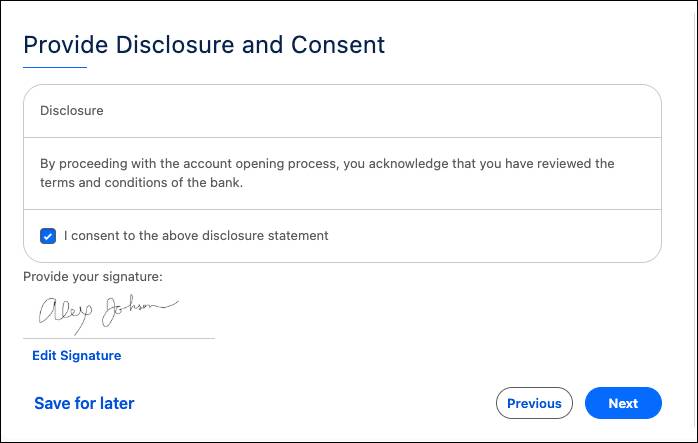
Like other Digital Origination for Lending features, Business Rules Engine determines the necessary disclosures and consents. Use a Business Rules Engine Decision Matrix to define the criteria to show certain disclosures and collect certain consents for different applicants.
Dynamic Offers and Pricing
As an application nears completion, an applicant wants to know what a loan will cost them.
Digital Origination for Lending includes tools to provide dynamic offers and pricing directly within the application form. First, set up integrations with external credit bureaus to get applicants' credit scores. To generate prices, Salesforce Pricing and Business Rules Engine use those credit scores and other inputs you configure through business rules.
This process starts with an Omniscript integration that you set up to run a soft credit check behind the scenes. In the US, you can use included Equifax integration templates for faster set up. The Party Credit Profile object stores this information.
Then, by using the data defined in the Product Attributes, Salesforce Pricing calculates the final net price, provides complete visibility into the pricing calculation process, and gives applicants real-time loan offers.
How? Business Rules Engine uses the party credit profile and other data collected in the application form to determine an offer interest rate. A Pricing Procedure, a specific type of Business Rules Engine expression set, can automatically determine an offer interest rate based on the product list rate, an applicant’s credit score, the loan term, and other attributes.
Business Rules Engine then calculates interest and monthly payments to make a personalized offer to the customer. The Application Form Product Proposal object stores this offer.
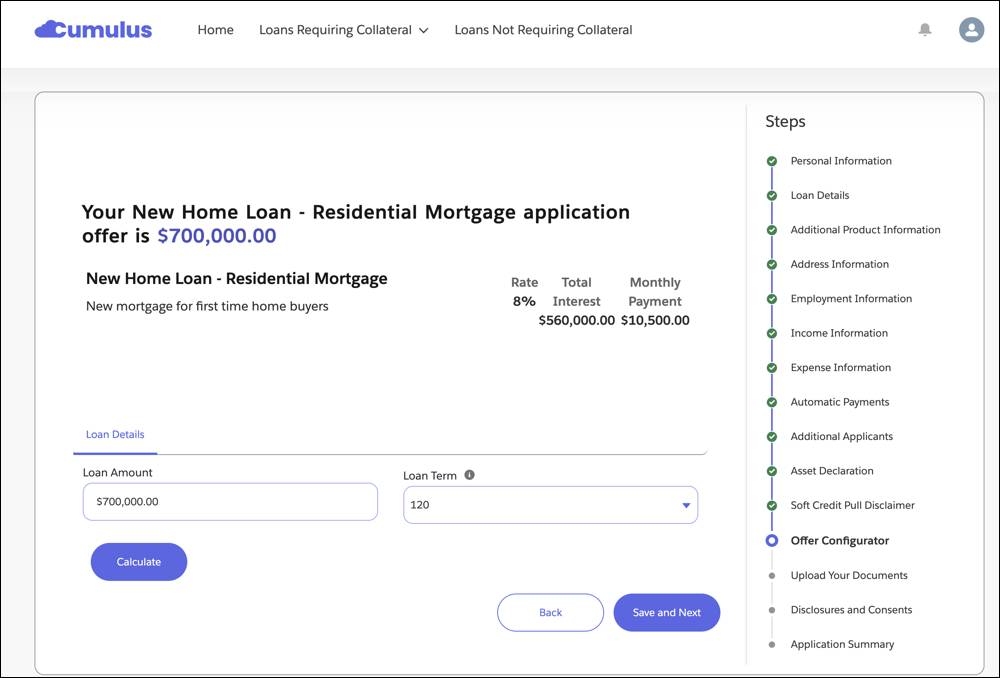
The applicant, broker, or your loan officers review the offer in the Omniscript form. With Product Configurator, these roles can explore loan options and customize loan parameters to receive updated offers in real time.
Document Collection
Business Rules Engine doesn’t only help with disclosures, consents, and pricing. Dynamically decide the required documents for a loan by using a Business Rules Engine Decision Matrix. This tool automatically prompts your client to provide the exact set of documents that you need for each loan product and applicant’s situation.
The Decision Matrix creates a Document Checklist Item record for each necessary document. The Discovery Framework Document Matrix element in the Omniscript form presents these document requirements to the applicant.
Every document an applicant uploads is then stored in its own document checklist item, where you manage the documents you need during the life of a loan. You learn more about document checklist items later in this badge.
What’s Next?
In this unit, you learned that Digital Origination for Lending simplifies loan applications by using Omniscripts for guided forms. Business Rules Engine helps you provide pricing, specify which disclosures to share, decide which consents to capture, and select the necessary documents to process an application.
Finally, when an applicant, broker, or one of your loan officers completes an application, they review an application summary and submit it. Then it’s ready for either straight-through processing or review by loan processors and underwriters.
Continue to the next unit to learn more about how review works, including automated straight-through processing.
Resources
- Salesforce Help: Self-Service Loan Application for Digital Lending
- Salesforce Help: Rep Assisted Loan Application for Digital Lending
- Salesforce Help: Manage Every Aspect of Questionnaire-Driven Information Collection
- Salesforce Help: Application Action Items for Digital Lending
- Salesforce Help: Set Up Secure Self-Service Loan Assets for Digital Lending
- Salesforce Help: Pricing for Digital Lending
- Salesforce Help: Disclosure and Consent for Digital Lending