Simplify Client Intake and Verification
Learning Objectives
After completing this unit, you’ll be able to:
- Differentiate between the data models used for individual and B2B clients during onboarding.
- Identify the tools and applications used for collecting client information.
- Explain how automations help verify client data and ensure compliance.
Standardize Intake and Verification
Onboarding begins with the intake process, which focuses on collecting initial client data. Agentforce Financial Services helps you standardize and automate this process with a structured framework for collecting information and documents. Ensure compliance and consistency across products and geographies by defining your processes and automating them where appropriate.
For example, create automations to make sure that clients complete applications and provide the necessary documents. Then, use included tools to verify all supported data.
In this badge, you explore tools for the intake and verification process, starting with how client data is stored.
Explore Client Data Models
Financial institutions work primarily with two different types of clients: individuals and businesses. How you store intake data for these two client types is slightly different.
Individual Clients
Individual clients are represented by person account records. You use the householding data model—which includes the Party Relationship Group and Account objects—to help relationship managers organize customers into household structures to gain insights into their financial profiles. Check out the Client Management in Agentforce Financial Services badge on Trailhead for details about mapping individuals, households, and relationships.
On top of these basic client management records, you use the Know Your Customer (KYC) data model to store identity verification, risk assessment, and screening checks for person accounts and leads. During onboarding, the Party Profile object and related object records store KYC details of an individual or group. Those details include information such as identity verification, credit score, and background checks, as well as addresses, employment, and income. See the Know Your Customers link in the Resources section for details.
B2B Clients
B2B clients are represented by business account records. The individuals who work at those accounts are represented by person account records. The Client Management in Agentforce Financial Services badge on Trailhead also shows how to map businesses.
To onboard B2B clients, Agentforce Financial Services includes specific Business Client Engagement features. These features help you understand your B2B clients through the Onboarding and KYB data models. Integrated Onboarding also works with the Beneficial Owners and Controlling Parties (BOCP) data model and integrations help you capture details about who manages a B2B client. Dedicated records for these business-specific details helps you tailor your processes to B2B clients as well.
Collect Client Information
Whether you’re working with individuals or B2B clients, collecting information during intake is an integral step.
To start, use Agentforce to create agents to autonomously answer routine client inquiries. For example, use the Loan Product Assistance template to quickly set up an agent that provides basic loan product information.
Then when it’s time to collect client details, use Discovery Framework to create digital forms and manage assessment questions to efficiently get the information you need. Discovery Framework uses a specialized data model and Omnistudio to help you manage every aspect of an onboarding form. Here’s an example intake form.
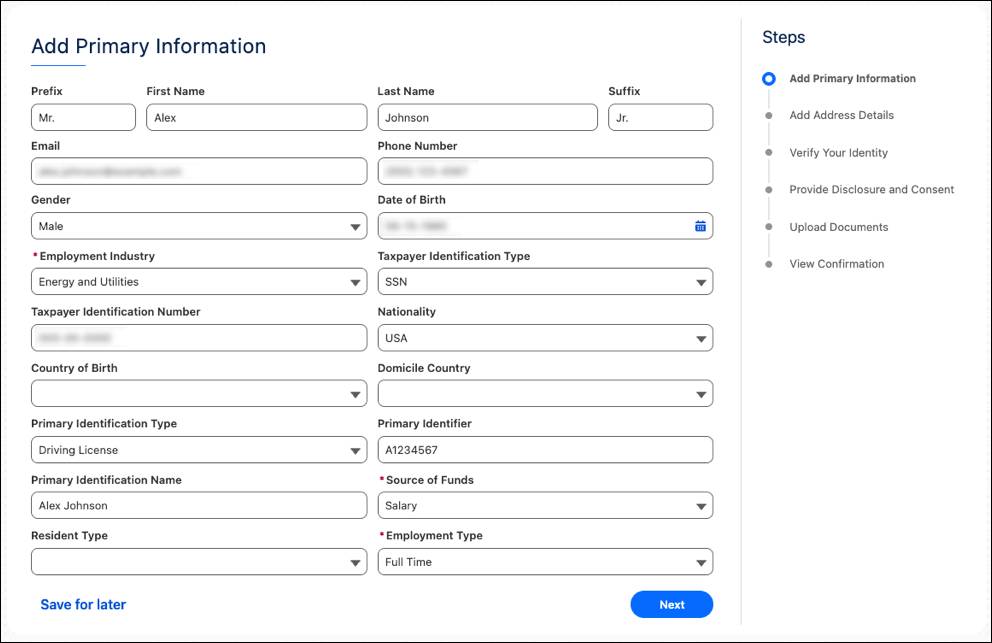
Discovery Framework forms also support prefilling client information from Salesforce or integrated third-party sources to minimize the amount of information your clients provide. You can even deploy these forms on multiple channels and public-facing sites so that your clients and your reps can collaborate on the same intake form.
To collect necessary documents, the Document Matrix feature helps you define and display all of the required intake documents. Each client-provided document is then stored in Document Checklist Item records. To automate document processing, use the Intelligent Form Reader feature to automatically extract data from uploaded documents and store it in Party Profile and related objects.
By using these tools together, you can trace and audit all of your clients’ responses and documents.
Verify Client Data
After collecting client data, your team proceeds to verify that data. There are a few tools to do this.
Action plans and action plan templates help your staff manage and track manual, repeatable tasks. This gives you built-in compliance and confidence that each rep is following the same steps in a process.
Remember that each uploaded document, too, is stored in a document checklist item. Your reps then use those items to verify documents against client data and track document approval status. Using the Validate Document feature, your mid-office reps can compare uploaded documents against party profiles, applications, application form products, and application forms in a single split-screen view.
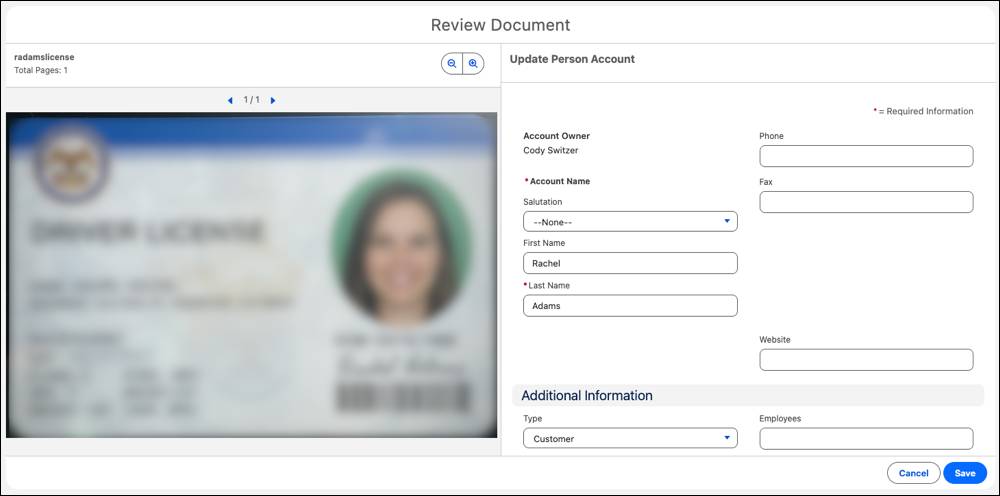
These tools and processes ensure all necessary documentation is in order for evaluation.
To verify data against external sources, configure Integration Definitions for managing external service callouts.
And, finally, before you move on to evaluation, configure Business Rules Engine (BRE) to automate complex decision-making processes at the verification stage. For example, configure BRE with criteria to determine eligibility and assign preliminary risk ratings based on a client's KYC and KYB data.
What’s Next
In this unit, you learned how customer onboarding in Agentforce Financial Services standardizes and automates the intake and verification processes. This includes collecting client data with tools such as Discovery Framework and streamlining data verification with Action Plans and the Business Rules Engine. By deploying these tools, you take the guesswork out and provide a better experience for customers and review teams.
Now it’s time to move on to the final stages of onboarding: evaluating and approving clients and setting up accounts.
Resources
- Trailhead: Client Management in Agentforce Financial Services
- Salesforce Help: Know Your Customers
- Trailhead: Agentforce Financial Services B2B Foundations
- Salesforce Help: Business Client Engagement
- Trailhead: Agentforce for Financial Services
- Salesforce Help: Discovery Framework
- Salesforce Help: Intelligent Form Reader
- Salesforce Help: Validate Documents in Document Checklist Items
- Salesforce Help: Create Integration Definitions for Integration Orchestration
- Trailhead: Explore Business Rules Engine