Track Clients and Their Relationships
Learning Objectives
After completing this unit, you’ll be able to:
- Describe the difference between business accounts and person accounts in Agentforce Financial Services.
- Explain how individual clients, business clients, and groups are connected.
- Define relationship objects.
Before You Start
Before you start this module, consider completing this recommended content.

Manage Critical Client Relationships
In the financial services industry, relationships are critical. The relationships you form with your clients are important for building trust and long-term success for both your clients and your business. After all, financial services aren’t just one-time transactions—they’re complex, personal, and long-term relationships.
Building and maintaining these relationships is a driver for customer loyalty, repeat business, word-of-mouth referrals, and revenue.
Fortunately, Agentforce Financial Services includes helpful objects and tools to track your clients, whether they're individuals or commercial entities. Plus, with its powerful data model, you have a way to track complex networks of relationships between individuals, families, employers, companies, and other financial service providers.
In this module, you learn how these objects work together. You can apply what you learn here to help your organization and users model complex relationships and provide the groundwork to track your institution’s complex client relationships.
In this unit, you start with the basics of the data model and its objects.
Understand Person Accounts and Business Accounts
By default, Salesforce is set up for business-to-business (B2B) sales organizations. B2B organizations conduct transactions with other organizations, which are tracked using the Account object. To get to that point, salespeople work with and engage individuals tracked using the Contact object. This is sometimes called the Individual Model and is only supported in Agentforce Financial Services orgs with existing individual model implementations.
Financial institutions like yours likely engage and transact with both organizations and individuals, so a different data model is needed.
You use two different kinds of accounts in Agentforce Financial Services.
-
Person accounts (
 ) track an individual. These records combine fields from the Account and Contact objects. Use person accounts to store details about individual clients, their family members, key staff at B2B clients, and other individuals.
-
Business accounts (
 ) track an organization or group of individuals, such as a household, company, or government agency. The people working at those organizations are tracked using related person account records.
Business accounts represent households, but they’re different from companies and other organizations because the Party Relationship Group object—which you learn more about later in this unit—defines a business account as a household.
You can create record types for both person and business accounts and use different fields and page layouts for different record types for people and organizations.
Map Relationships Between Clients and Organizations
You track more than just individuals and organizations, though—you also track how they’re related to each other. Who's in a client’s household? Who's a wealth-management prospect’s spouse? Who are the key players at a company that applied for a loan?
Agentforce Financial Services uses three relationship objects to connect stakeholders and groups.
-
Account contact relationship connects a person account and a business account, such as a person account to their household or their employer.
-
Contact contact relationship connects person accounts to each other. Use two contact-contact relationships to map an inverse relationship, such as spouses, a parent and child, or neighbors.
-
Account account relationship connects business accounts—such as businesses and households—to each other. Use two account-account relationships to map an inverse relationship, such as the business relationship between a client business and another bank or insurer that they work with.
You use these three objects to connect clients and groups, but other objects define those relationships.
Define Relationship Records
Agentforce Financial Services uses two objects to describe the nature of relationships between people, businesses, or households.
-
Party role relationship describes account-account and contact-contact relationships and defines the relationship between two people or companies. For example, if you have contact-contact relationships mapping a parent and child, relate a party role relationship to each contact-contact relationship to describe the relationships as parent-child and child-parent.
-
Party relationship group relates to business accounts to describe them as either a household or a group. Party relationship groups also store financial information and other details about the related business account.
OK, that’s a bunch of objects! To understand how all of the records work together, explore the example in the next section.
Explore an Example Client Model
Imagine that you’re working with clients named Leah and Sam Mason, who are married. They receive health insurance from Cumulus Insurance and you want to track that relationship. How does the data model work in this situation? Check out this diagram for all of the records.
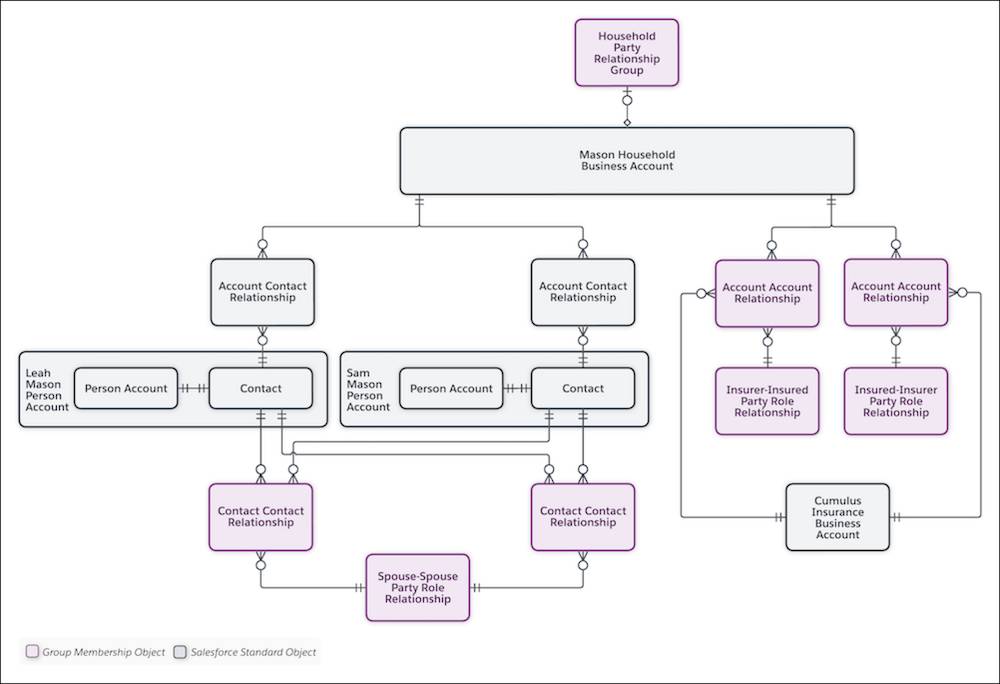
Start with Sam and Leah’s household.
- Person accounts represent Leah and Sam because they’re individual stakeholders.
- A business account represents Leah and Sam’s household because it’s a group of individuals.
- Account-contact relationships connect Leah and Sam to their household business account.
- A party relationship group defines the business account as a household.
- Contact-contact relationships map Leah and Sam’s relationship to each other. There are two contact-contact relationships to capture the reciprocal relationship—Leah is Sam’s spouse and Sam is Leah’s spouse.
- A party role relationship defines the contact-contact relationships between Leah and Sam.
Leah and Sam’s household business account is also related to Cumulus Insurance, the company that offers health insurance to Sam and Leah. Let’s explore those records next.
- A business account represents Cumulus Insurance because it’s a business or group of individuals.
- Account-account relationships connect Leah and Sam’s household business account and Cumulus Insurance business account. There are two account-account relationships to capture the reciprocal relationship—the household is the insurer’s client, and Cumulus Insurance is the household’s insurer.
- Party role relationships define the account-account relationships between the household and the insurer.
You don’t need this level of detail for every individual client or business. Often, you only track your relationship to an individual client using a single person account record. Think of all of the individual account holders your institution interacts with every day.
For more examples of how these records can be used to map relationships, see How Agentforce Financial Services Models Groups and Relationships in Salesforce Help.
Now you know the basic objects. Next, you learn more about person accounts and how they work.
Resources
- Salesforce Help: How Agentforce Financial Services Models Groups and Relationships
- Salesforce Help: Data Models for Agentforce Financial Services
- Salesforce Help: How Is a Person Modeled in Agentforce Financial Services?
- Salesforce Help: What Is a Group in Agentforce Financial Services?
- Salesforce Help: Groups and Households in Agentforce Financial Services
- Salesforce Help: Group Membership and Households
- Salesforce Help: What Is a Relationship in Agentforce Financial Services?