Power Up Clinical Operations
Learning Objectives
After completing this unit, you’ll be able to:
- Explain how Agentforce enhances clinical trial operations in Life Sciences Cloud.
- Identify key Agentforce skills for site selection, candidate matching, and participant engagement.
- Describe how digital labor accelerates recruitment and improves site performance.
Clinical Trials: Timelines and Trust
Clinical trials run on strict timelines. For clinical operations teams, it's a high-stakes race against the clock, demanding both speed and an unwavering commitment to precision and compliance.
Historically, this race has been run on a patchwork of spreadsheets, manual summaries, and disconnected tools. This fragmented approach creates risk at every turn: missed deadlines, enrollment shortfalls, and a chronic lack of visibility across teams.
Agentforce is the strategic copilot for this race. It embeds intelligent assistance directly into Life Sciences Cloud, automating routine tasks, surfacing critical insights, and accelerating execution without compromising the data integrity and regulatory guardrails that are the bedrock of clinical research.
In this unit, you explore how Agentforce supports two foundational stages of study setup.
-
Site Strategy and Activation: Move from a wide net of potential sites to a short list of activated, high-performing partners.
-
Participant Matching: Shift from reactive screening to proactive, AI-driven cohort building.
Together, these capabilities help study teams make smarter decisions, reduce manual effort, and align site and participant strategies earlier in the process.
Search and Filter with Context
Meet Diego, a site feasibility lead for an upcoming oncology trial. His first mission is to find potential sites. The old way was a data-mining expedition, a manual slog through spreadsheets, browser tabs, and static reports, each with stale data and limited filters.
Now, Diego’s workflow is a conversation. He opens the Clinical Study record and launches Agentforce. The agent, already aware of the study’s context, instantly proposes a set of smart search filters tailored to the oncology trial. Diego quickly refines the criteria, adding parameters such as past enrollment performance.
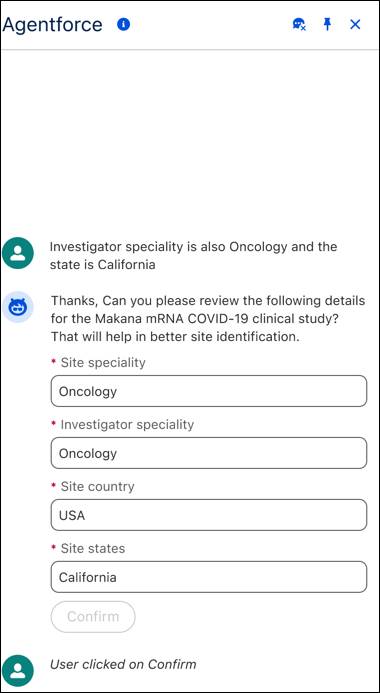
The agent isn’t just running a search, it’s executing a targeted intelligence-gathering operation. By pulling context directly from the research study record, it filters out unnecessary details and presents a clean, curated list of eligible sites and investigators.
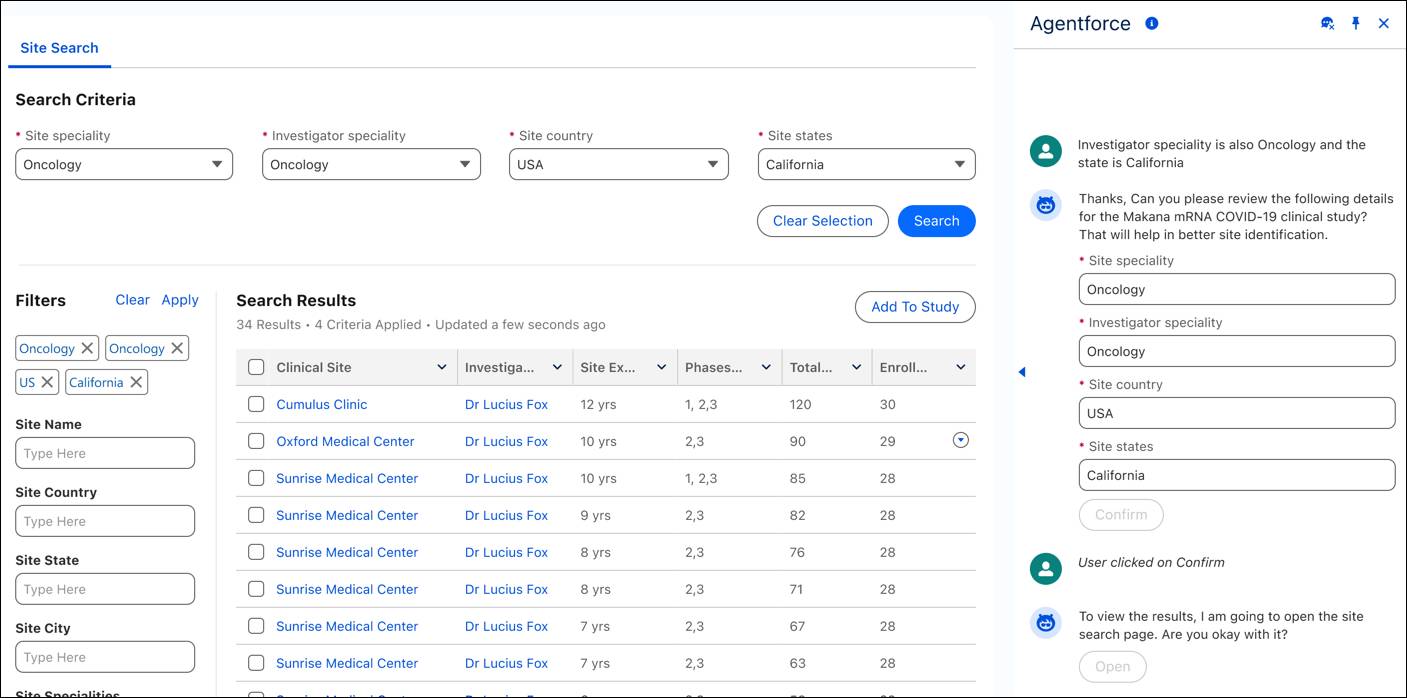
Instead of losing hours to fragmented systems, Diego gets a research-aligned short list in seconds. He can now focus on evaluating quality, not just quantity.
Evaluate and Select Sites
With a list of potential sites in front of him, Diego’s next challenge is evaluation. In the past, this meant manually reviewing profiles, navigating disconnected records, and compiling comparison notes.
Agentforce turns this manual labor into an instant briefing. From the results page, Diego can now request a summary for any site or investigator on his list.
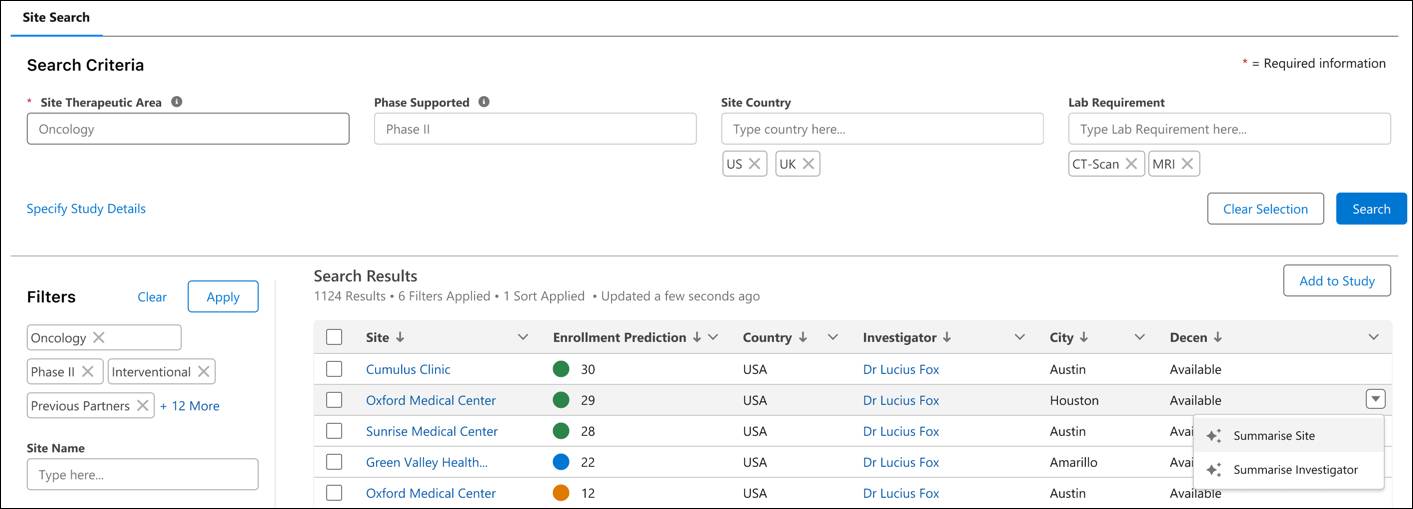
In seconds, the agent generates a structured dossier on each target. Site summaries detail trial capabilities and historic enrollment performance, while investigator summaries provide credentials and therapeutic experience.
Here’s an example site summary.
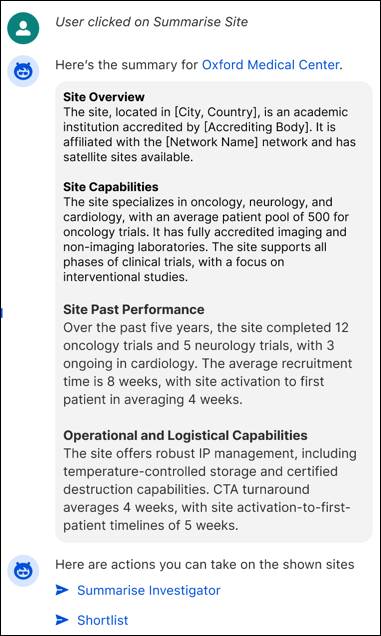
The summary includes an overview of the site and its capabilities, past performance, and operational and logistical capabilities.
These summaries are powered by flows that combine structured data from multiple records with the trial-specific context of the current study. Instead of digging through records, you get consistent, actionable profiles at a glance, helping you make faster, data-supported decisions on who to prioritize.
Activate Sites and Determine Feasibility
Diego has his short list. Now he sets the wheels in motion without losing momentum.
From the results list, select Add Site to Study for each chosen facility. Agentforce creates the necessary records, linking them to the study and creating a single source of truth for the entire team. With the roster set, the agent anticipates the next logical step and prompts to launch the feasibility assessments.
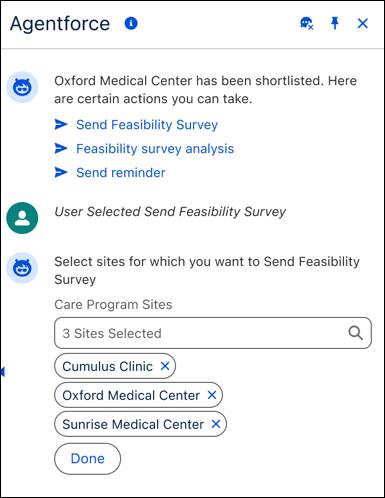
From the conversation with the agent, select additional sites as recipients of the survey.
Next, select the correct assessment template based on the study’s context and click Create Questionnaire. 
With a final confirmation, the assessments are delivered to each investigator through a secure portal, prepopulated and tracked automatically.
Later, you can use Agentforce to analyze and provide a summary of the responses received for the survey.

The summary shows the maximum, minimum, and average scores from the survey, as well as response distributions for each score. What was once a multi-day, multi-system logistical hurdle is now a seamless, minutes-long workflow.
Match Candidates and Build Cohorts
With the sites selected, attention shifts to the next critical phase: participant identification. Finding eligible patients is one of the most time-consuming aspects of a clinical trial, and historically, this process only began after sites were active, often leading to delays and missed targets.
Agentforce fundamentally changes this dynamic by shifting candidate matching to earlier in the lifecycle. It takes advantage of an intelligent agent to evaluate potential participants against a trial's specific inclusion and exclusion criteria, building qualified cohorts before recruitment even starts.
Intelligent Evaluation at Scale
Agentforce supports intelligent evaluation processes that go far beyond simple data filtering. For example, consider a site feasibility lead such as Diego, who wants to assess whether a patient is a strong candidate for a clinical trial. When he initiates the evaluation from the patient's record, Agentforce springs into action.
Using a preconfigured prompt template, the agent processes the full patient record, including structured data such as diagnoses, medications, and demographics, as well as unstructured content such as clinical notes and diagnostic summaries. The agent applies logic to evaluate complex criteria with high precision. For example, it can:
-
Calculate age based on the patient's date of birth.
-
Evaluate time-bound data, recognizing when a condition has resolved and no longer applies to a given eligibility criterion.
-
Parse text from summaries, extracting specific clinical values directly from a note to confirm a match.
-
Flag missing information when a record lacks sufficient detail to make a clear determination.
Instead of manually combing through records, Diego receives a structured, criterion-by-criterion breakdown within seconds. Each item includes a status of Match, Not Match, or Insufficient Data, along with supporting evidence from the patient’s record to explain the result.
From Individual Assessment to Proactive Cohorts
You can run this powerful evaluation on a single candidate or scale it across entire lists of potential participants from sources such as a site’s Electronic Medical Records (EMR), provider referrals, or a sponsor's patient registry. This gives clinical teams the ability to move from reactive screening to proactive cohort building. By understanding where eligible populations exist early in the process, they can:
- Forecast recruitment readiness across selected sites.
- Proactively identify and prioritize high-fit participants for outreach.
- Fine-tune site strategy based on real eligibility data, not assumptions.
By shifting candidate matching earlier, Agentforce creates a tighter alignment between site selection and enrollment strategy, improving the efficiency of clinical trials and increasing candidate conversion rates.
Set a New Standard for Clinical Trials
In this unit, you saw how Agentforce supports two critical steps in clinical trial setup: selecting the relevant sites and matching the correct candidates. By unifying these workflows into a single workspace, Agentforce helps teams move faster, reduce manual effort, and make more confident decisions.
Next, shift focus to Patient Services Programs and explore how Agentforce supports therapy initiation, benefits verification, and program outcomes.