Create an Executive Summary
Learning Objectives
After completing this unit, you’ll be able to:
- Explain what to include in an executive summary of the chosen grid option.
- Describe how to establish a framework for future growth.
Prepare an Executive Summary
Once your client selects and approves a grid design model, your next step is providing an executive summary of the winning grid design. Your client will use this document when they implement and grow their Slack instance, so be sure that it includes the following.
- Workspace recommendations, including access level
- Channel recommendations, including type and public vs private (for example, #announcements, default, org-wide)
- Key benefits
- Key considerations
This is the final product that you provide in relation to the grid design, so make sure it’s clear and concise.
Service Engagement Example
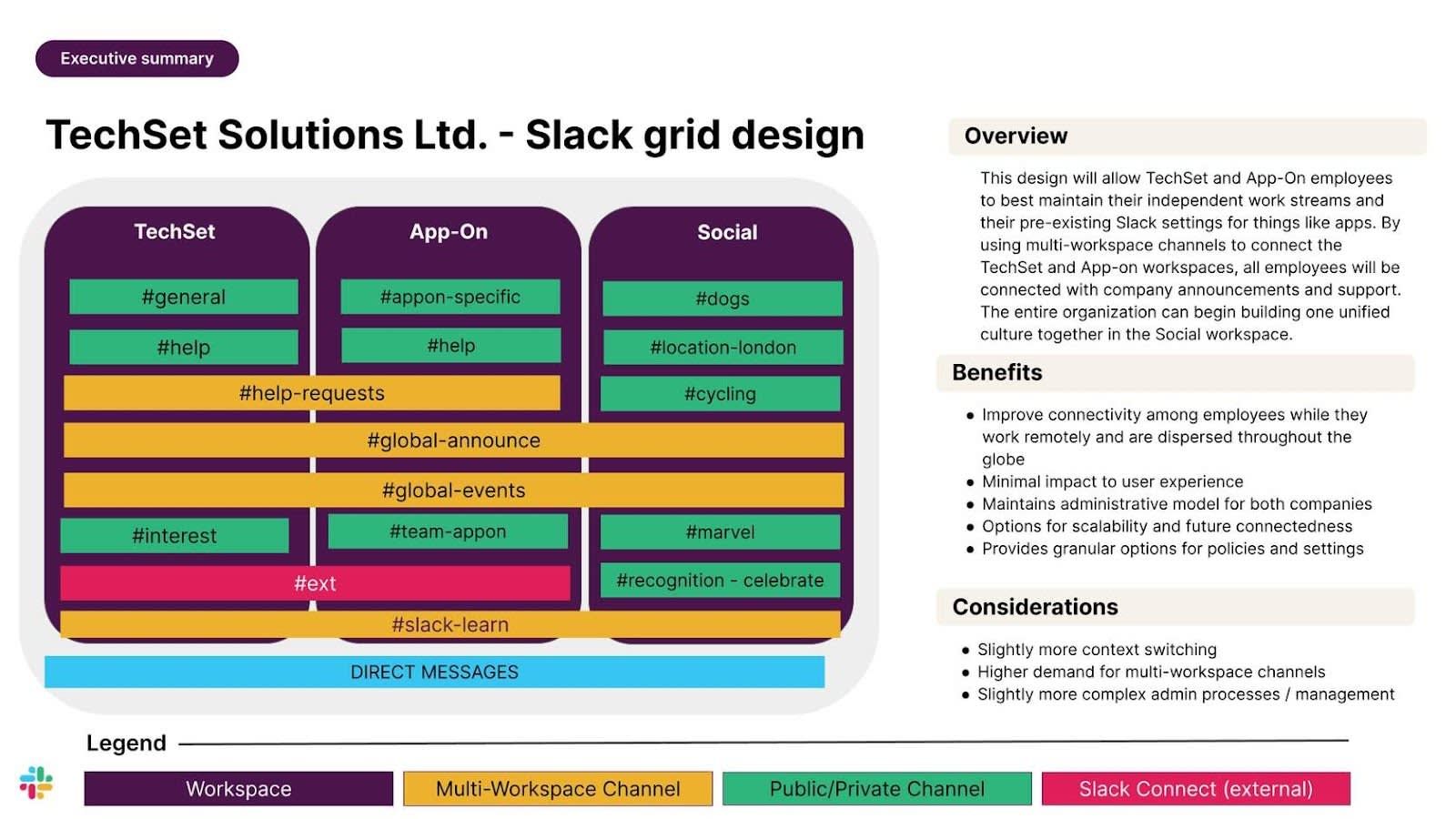
Let’s see what this looks like for our example client, the merged tech company. Following your grid design workshop, you create an executive summary to help bring alignment and facilitate a final sign-off with the client’s leadership team members who weren’t present at the workshop. You deliver a graphic that shows how the two companies can work both separately and collaboratively, and include an overview and list of benefits and considerations. Take a look.
Overview:
The design will allow employees from both companies to best maintain their independent work streams and their preexisting Slack settings for things like apps. By using multiworkspace channels to connect the two companies’ workspaces, all employees will be connected with company announcements and support. The entire organization can begin building one unified culture together in the Social workspace.
Benefits:
- Improved connectivity among employees while they work remotely and are dispersed throughout the globe
- Minimal impact to user experience
- Maintains administrative model for both companies
- Options for scalability and future connectedness
- Provides granular options for policies and settings
Considerations:
- Slightly more context switching
- Higher demand for multiworkspace channels
- Slightly more complex admin processes/management
Follow-Up Steps
After a grid design workshop, the clients who participated need to socialize their final decision with those not in the room to get sign-off. Gaining alignment for a final grid design can be difficult when there are many stakeholders involved.
As the client grows and matures their Slack instance, hopefully they use the selected design option and apply your key considerations as a guide. Most organizations consider adding new workspaces as their needs grow or as they get requests from users to add a new workspace. Next, explore how you can guide your client to thoughtfully consider adding new workspaces to an established design.
Plan for Growth
After launching their initial grid design, your client may consider adding new workspaces. A grid design is not meant to be static–it will change as an organization’s needs change over time. But too many workspaces can create workspace sprawl if not added thoughtfully. Be sure to provide your client with guidance on when a new workspace should be created, ideally in the form of a workspace decision tree.
To decide whether a new workspace should be created, admins can ask a series of questions. Let’s take a look.
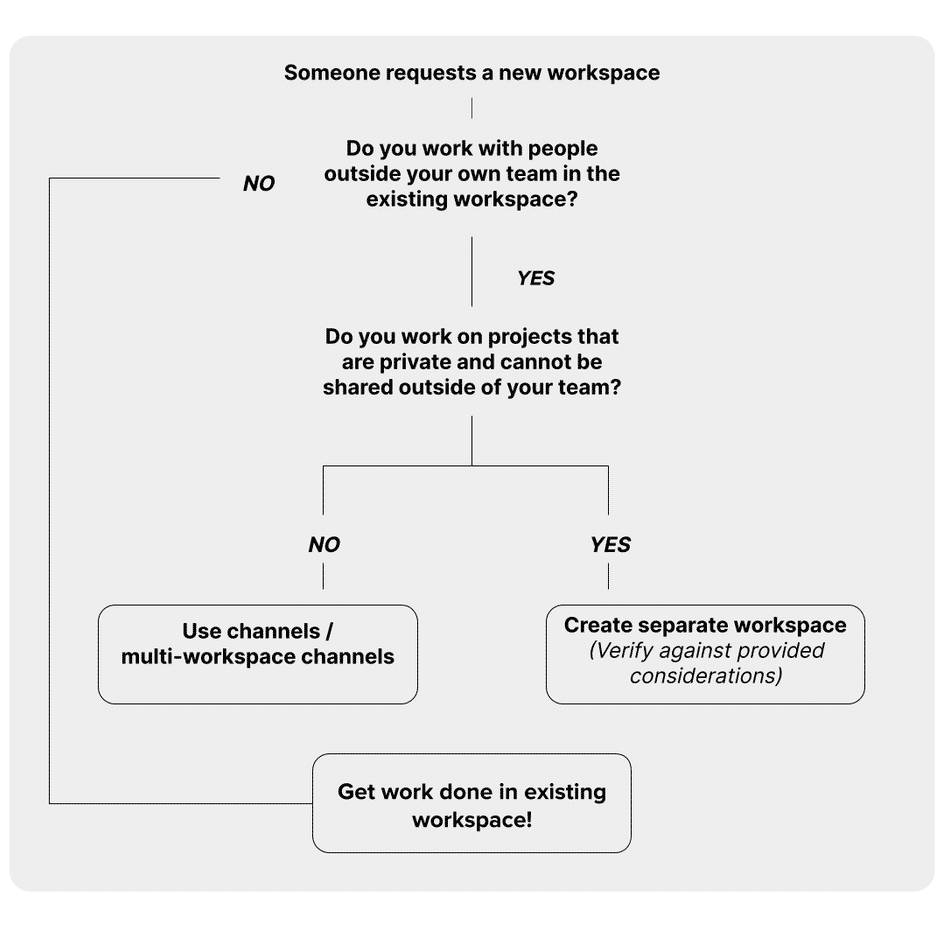
When a User Requests a Workspace:
Ask them whether they're involved in a project with people across different business units (cross-functional), who are outside of their current workspace.
-
No: If their project is limited to internal members, they should get their work done in their primary workspace and should be directed to create a channel in that existing workspace.
-
Yes: If their project involves colleagues from other workspaces, next ask them if their work requires privacy. If so, it may require a new workspace to keep the work separate from the rest of the organization.
If they’re considering adding a new workspace, remind them that there are additional considerations. For example, workspaces require continuous maintenance, so the requester should have admins in mind to manage the new workspace. This alone may be a compelling reason to start with a channel-first approach. Let’s review the most important considerations next.
Considerations for a New Workspace
If the decision tree leads your client to consider creating a new workspace, verify the decision against the following considerations.
- Members of the new workspace work independently of the existing workspace population.
- There’s a high level of privacy required. Most channels need to be restricted to a specific set of employees.
- New workspace administration (permissions, apps, profiles, status) needs to be handled uniquely from the existing workspace.
- Security exceptions are required. For example, retention settings or app access should be restricted beyond the broad organization settings due to external members or international restrictions.
- There’s a dedicated admin team to support this new workspace.
Wrap It Up
You’ve learned a lot in a short amount of time–from planning a successful grid design workshop and guiding your client to the best grid design, to setting them up for future growth. Happy planning!