Build Configuration Rules
Learning Objectives
After completing this unit, you’ll be able to:
- Describe the purpose of a product model and configuration rules.
- Differentiate between product configuration rules and attribute configuration rules, and describe example use cases.
- Explain how scope, conditions, and actions define the structure of a configuration rule.
- Create and test a configuration rule.
Configuration Rules in Insurance
Once a customer qualifies for an insurance product, the next step is configuring that product to fit their specific needs. Configuration rules define how insurance products behave during customization, ensuring that selections remain valid, compliant, and tailored to the customer’s profile.
With Digital Insurance, insurance products are built using a product model that organizes offerings into product components, such as root products, insured items, insured parties, and coverages. This structure supports flexible, personalized configurations for customers.
For example, the Auto Silver product bundle includes a base product and optional coverages like Comprehensive, Collision, and Uninsured Motorist. Customers can bundle multiple vehicles and drivers under the same policy while customizing coverage options to fit their needs.
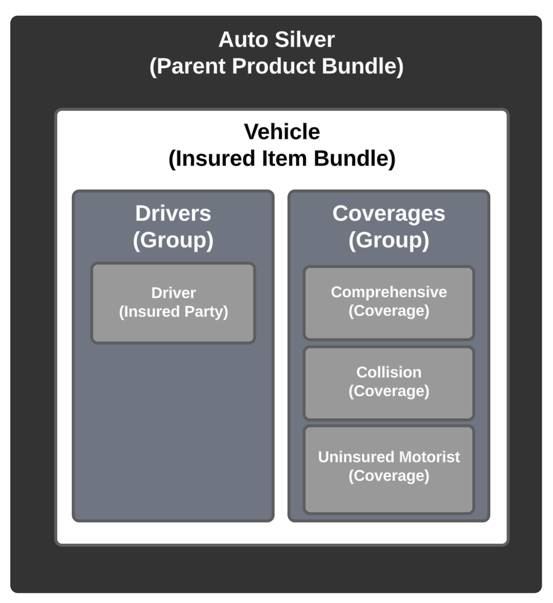
Within this structure, attributes store important details about each component. Insured party attributes contain attributes about the policyholder or other covered parties, such as driver age and driving history. Coverage attributes define terms like limits and deductibles.
To create a seamless quoting experience, insurers can control how these product components interact. Configuration rules help by:
- Guiding customers through valid product selections.
- Blocking incompatible or illogical combinations to prevent errors.
- Automating decisions to enforce business and compliance requirements.
Now, let’s explore the types of configuration rules and how they shape product behavior.
Types of Configuration Rules
Configuration rules fall into two main categories: product configuration rules and attribute configuration rules. Each rule is executed through actions that define how products and attributes behave.
Product Configuration Rules
These rules apply to entire products or coverages, determining whether they should be added, removed, hidden, or required in a quote.
Here are the available product configuration actions.
Attribute Configuration Rules
These rules control specific product attributes, such as deductibles and limits.
Now that we’ve covered the types of rules, let’s break down how they are structured.
Components of Configuration Rules
Each configuration rule consists of three key components.

-
Scope: Defines where the rule applies (specific products, bundles, or entire transactions).
-
Conditions: Specifies the criteria that must be met for the rule to execute.
-
Actions: Determines what happens when the rule conditions are met.
Justus wants to build a configuration rule that ensures proper risk management for high-risk drivers. Here’s the data he plans to add.
-
Scope Details: The Vehicle bundle for the Auto insurance product.
-
Conditions:
- The driver is under 25.
- Their driving record shows more than five accident points.
- The driver is under 25.
-
Actions:
- Require Collision coverage.
- Set the Collision deductible to $1,000.
- Require Collision coverage.
We’ll follow Justus through the process of creating this rule. Let’s start with scope, where Justus defines where the rule applies.

Scope: Where Rules Apply
The scope of a configuration rule defines which level of a product or transaction it applies to. There are two levels of rule scope used for product rules.
Scope Object |
Description |
When to use? |
|---|---|---|
Product |
Applies to a specific product and its attributes. |
When configuring the internal details of a single product independent of a bundle. |
Bundle |
Applies to a product bundle including all related components within it. |
When configuration depends on interactions between products in a bundle. |
For his high-risk driver rule, Justus selects Bundle scope for the Vehicle product bundle, ensuring that vehicle details, driver history, and coverages can be evaluated together.

Conditions: When Rules Execute
Conditions define what must be true for a rule to trigger. Think of them as the “if” statement in the logic:
- “If these conditions are met, then take this action.”
A single rule can contain up to three conditions. Each condition is structured around three key elements.
Element |
Description |
|---|---|
Resource |
The product or product classification the condition applies to. |
Attributes and Fields |
The specific data fields being evaluated. One resource can reference up to eight attributes or fields. |
Operator and Value |
Defines how the attribute is compared to a threshold. The available operators and values are inherited from the data type and available values of the attribute or field. |
For the rule, Justus defines the following condition.
- Resource: Product
- Operator: Equals
- Value: Driver
- Operator: Equals
- Attributes:
-
Age is less than 25.
-
Driver Accident Points are greater than 5.
-
Age is less than 25.
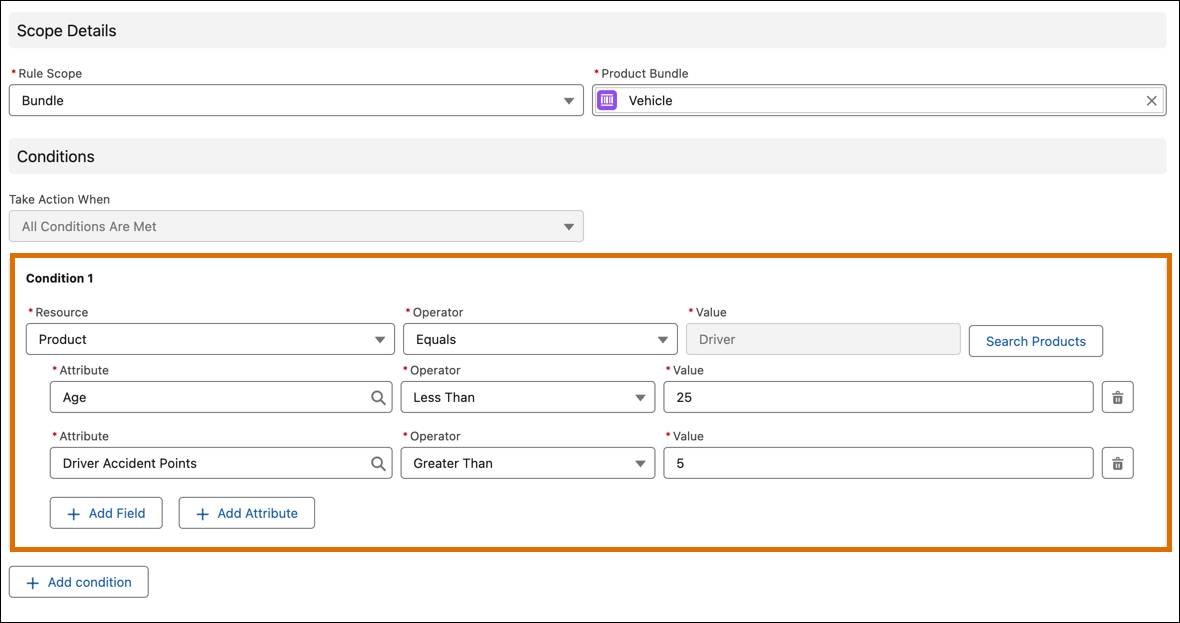
This condition will be met only if both attribute subconditions are met.
Actions: What Happens When Conditions Are Met
Actions define what the system does when conditions are met. This is the “then” statement in the logic:
- If these conditions are true, then take this action.
You can define three actions on a single rule.
Justus sets an Auto-Add action on the Collision coverage and locks it so the user can’t remove it during configuration.
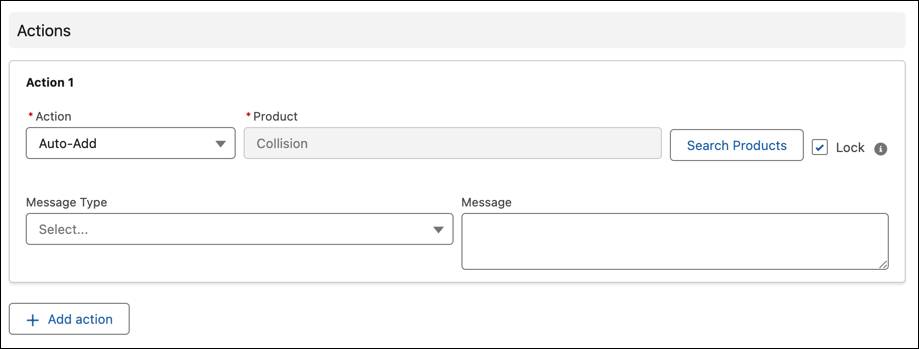
Next, Justus clicks Add action to add another action. This time, he adds a Set Attribute action that sets the Collision coverage Deductibleto $1,000. He also includes an informational message that provides context to the user.

After reviewing the logic, Justus saves the rule and then tests it on a sample quote. Everything works as expected!
Through this rule, Cumulus Insurance offers adequate risk-based coverage and protects its business objectives.
A Smoother Experience
Once active, configuration rules guide users seamlessly through quoting. Customers and agents can focus on customizing their selections while the system ensures everything aligns with business rules.
When users add the Auto Silver Bundle, the rules Justus configured ensure that:
- Collision coverage is automatically added and the Collision deductible is set to $1,000 for high-risk drivers.
- Informational messages guide users through any adjustments or requirements.
In this unit, we explored how configuration rules guide product behavior during the quoting process. We covered the key components of configuration rules—Scope, Conditions, and Actions—and followed Justus as he applied these concepts to configure the Auto Silver product for Cumulus Insurance.
In the next unit, we examine underwriting rules that reduce unnecessary steps in operational processes and ensure efficient management of insurance transactions.