Say Hello to Next-Generation DevOps Center
Learning Objectives
After completing this unit, you’ll be able to:
- Explain what DevOps Center is.
- List the benefits of using DevOps Center.
- Describe how declarative and programmatic developers work together to release changes.
What Is DevOps Center?
Salesforce DevOps Center provides a unified, AI-powered experience for application change and release management. It brings modern DevOps best practices to all the members of your development team, regardless of where each falls on the low-code to pro-code continuum.
We’ve evolved the original DevOps Center into a next-generation version built directly into the Salesforce Platform. With this version of DevOps Center:
-
You can use natural language for complex tasks. DevOps Center is powered by the Salesforce DX Model Context Protocol (MCP) Server. Instead of wrestling with manual steps, you can ask Agentforce, “Resolve merge conflicts in WI-000042.”
-
You no longer have package downloads or installs. After you turn it on in your DevOps Center Hub org, you can start using it right away.
-
You can view and commit changes from DX Inspector. DX Inspector lives in your development org and gives you quick access to metadata tracking and visualization. It tracks your changes as you work, replacing manual logs like sticky notes and spreadsheets.
-
You can commit and promote metadata and its associated configuration data, such as custom settings or Data Kits, in a single orchestration. That keeps dependencies intact, resulting in a complete, working release.
And fundamental DevOps best practices haven’t changed.
-
The source control repository is your source of truth for project changes, ensuring that everyone works with a consistent set of changes.
-
Source control branches are created and managed for you. You use clicks to move changes through the release pipeline.
-
You can do your development work inside or outside of DevOps Center using the tools of your choice. So everyone has visibility into one another’s changes regardless of how they work.
How DevOps Center Improves Change and Release Management
DevOps Center uses modern developer tooling under the hood, including Salesforce DX project compatibility, Salesforce CLI, Metadata API, and source control. The next-generation DevOps Center enhances this foundation with agentic workflows that accelerate daily tasks and simplify complex operations. You don’t need to be familiar with the developer tools or AI workflows to get the best from DevOps Center.
How does DevOps Center help teams release changes more efficiently?
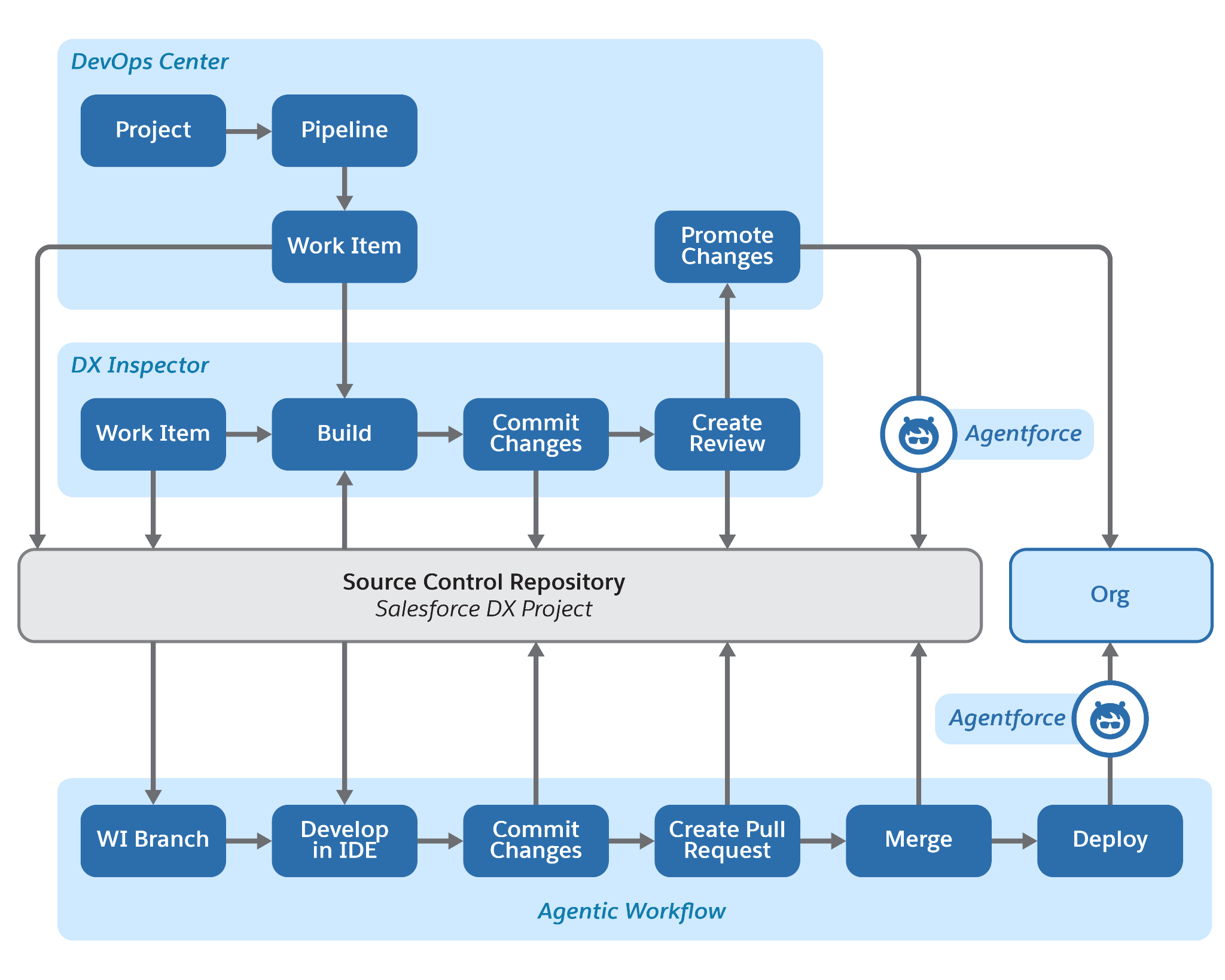
Let’s say that you're a Salesforce admin and your team is launching a new feature. With DevOps Center, low-code and pro-code users work together with agentic workflows. Because the source control system is the centralized source of truth, you and your team can collaborate and manage releases with confidence.
-
Declarative users: As a Salesforce admin, you create a work item and perform development in a sandbox. Instead of tracking changes in a spreadsheet, you use the Change Management tab in DX Inspector to view and commit changes directly to your source control.
-
Programmatic developers: While you’re building, programmatic developers on your team add custom code. They work directly in a work item feature branch using their preferred tools. They commit and merge changes directly in the repository, and you and the team maintain complete visibility into their progress from within DevOps Center.
-
Release managers: The release managers oversee the entire pipeline and promote the changes from the DevOps Center UI or by using the Salesforce CLI, ensuring a governed and predictable release.
-
Agentic workflows: Agentic workflows in DevOps Center provide AI assistance for routine tasks, so you and your team can focus on high-priority DevOps work.
Here are a few examples of how your team can use agentic workflows.
Programmatic developers can interact with DevOps resources conversationally using Agentforce Vibes. For example, instead of using complex Git commands, they can prompt Agentforce Vibes with “Commit changes: Fixed validation for Contact email.” If a merge conflict occurs, the release manager can use Agentforce to analyze the conflict and suggest resolution strategies. For example, instead of manually resolving the merge conflict in the source repository, the release manager can prompt Agentforce Vibes with “Resolve the conflict by keeping current changes.”
More Ways DevOps Center Works for You
In addition to the new features, DevOps Center also provides these productivity enhancements and features.
-
Smart conflict resolution: DevOps Center identifies work items that have conflicts with other work items in the pipeline. With Agentforce, you can resolve conflicts using natural language prompts.
-
Work item: Defines the requirements for the change to be made and tracks the associated changes through the release lifecycle. Work items increase visibility regarding where changes reside in each pipeline stage.
-
Flexible environment support: Teams can track and commit changes even from non-source-tracked development environments using DX Inspector.
-
Activity history: Provides increased visibility, auditability, and error tracking in both work item and pipeline views.
-
Development environment synchronization: Detects when a development environment is out of date so you can ensure that you’re working against the latest source of truth. Tells you what’s different, and enables you to synchronize it to avoid future conflicts.
Get Started with DevOps Center
To get started with the next-generation DevOps Center, from Setup, in the Quick Find box, enter DevOps Center, and then select DevOps Center.
Resources
- Salesforce: DevOps Center Trailblazer Community Group
- Salesforce Help: Develop and Deploy with DX Inspector
- Salesforce: Help: Manage and Release Changes Easily and Collaboratively with DevOps Center