Know When You Should Profile Data
Learning Objectives
After completing this unit, you’ll be able to:
- Identify common Salesforce initiatives and activities that benefit from data profiling.
- Explain how data profiling informs cleanup, migration, adoption, and AI readiness efforts.
- Recognize when to profile data to support data quality improvements and support ongoing monitoring and governance.
Run Data Profiling at the Right Time
Data profiling is most helpful when done to support:
-
Project planning and execution, where data profiling helps teams understand the current state of data before designing migrations, integrations, or AI initiatives.
-
Ongoing data governance and stewardship, where data profiling helps monitor data quality over time and detect adoption or configuration issues early.
In the following sections, you explore common Salesforce use cases where data profiling provides valuable insights and helps organizations maintain reliable, trusted data.
Key Use Cases for Data Profiling
Assess Current State of Data and Data Model Quality
Whether you’re a Salesforce admin new to an org or a consultant preparing to work with a new client, assessing the state of the data can help you get up to speed quickly.
Evaluating data quality, checking whether objects are approaching platform limits, and identifying optimization opportunities—such as retiring unused fields that still appear in reports or user interfaces—can help you understand the system and deliver value faster.
What to Assess |
NTO Example |
|---|---|
|
Objects that are nearing custom field limits, and how many fields can be deprecated. Unused or abandoned fields that are referenced in user interfaces to improve usability. For the largest objects, identify records that have not been created or updated for more than 2 years as archival candidates to reduce storage costs. |
Luna assesses the foundational objects in Service Cloud: Contact and Case, and the top 10 largest objects in NTO’s org. She discovers that the Case object is nearing its limits and reaches out to the Salesforce admin to start a field-cleanup and optimization project. |
Cleanup and Optimize Unused Field Metadata
Over time, Salesforce orgs accumulate custom fields created for past projects, integrations, or experiments. Data profiling helps identify fields that are rarely populated, populated only with default values, or no longer referenced in reports, automation, or user interfaces. By identifying these patterns early, teams can safely retire unused fields, simplify the data model, and improve usability while reducing technical debt.
What to Assess |
NTO Example |
|---|---|
|
Fields with a 0% or very low population rate might be unused or abandoned. Fields populated primarily with default values or with only a single value might not capture meaningful user input. Fields that are not referenced in reports, automation, or user interfaces might indicate technical debt and unnecessary complexity. |
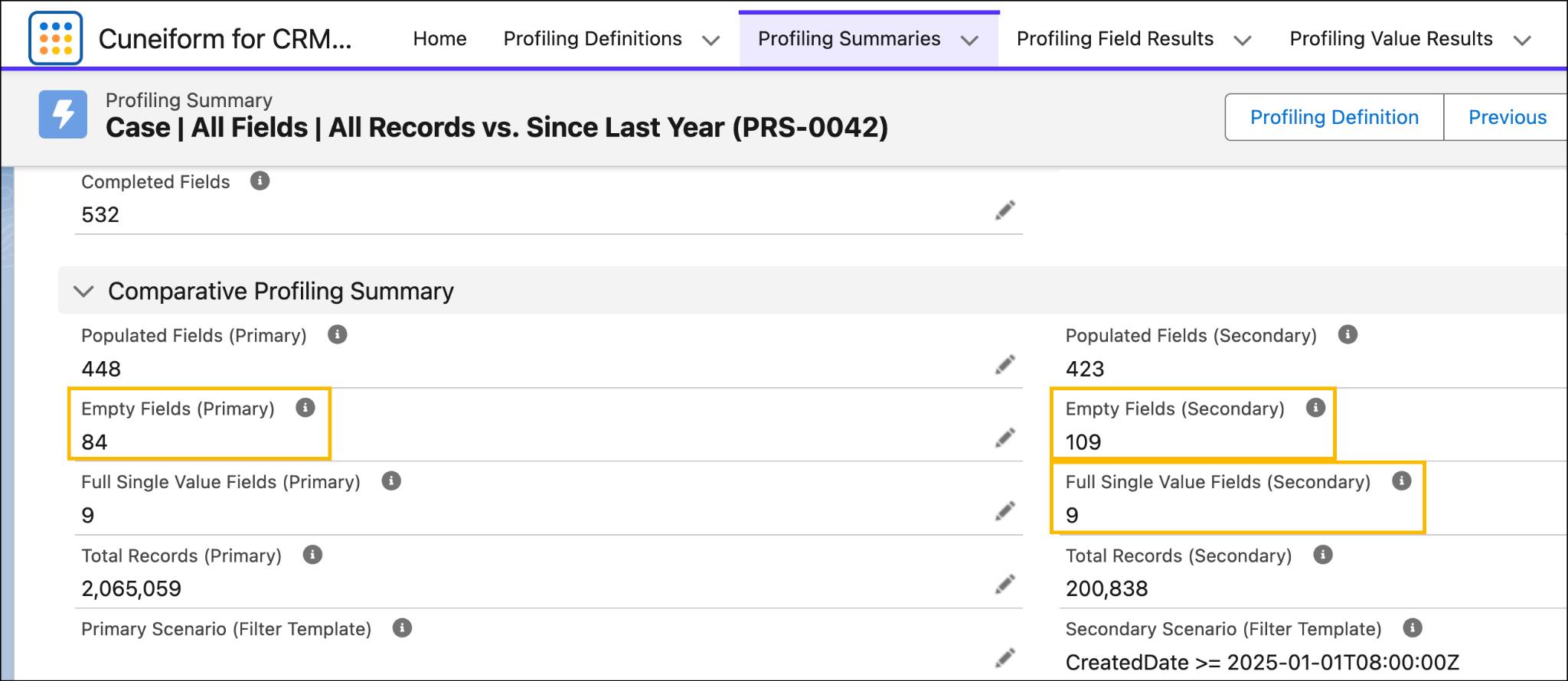
Luna identifies that NTO’s Case object has 84 never-used, empty fields, and another 25 fields that have not been used since January 1, 2024, more than 2 years. She then identifies fields that can be quickly and safely retired:
Luna then marks these fields for deprecation and retires them with confidence. Luna also notes the nine fields that are populated with only a single value for further research. |
Assess Archival Savings Potential
Transactional records, such as Cases, Opportunities, or Orders, might need to be kept for many years to comply with legal or company retention requirements. However, these records do not always need to stay in operational systems, where large data volumes can increase storage costs and affect system performance.
Use data profiling to estimate how many records—and how much storage—could be moved to a lower-cost archive while still meeting retention policies. Then monitor object growth and storage trends over time to confirm that the archiving policy continues to work as expected.
What to Assess |
NTO Example |
|---|---|
|
Object-level and recent record volume and storage, determined by the created or last updated date analysis. Further focus analysis based on record types or other segmentation fields to ensure object-specific operational needs are met. |
Luna observes that only 200K Case records out of 2 million are operationally significant, based on analyzing how many records were recently created. She identifies an opportunity to archive 90% of the records. |
Focus Data Migration and Integration Projects
When building an analytics dashboard, integrating data across systems, or moving from a legacy org to a new CRM, it helps to identify the data that matters most to the business. This allows teams to deliver projects faster and at a lower cost.
Data profiling shows which fields are recently used and reliably populated. This helps teams focus their analysis and mapping work on a smaller set of high-value fields.
Teams can also plan to archive older data during migration. This keeps the new operational system cleaner, while tools like Data 360 can still combine operational and archived data for analytics.
What to Assess |
NTO Example |
|---|---|
|
Fields that are recently populated and actively used indicate relevance to current business operations, that is, the proposed scope. Fields that are rarely populated or no longer updated can be considered out of scope. |
NTO recently acquired another company and plans to migrate relevant customer and case records into its primary Service Cloud org. Luna knows that migrations require both data consolidation and careful field mapping to preserve important information. To keep the project focused, she uses data profiling to identify fields that were recently used and recommends archiving older records that are no longer needed in the operational system. |
Assess AI and Agentforce Readiness
AI and agentic systems rely on structured data that is consistent, complete, and reliable. Before deploying AI-powered features such as Agentforce, it’s important to evaluate whether the underlying data can support accurate reasoning and automation.
What to Assess |
NTO Example |
|---|---|
|
Fields with consistent population and meaningful value distributions indicate reliable signals. Fields with standardized or controlled values highlight what you might need to standardize across sources. Fields referenced in operational workflows imply relevance, though you should validate whether these workflows are relevant to the use case. |
Luna profiles NTO’s Case and Contact objects for the case deflection agent. For a deeper dive into assessing data readiness for AI, see the AI Data Readiness Assessment Fundamentals badge. |
Monitor User Adoption Across Process Stages
When new fields are added or existing fields are changed, it’s important to confirm that users are using them as intended. Data profiling can track field usage over time and help teams quickly spot fields that are not being filled in or are used differently across processes.
By monitoring these fields early in the rollout, teams can engage stakeholders, clarify how the fields should be used, and make sure the data supports reporting, automation, and decision-making.
What to Assess |
NTO Example |
|---|---|
|
Newly created or revised fields. Set up frequent but short-term monitoring to assess adoption trends. |
Luna sets up automated daily profiling for four weeks to monitor five new Case fields recently introduced by the service team. She finds that four fields are consistently populated, while one remains empty. Luna follows up with the business stakeholder who requested the field to confirm whether additional training or process clarification is needed. |
Data profiling can also show how fields are filled in during specific business scenarios. Teams can apply filters for important stages or outcomes, such as opportunities that were won or lost, cases that met or missed service targets, or records owned by certain regions or teams.
This analysis helps teams spot patterns in how data is captured during key moments in a process. These insights can show whether differences in outcomes are linked to certain case types, teams, or data entry habits. With this information, teams can focus on improving the processes with the greatest impact.
What to Assess |
NTO Example |
|---|---|
Field usage within specific business scenarios or process stages. |
Luna profiles NTO’s Case records to compare fields for cases that closed within SLA versus those that exceeded the SLA. She discovers that SLA breaches occur more frequently for a specific case type handled by a particular support group, helping the team focus on process improvements where they are most needed. |
When to Profile Data
Data profiling works best when it becomes a regular part of how teams manage and improve their data. Whether teams are preparing for a new initiative, checking the results of data changes, or tracking the use of new fields, data profiling helps them see how data is actually used.
By running data profiling at key points in the data and process lifecycle, teams can find issues earlier, confirm that improvements are working, and make sure their data continues to support reliable decisions and automation.
When |
Why It Matters |
|---|---|
Before starting a new initiative |
Understand what data can support the work and what data needs cleanup. |
Before a bulk data cleanup or data load (for example, migration) |
Capture the current state of the data so you can compare results later and choose sample data for testing. |
After a bulk data cleanup or load |
Check how the operation changed the data. |
After deploying new or updated fields |
Track whether users are using the new fields as expected. |
Run data profiling regularly |
Detect changes in data quality that could affect business operations, automation, or AI agents. |
Now that you understand when to profile and why it matters, let’s explore the different types of data profiling solutions you can use to support your initiative.