Elevate Your Contact Center with Automation and AI
Learning Objectives
After completing this unit, you’ll be able to:
- Distinguish between interactive voice response (IVR) and intelligent virtual agent (IVA) and identify when to use each.
- Set up a basic IVR experience using Omni-Channel Flow.
- Explain how IVA works in Salesforce using Agentforce.
Supercharge Your Contact Center
You have now laid the groundwork for a solid contact center. Your numbers are live, your channels are connected, your recordings and transcripts are flowing, and your media is polished and on brand. With the foundations in place, it is time to focus on what truly transforms daily operations. Productivity is everything in a modern contact center. The more you streamline routine tasks, the more energy your reps can spend on meaningful conversations. Automation and AI help reduce busywork, shorten wait times, and give your agents the tools they need to deliver faster, more accurate support.
This is where interactive voice response (IVR) and intelligent virtual agents (IVA) come in. IVR acts as an automated first point of contact, handling basic requests so callers are not immediately dependent on a live agent. IVA goes a step further by engaging callers conversationally and taking care of common needs end to end. Together, they reduce routine load and allow human reps to focus on cases that genuinely require their expertise.
IVR Versus IVA
Before you dive into IVR and IVA, it helps to know what makes them different. An IVR gives you structured, reliable routing that guides your customers exactly where they need to go, while an IVA adds an intelligent, conversational layer that can handle more complex requests. Think of it as the difference between following a script and having a real conversation. Here is how they stack up.
Feature |
IVR (Interactive Voice Response) |
IVA (Intelligent Virtual Agent) |
|---|---|---|
Purpose |
Routes callers through keypad or simple voice prompts |
Holds natural conversations and completes tasks using AI |
Customer Interaction |
Menu-driven and static |
Conversational, adaptive, and intent-aware |
Complexity Handling |
Limited to simple routing logic |
Handles multistep requests and understands context |
Agent Productivity Impact |
Reduces basic workload |
Automates repetitive tasks and reduces case volume |
Personalization |
Same experience for all callers |
Tailors interactions based on customer history and CRM data |
Resolution Capacity |
Collects inputs and resolves queries and simple tasks |
Can resolve common requests before involving an agent |
You’ve explored the differences between IVR and IVA. It’s time to build a flow to see it in action.
Configure IVR with Omni-Channel Flow
IVR gives customers a simple, guided way to interact with your system, access self-service options, and navigate toward the right support path. With Agentforce Voice, you configure an IVR through an Omni-Channel Flow, which gives you complete control to tailor the experience based on your business needs. In this example, you set up a simple two option IVR that lets callers choose between technical support or billing support.
- In Setup, in the Quick Find box, search for and select Flows.
- Click New Flow.
- In the New Automation pop-up, choose Omni-Channel Flow. This flow combines Omni-Channel routing with Flow Builder so you can route conversations and related records to the right destination.
- In the canvas, click
 and choose Play Prompt from the list.

- Open the flow properties and enter the flow Name and Description (the API name is autogenerated). Set the Timeout Length to define how long the flow waits before moving to the next step.

With the flow properties set, the next step is to configure the prompt details. This is where you define what the customer hears in the IVR message.

- Under the Prompt section, set up the Record ID. This field stores the record for each call that moves through the IVR. Click the Record ID field and select New Resource.
- Choose Variable as the Resource Type.
- Set the API name to
recordId.
- Set the Data Type to Text.
- Select Available for input so this variable can be used in the next steps of the flow.
- Click Done.
Now you can set the Record ID field to the variable you just created and follow the last few steps to finish.
- Choose the appropriate Prompt Type. Media plays a pre recorded file, while Message reads out text you type.
- Set the language and choose a voice profile.
- Click Preview Voice to hear the prompt and adjust as needed. You can also search for and add merge fields to personalize the message with customer or record details.
Nice work! You’ve configured the message customers will hear. If your goal is only to share information, you’re done! If you want customers to respond, such as choosing between technical or billing support, continue setting up the response experience.
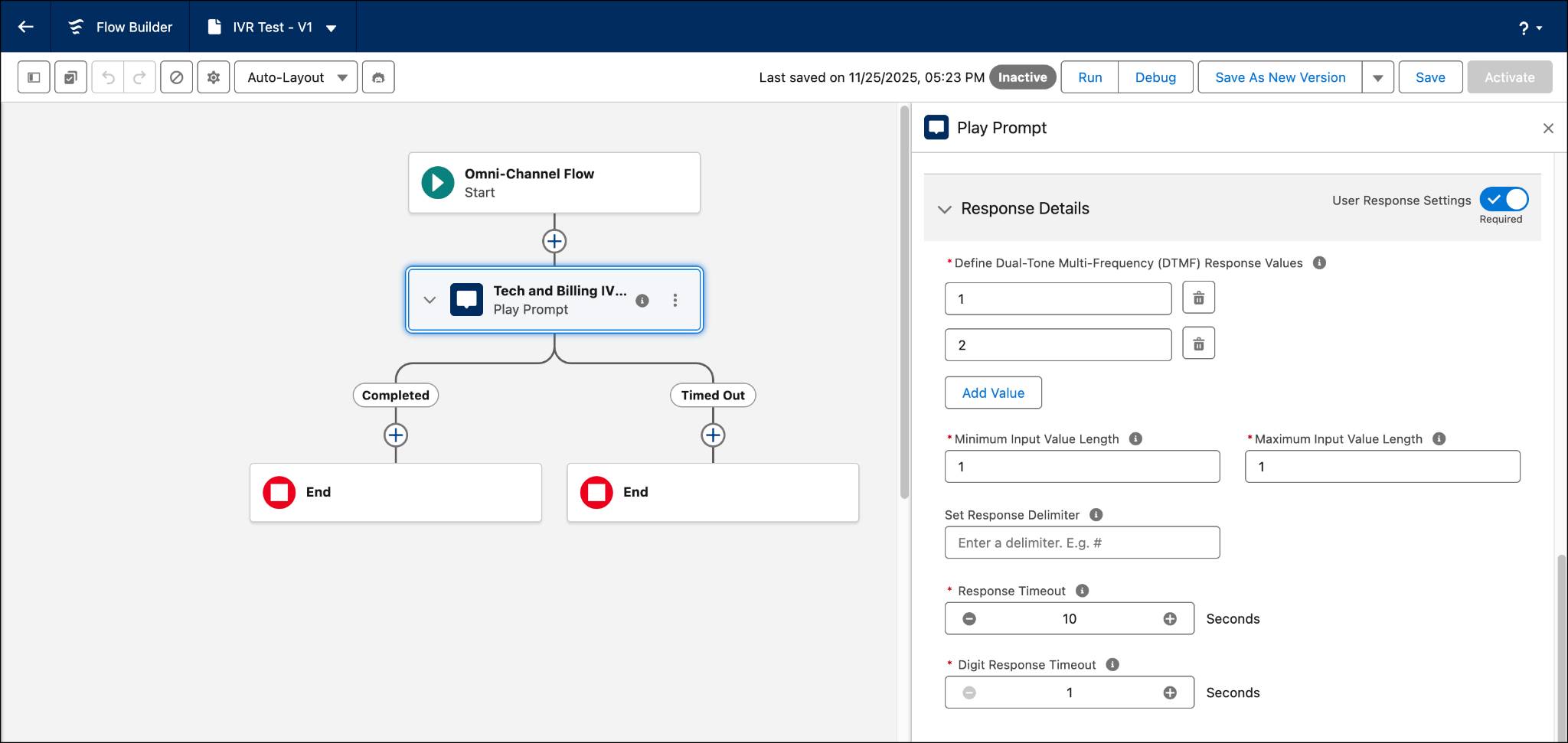
- Toggle Response Details on.
- In the Define Dual Tone Multi Frequency (DTMF) Response Values section, click Add Values and enter the inputs you expect from the customer. In this example, enter 1 for technical support and 2 for billing support. You can also add merge field values if you expect inputs like account numbers or other identifiers pulled from customer records.
- Enter the Minimum Input Length so the system prompts the user to try again if they enter fewer digits, and the Maximum Input Length to define when the system should ignore any extra digits. For this example, set both to
1.
- If needed, set a Response Delimiter like # to let customers end their input early.
- Set the Response Timeout to define how long the system waits for input after the prompt finishes before retrying.
- Set the Digit Response Timeout to define how long the IVR waits between each number a caller presses before treating their input as complete.
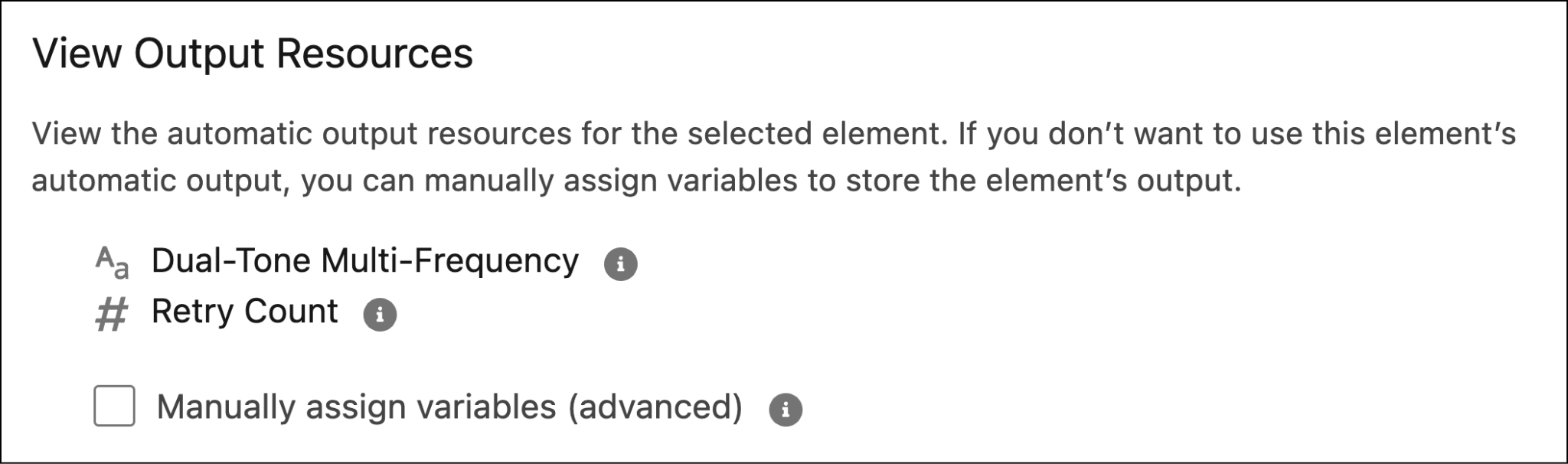
The flow now captures the customer’s input and saves it as resources that can be used in the next step. Review the View Output Resources section to see these values.
You have successfully created a flow that plays an IVR message, collects customer input, and stores that input as resources. You can use these resources to define what happens next in your routing logic, such as sending the call to the technical support queue when the caller presses 1 or to the billing support queue when they press 2.
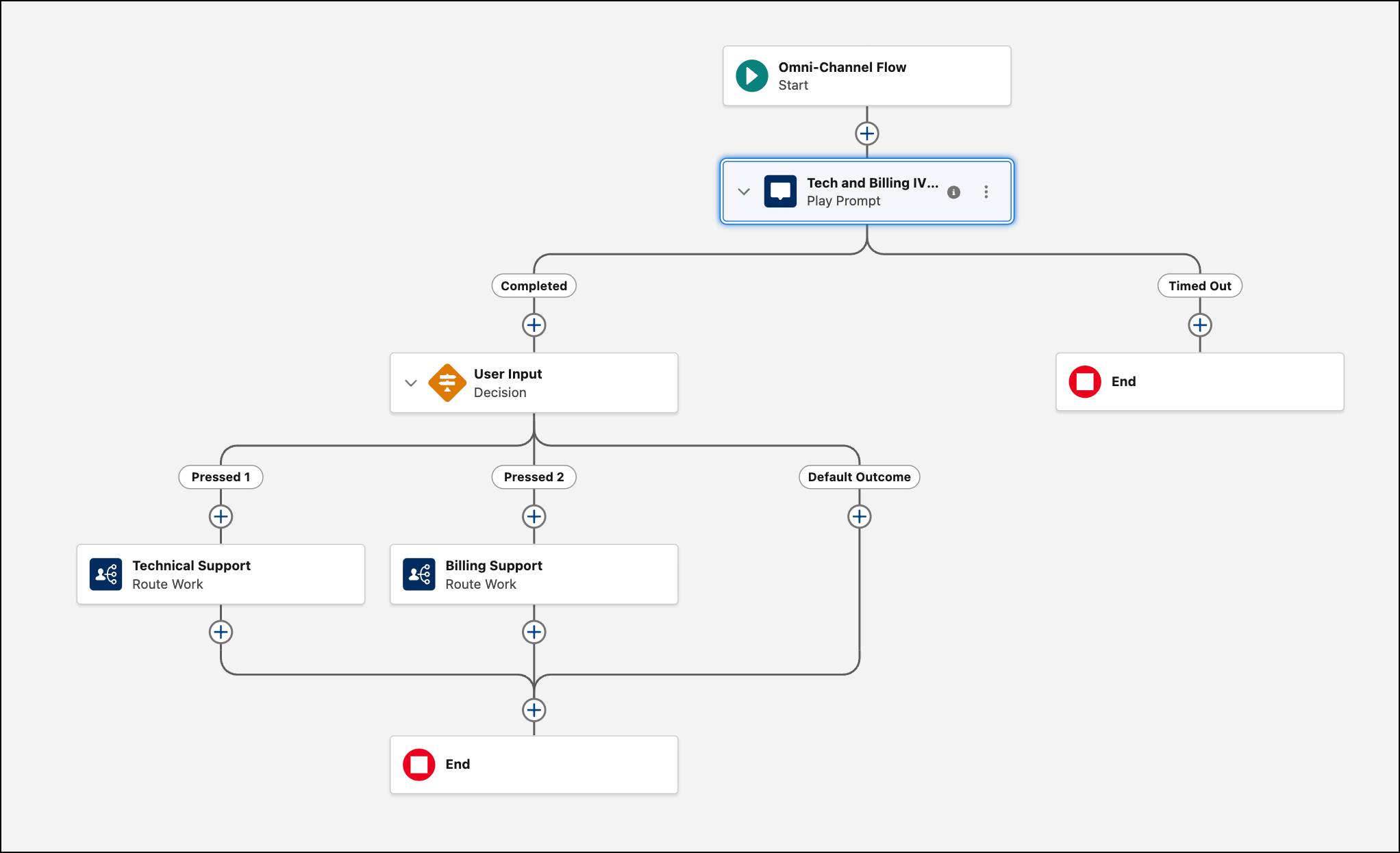

You’ve now built a simple, flexible IVR experience that guides callers with a clear message and captures their input for smooth routing. This foundation gives you everything you need to expand your IVR with more options as your business grows. With Agentforce Voice and Omni Channel Flow working together, you can shape a customer experience that feels intuitive and completely aligned with your support process.
Meet Your New AI Sidekick
The Interactive Virtual Assistant, or IVA, is your AI-powered agent designed to modernize how you manage customer conversations across voice channels. In Agentforce Contact Center, the IVA and conversational AI capabilities are delivered through Agentforce Voice
So how does adding these AI agents actually help your contact center? The biggest advantages are high deflection rates and true 24/7 availability, which translate into cost savings. When an AI agent handles routine questions around the clock, such as checking an order status, customers wait less and your overall call volume drops. This frees your reps to focus on complex, high-value conversations where they do their best work.
The real transformation comes from context and smooth handoffs. When the AI agent decides a human rep is needed, the system passes the conversation over with full context. The service rep receives the transcript and sentiment signals instantly, which means the customer never has to repeat themselves. This leads to faster resolutions and a more satisfying experience for everyone. The same integration also enables real-time transcriptions of live calls, which power downstream features like call summarization, agent assist insights, and quality management. By using Agentforce, you are creating an AI Agent First Contact Center designed to elevate customer satisfaction while reducing operational costs. If you want to learn how to set it all up and bring these AI capabilities to life, check out AI Integration for Agentforce Contact Center.
As you move from design to real world deployment, it is also important to understand the responsibilities that come with running a modern contact center, including meeting key compliance requirements that help protect customers, businesses, and emergency services.
Stay Compliant in a Modern Contact Center
When you run a contact center, you’re not just thinking about agents, calls, and customer experience. You’re also responsible for meeting important regulatory requirements that exist to protect customers, public safety, and the broader communications ecosystem. At their core, these standards are about trust, transparency, and safety.
-
STIR/SHAKEN is about fighting spam and fraud. It helps verify that the caller ID information shown to customers is real and has not been spoofed. When your outbound calls are properly authenticated, customers are more likely to trust who is calling them, which improves answer rates and protects your brand reputation.
-
E911 is about safety. If someone places an emergency call from a business phone or softphone, E911 ensures that emergency services can see accurate location information and respond quickly. This is especially important in modern contact centers where agents may work from different offices or even from home.
To go deeper, you can explore the official guidance directly from regulators:
Wrap Up
You can now elevate your contact center from functional to exceptional. With Agentforce Contact Center, IVR, and IVA working together, you can design experiences that feel effortless for customers and empowering for your agents. You have the tools to modernize how customer conversations are handled across the business.
You are fully equipped to shape a modern, AI-driven engagement center that truly raises the bar for customer experience. The future of your contact center is in your hands, and you’re ready to lead it.