Create Qualification Rules
Learning Objectives
After completing this unit, you’ll be able to:
- Describe the purpose of Product Catalog Manager.
- Explain the types of product qualification rules.
- Create and test a product qualification rule based on customer and product criteria.
Organize Products
Insurance providers offer a diverse range of products tailored to customer needs. With Digital Insurance, insurers can use the Product Catalog Manager to organize products into categories.
For example, Cumulus Insurance has organized its products into categories—such as Auto, Business, and Home. Each category includes distinct products: Auto includes Classic Car and Silver Auto, Business includes Small Business and Enterprise, and Home includes Standard and Condo.

Can you guess how insurers make sure that customers only see relevant, eligible products?
The answer: qualification rules. Recall from the previous unit that they act as gatekeepers and determine which products or product categories are available based on eligibility criteria.
In this unit, you learn how to implement these rules. First, let’s learn about the different types available.
Types of Qualification Rules
Qualification rules can apply at two levels. Here’s a description of the levels, each with an example.
Level |
Description |
Example |
|---|---|---|
Product Category |
Apply broadly to an entire product category. |
All Auto products require the insurer to be above the age of 18 and reside in an eligible region. |
Product |
Refine eligibility at the individual product level. |
A Classic Car product is only available for vehicles 25+ years old. |
In addition to qualification rules, insurers use disqualification rules to prevent ineligible customers from selecting certain products. Consider these qualification and disqualification rule examples.
Type |
Description |
Example |
|---|---|---|
Qualification |
Define when a product or category is eligible. |
A life insurance policy is available only to customers aged 18 to 65. |
Disqualification |
Define when a product or category is ineligible. |
A flood insurance product is disqualified for homes in low-risk flood zones such as desert regions. |
By combining qualification and disqualification rules, insurers fine-tune product availability without having to define every possible scenario explicitly.
When designing qualification rules, keep these principles in mind.
-
Default Eligibility: If a product has no qualification or disqualification rules, it's automatically eligible.
-
Category Dependencies: A product is only available if its category is qualified. If a category is disqualified, all its associated products are also disqualified.
Design Qualification Rules
Let’s follow Justus, the product admin at Cumulus Insurance, as he sets up the qualification rules for its Business insurance products.

He defines the following criteria for Small Business and Enterprise products.
Product Qualification
- Small Business (1): Available to businesses with 100–1,000 employees.
- Enterprise (2): Available to businesses with 1,000+ employees.
Product Disqualification
- Small Business (3): Excluded for businesses in the transportation industry.
- Enterprise (4): Excluded for businesses in the agriculture industry.
Here’s how he implements these rules.
Create Qualification Records
Qualification criteria are stored as records in specialized Salesforce objects.
Each qualification object can include custom fields to support specific eligibility requirements.
For example, Justus adds:
-
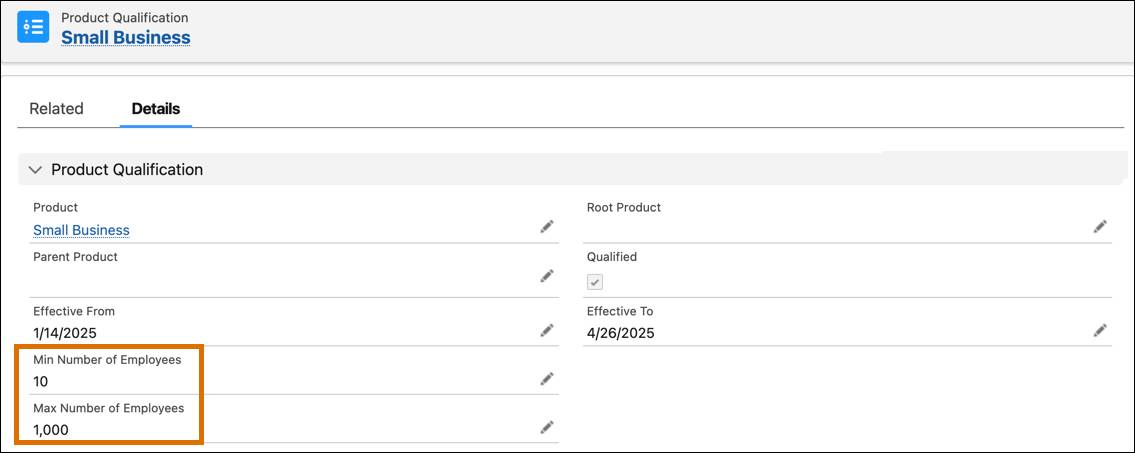
Min and Max Number of Employees fields to the Product Qualification object.
-
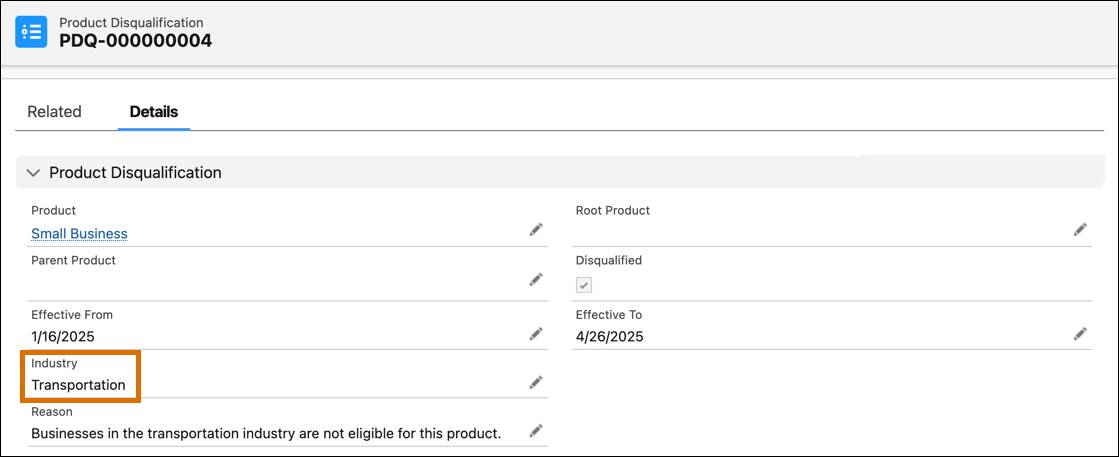
Industry Type field to the Product Disqualification object.
After setting up the necessary fields, Justus configures the records for each product.
He creates a qualification record for the Small Business product, defining its minimum and maximum number of employee limits.
He then creates a disqualification record for the same product that disqualifies the transportation industry.
Justus repeats the process for the Enterprise product, ensuring that both products have qualification and disqualification records in place.
Define Decision Tables
After creating qualification and disqualification records, Justus structures them into decision tables to automatically evaluate eligibility. For the products Small Business and Enterprise, a qualification table combines qualification rules, while a disqualification table combines disqualification rules.
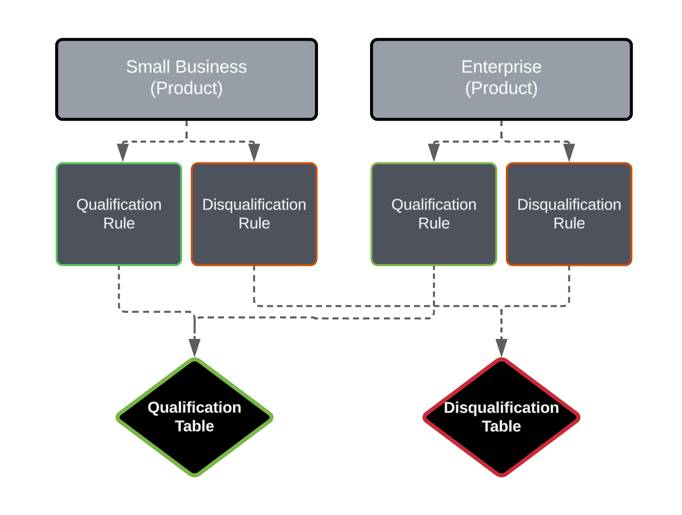
A single decision table can store multiple rules so you can efficiently manage product eligibility in one place. In short, decision tables centralize and automate the evaluation of multiple qualification rules.
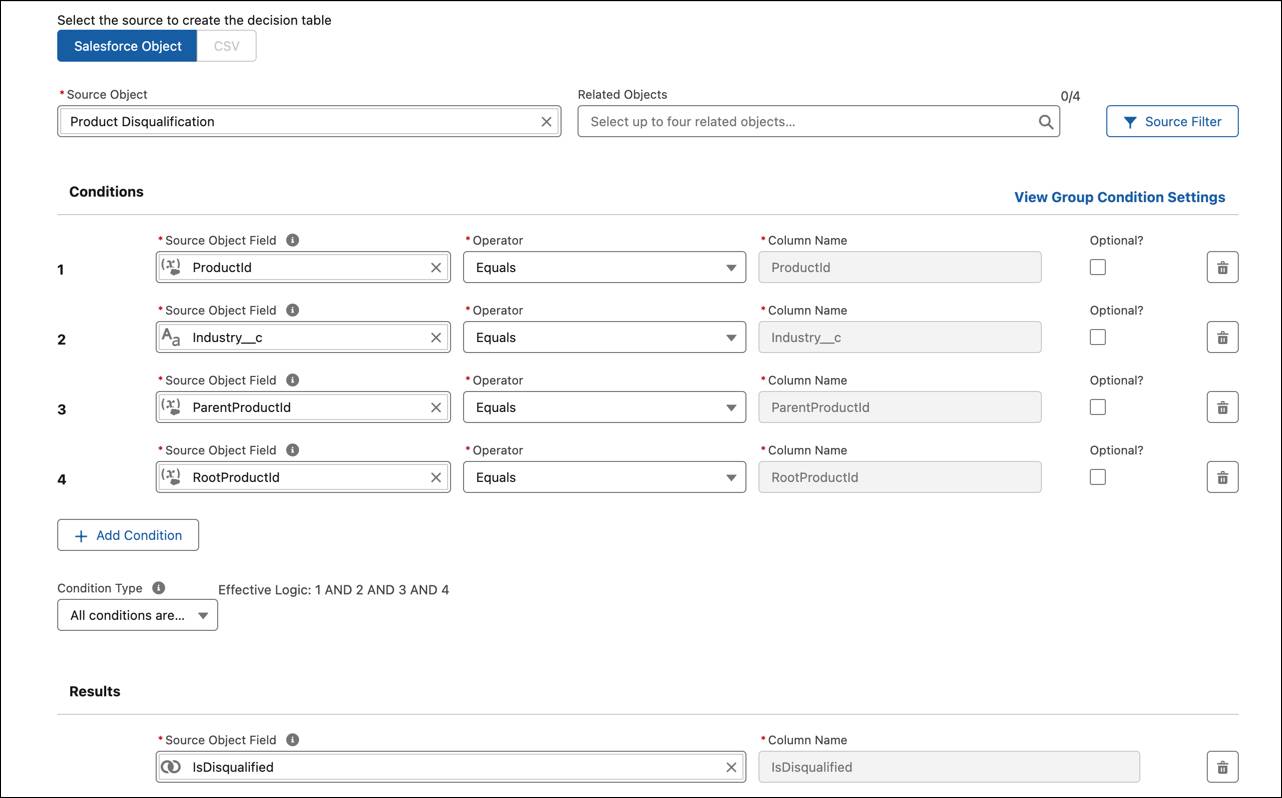
A decision table consists of three key sections: Source Object, Conditions, and Results. Justus creates the product qualification decision table, linking it to the Product Qualification source object and defining its conditions and results.

Here’s what each section is about.
Section |
Description |
Example |
|---|---|---|
Source Object (1) |
Defines where the decision table pulls data from. |
Justus selects Product Qualification, ensuring the table references all of the qualification records. |
Conditions (2) |
Specifies the criteria for eligibility, using fields, operators, and logical relationships. |
Justus adds Max_Number_of_Employees (<) and Min_Number_of_Employees (≥) to set eligibility thresholds for business size. |
Results (3) |
Defines the outcome based on whether conditions are met. |
If all conditions are met, IsQualified = TRUE, making the product available for selection. If all conditions aren’t met, IsQualfied = FALSE, and the product won’t display. |
Similarly, Justus creates the product disqualification decision table and links it to the Product Disqualification source object.
Once saved, the rules are displayed in table format, where:
- Each column represents a rule criterion (number of employees, industry type).
- Each row represents a specific rule tied to a product or product category.
For example, the product qualification table maps the conditions for two rules.

The first rule applies to the Enterprise product. The second rule applies to the Small Business product.
As new rules are added, the tables automatically expand, keeping rule logic centralized and easy to manage.
Extend the Context Definition
With decision tables in place, the next step is to connect them to real-time customer data. A context definition ensures that the system pulls in the right information—such as number of employees or industry type—so that qualification rules can be accurately applied.
To build a context definition, first determine which customer attributes are required for rule evaluation. Then, map those fields to the relevant Salesforce objects and fields.
For example, Justus needs to qualify business insurance products based on company size and industry. To accomplish this, he sets up a context definition that maps number of employees and industry type to the Account object.
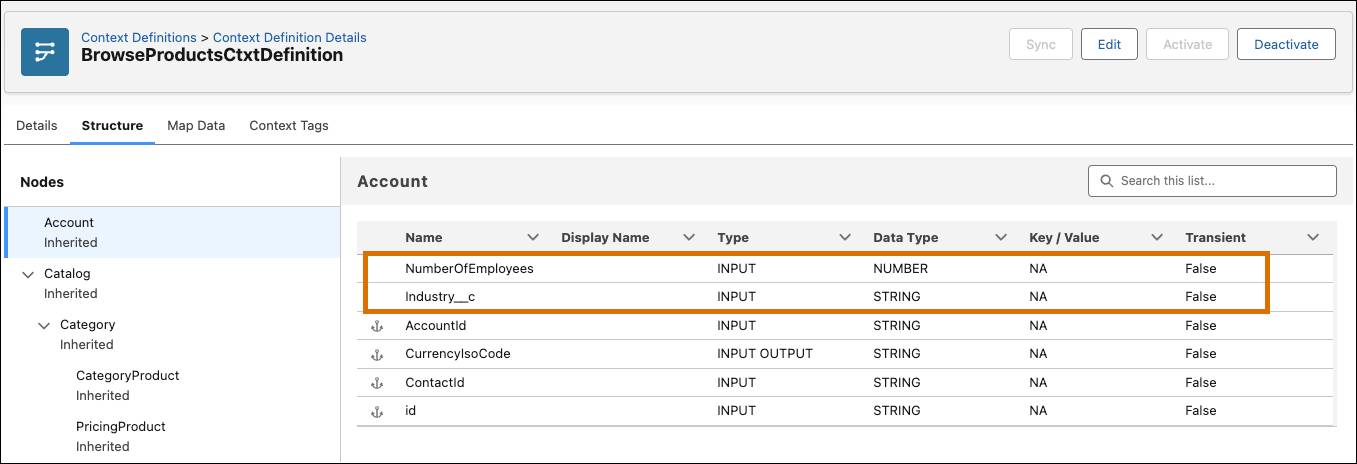
Once configured, the context definition allows the qualification procedure to retrieve customer data, evaluate it against qualification rules, and determine product eligibility automatically. If new rules require additional fields, you can easily extend the context definition to accommodate them.
Build a Qualification Procedure
Now it's time to bring everything together with a qualification procedure. This procedure contains qualification and disqualification tables.
A single qualification procedure can evaluate both qualification and disqualification rules. Here’s the structured sequence it follows.
- Takes customer information and product details as input.
- Looks up qualification and disqualification rules in the decision tables.
- Returns eligibility results (the products or categories the customer qualifies for) based on rule evaluations.
Create the Procedure
Justus creates a new qualification procedure, referencing the correct context definition so that the system pulls the right data fields.

He then creates a procedure version with two evaluation steps for both disqualification and qualification.
Evaluate Disqualification
- This step checks if the customer is ineligible for the product by referencing the product disqualification table.
- It takes Product ID and Industry as inputs and returns a qualification status and reason based on the decision table logic.

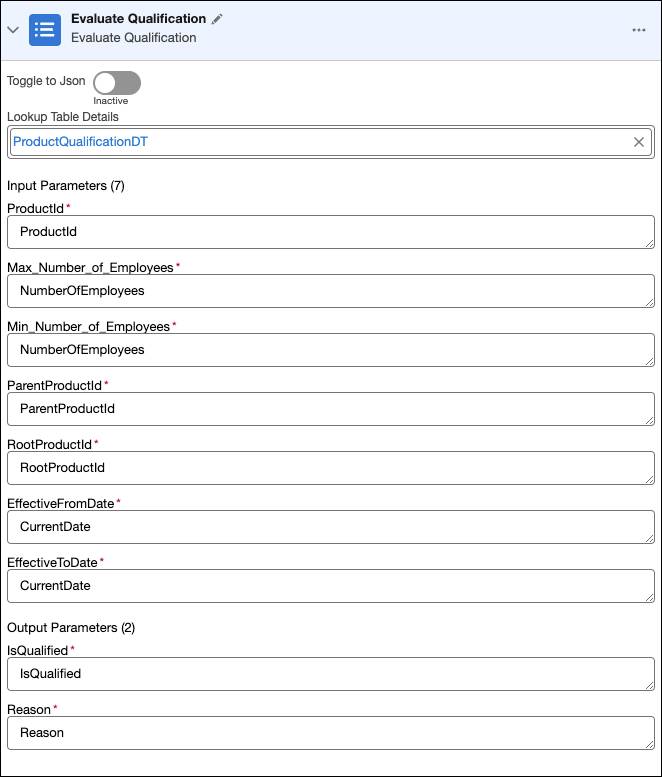
Evaluate Qualification
- This step verifies if the customer meets the eligibility criteria by referencing the product qualification table.
- It evaluates factors like the number of employees to determine if the product should be offered or filtered out.
Test the Qualification Procedure
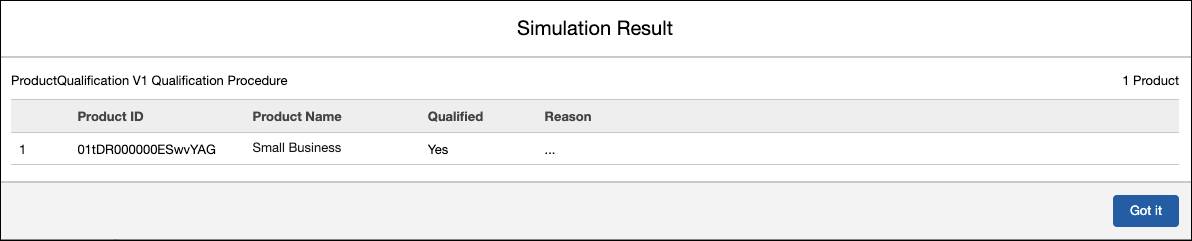
Before deploying the procedure, Justus simulates a couple of test cases to ensure the rules work as expected.
Test Case 1: Eligible Customer
Justus enters the following inputs for an eligible customer.
-
ProductId: [Id of Small Business Product]
-
Industry: Retail
-
Number of Employees: 150
The system correctly qualifies the product for selection.
Test Case 2: Ineligible Customer
Justus then tests an ineligible case by increasing the employee count to 1,500, exceeding the Small Business product’s limit.

The procedure disqualifies the product, ensuring it isn’t offered to the customer.
By testing various input characteristics, Justus verifies that the procedure applies the rules correctly. Once satisfied, he activates the qualification procedure.
Finalize the Setup
To ensure that the qualification rules work during product discovery, Justus updates Product Discovery Settings to include:
-
Context Definition: Ensures the correct customer data is retrieved.
-
Qualification Procedure: Ensures that eligibility rules are enforced.

Now, when an agent or customer uses Product Discovery, the system automatically filters out ineligible products, and displays only those that meet qualification criteria.
Deliver Results
With the qualification procedure in place:
- The product catalog is automatically filtered, ensuring only relevant options are displayed.
- Agents and customers experience a smoother quoting process with accurate, prescreened product choices.
- Additional products and categories can be added seamlessly using the same structured rule logic.
By structuring qualification rules into decision tables and automating their application through a qualification procedure, Cumulus Insurance has built a foundation for smarter, more accurate product recommendations.
But qualification is only part of the equation. Next, you’ll explore configuration rules, which define coverage options, terms, and values—adding even more flexibility to the quoting process.