Build Pricing Procedures
Learning Objectives
After completing this unit, you’ll be able to:
- Explain the role of pricing in the insurance quoting process.
- Identify the core components of Digital Insurance pricing configuration.
- Describe how decision matrices and pricing procedures calculate premiums.
- Outline the configuration workflow for building and connecting a pricing procedure to quoting and product data.
Pricing Insurance Products with Precision and Flexibility
Once your product is modeled and rules applied, the next question follows: What does it cost?
Insurance pricing—also called rating—turns product selections, risk attributes, and customer data into traceable premiums. It underpins quoting and servicing, and must be accurate, responsive, and auditable to meet business and regulatory standards.
Static tables and hardcoded logic can’t handle modern insurance complexity. Insurers need flexible, data-driven pricing that evolves with products and markets. That’s what Digital Insurance delivers.
With a visual, no-code framework, Digital Insurance lets insurers define rating factors, build reusable pricing procedures, connect them to quote data, and test pricing
Set Up the Pricing Framework
At Cumulus Insurance, product admin Justus Pardo is ready to configure how the system calculates premiums for Auto Gold. He’ll base pricing on driver profiles, vehicle traits, and selected coverages.
To do this, Justus sets up three main components.
-
Advanced Decision Tables define how product and customer data translate into pricing factors.
-
Pricing Orchestration connects logic to live quote and product data.
-
Pricing Procedures calculate premiums through a structured, no-code sequence of steps.
Together, these deliver accurate, real-time premiums at scale. Let’s see how Justus puts them into action.
Define Pricing Inputs with Advanced Decision Tables
Justus starts by defining how product and customer data translate into pricing factors.
In Digital Insurance, this logic is codified through Entity-based Advanced Decision Tables. These tables capture both conditional logic and range-based mappings, making them useful for scenarios such as driver age bands, vehicle year, or declared value. They’re versioned for easy updates and can be created directly in Salesforce or uploaded from a CSV.
For Auto Gold, Justus uses advanced decision tables to define key risk-based pricing factors.
Here’s an example table that uses the declared auto value as an input and returns factors for both Comprehensive and Collision coverage
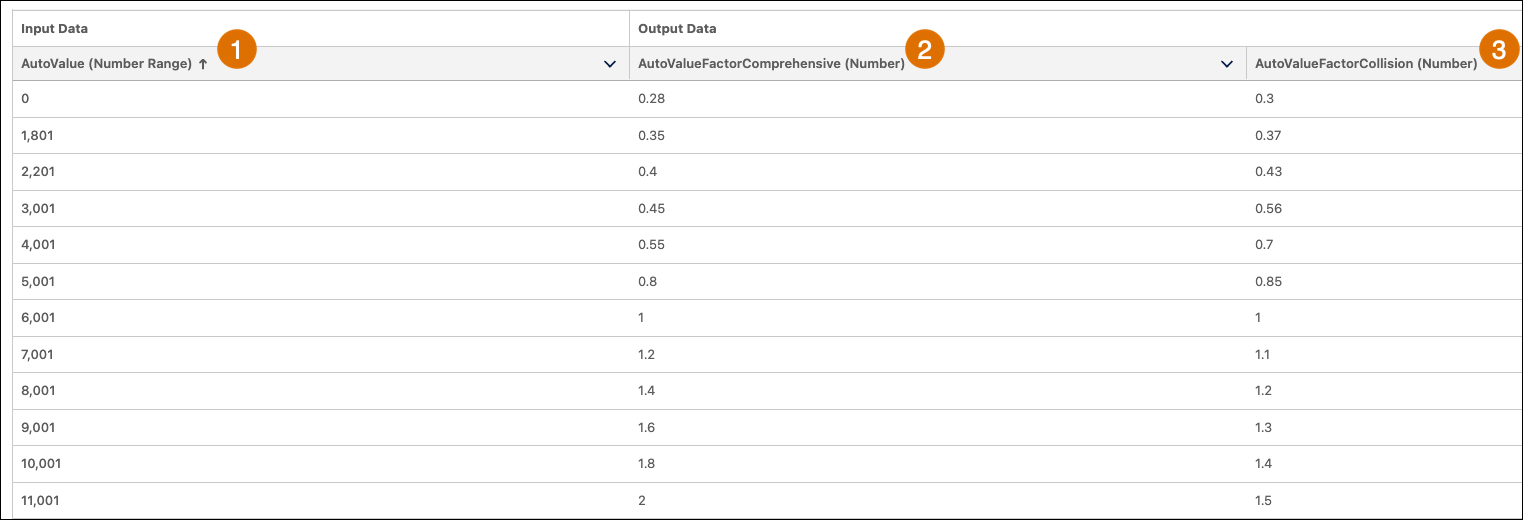
The AutoValue input column (1) defines a range of vehicle values. Each row maps those values to two output columns: AutoValueFactorComprehensive (2) and AutoValueFactorCollision (3). The factors increase as the vehicle’s declared value increases, reflecting higher risk exposure.
Whether adjusting for demographics, asset characteristics, or regional risk, advanced decision tables ensure pricing logic remains modular, version-controlled, and transparent.
Connect Logic to Quote Data with Pricing Orchestration
Now that Justus has defined inputs using decision matrices, he can connect them to pricing procedures and live quoting data. This step connects the data layer and quote interface so pricing logic can run at real time.
Key tools include:
- Pricing recipes that register which decision matrices a procedure can access.
- Context definitions that map quote and product fields to inputs and outputs used in pricing.
- Selling models that define the pricing frequency and type, such as one-time or recurring. Most insurance products use a One Time selling model to reflect their single-transaction nature.
- Price books that store a placeholder base price for each product. While insurance typically doesn’t rely on fixed list prices, price books are still required to render prices in quotes and support multi-currency setups when needed.
Together, these tools ensure your pricing procedure runs with the right data, returns calculated premiums, and plugs smoothly into the quoting flow.
See Set Up Digital Insurance Context and Pricing in Salesforce Help for more details about using these tools.
Calculate Premiums with Pricing Procedures
With inputs defined and orchestration in place, Justus builds the engine that ties it all together: a pricing procedure.
A pricing procedure is a visual, no-code sequence that transforms quote data into calculated premiums. Even for complex products like Auto Gold—with multiple vehicles, drivers, and coverage components—these procedures stay manageable thanks to their modular, step-based design.
Common step types include:
- List Price retrieves factors from matrices
- Formula Based Pricing applies arithmetic or conditional logic
- List Group applies logically conditionally
- Aggregation rolls up values across components
- Assignment writes results to context fields, which are persisted to object fields based on the context definition.
Let’s explore some of the key steps Justus designs for Auto Gold.
Retrieve Risk Factors
Justus starts by pulling in pricing factors from advanced decision tables using List Price steps.
For example, a step calls the Auto Value Factor decision table to retrieve the factors for Collision and Comprehensive coverage based on the vehicle's declared value.
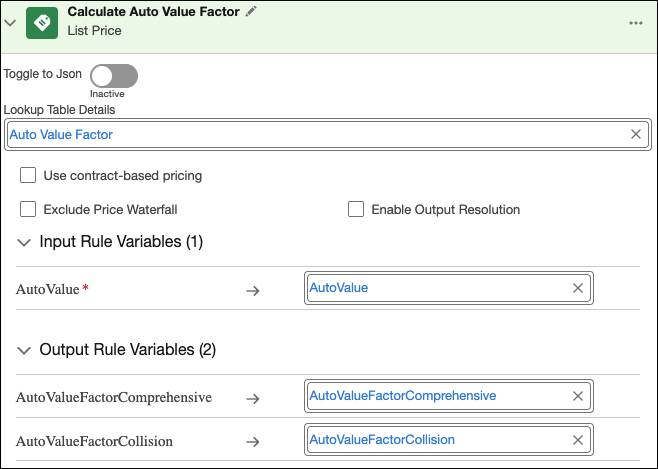
By calling an advanced decision table directly inside a pricing procedure, you can keep rating factors externalized and reusable. The table logic is maintained separately, yet it plugs seamlessly into the orchestration, allowing the same inputs and outputs to be reused across different procedures or products.
Calculate Base Premiums
Next, Justus uses formula based pricing steps to calculate coverage premiums. Each coverage—Collision, Comprehensive, Uninsured Motorist, and others—has its own formula combining base rates, modifiers, and coverage-specific logic.
Here’s the formula based pricing step that calculates the Comprehensive premium by multiplying input factors against a base rate.
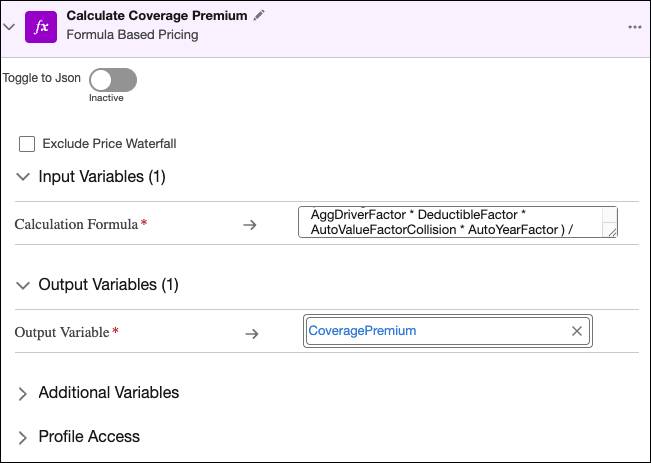
Formulas translate retrieved factors and other variables into premiums in a way that’s consistent and repeatable. Each formula is modular, letting you adjust or expand calculations without disrupting the rest of the procedure.
Handle Variants with List Groups
Auto Gold allows flexible combinations of vehicles and coverages. To manage that complexity, Justus uses List Groups, branches in the procedure that execute logic only when certain conditions are met.
In this example, he builds a List Group that applies logic specifically to Uninsured Motorist coverage. Inside the group, a List Operation checks whether the product is Uninsured Motorist. If the condition is true, the system calculates the premium with a formula step and assigns the result.

By containing the logic in a List Group, Justus ensures these steps only run when relevant. This keeps the overall procedure clean, modular, and easier to extend as new coverage variations are introduced.
Roll Up Totals
With individual coverage premiums calculated, Justus adds aggregation steps to roll up values across the product structure. Aggregation is commonly used to total premiums, such as rolling up coverages to the vehicle level, then vehicle totals to the overall policy. It can also be applied to other values, like rating factors or modifiers, as they move from child to parent components.
To support this, Digital Insurance provides up to five system-generated aggregation keys (AggregationKeyLevel1 through AggregationKeyLevel5). These keys correspond to the hierarchy defined in the product bundle, ensuring values are grouped correctly.
Here’s the step that aggregates the various coverage premiums into a single vehicle premium.
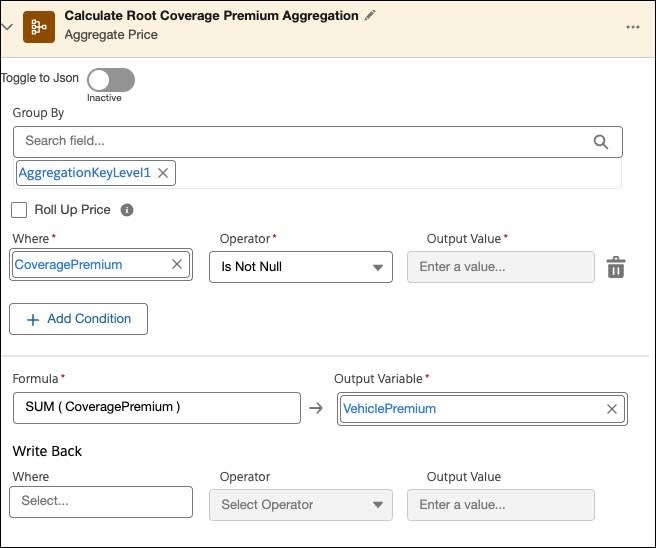
Aggregations roll up results across the product hierarchy, guided by built-in system keys. This design ensures calculations remain accurate across multiple levels, while letting the same aggregation patterns be reused whenever products share structural similarities.
Output Results
Finally, assignment steps write calculated values to context fields. In the last step of the procedure, Justus assigns the total Policy Premium—calculated from vehicle and coverage-level formulas—to the Net Unit Price context field for the Auto Gold root product.
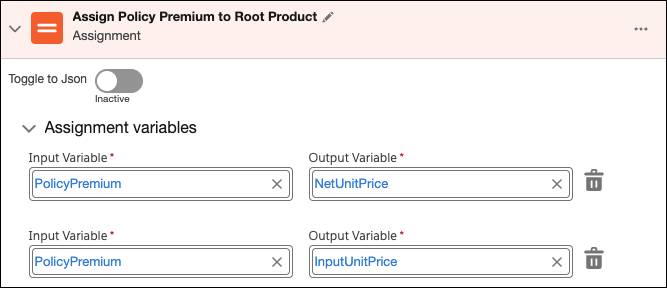
Assignments tie procedure outputs back to context fields so results flow into quotes and downstream processes. Because assignments rely on context mapping, the same procedure can be applied consistently across different products without re-engineering the outputs.
Simulate and Activate
Before going live, Justus tests his procedure using the built-in simulation tool, which allows users to input sample data, run the logic, and inspect outputs at each step.
He tests scenarios such as a young driver with accident points, a clean-record driver with two vehicles, and a high-value SUV with extra coverages.
For each case, he verifies that:
- List Price lookups return the correct factors.
- Formulas calculate accurate premiums.
- Conditional logic works as expected.
- Aggregations roll up values correctly.
- Assignments map outputs to the correct context fields.
Once satisfied, Justus activates the procedure, making it available for use.
Assign the Procedure to Your Product
With the procedure built, tested, and active, Justus connects it to the Auto Gold product using a Procedure Plan.
A procedure plan determines which pricing procedure should run for which product during quoting. Justus creates a rule-based plan with Auto Root as the product, selects the InsuranceContext, and specifies that the InsuranceDefaultPricingProcedure should be used when quoting that product.
This final step binds the pricing logic to the product, ensuring that real-time premium calculations run automatically every time a quote is generated.
From Pricing to Final Premiums
After assigning the procedure, Justus has turned Auto Gold’s product structure into a working rating engine. Advanced decision tables supply risk factors, orchestration ensures the right data flows in and out, and pricing procedures bring it all together into real-time, auditable premiums.
What could have required custom code is now a transparent, reusable framework that scales across coverages, vehicles, and policies. The result is faster setup, easier maintenance, and pricing that evolves as business and regulatory needs change.
Next, you extend this framework by adding surcharges. Why? So every quote not only calculates a base premium but also reflects the full set of taxes and jurisdictional charges that make up the true cost of coverage.