Clean Up Unused Fields and Field Configuration
Learning Objectives
After completing this unit, you’ll be able to:
- Explain the difference between metadata cleanup and data cleanup.
- Show how metadata cleanup can improve adoption, flexibility, and AI results.
- Define unused and abandoned fields, and identify common fields and settings that can be cleaned up.
- Describe how to safely deprecate and delete fields and how to check the impact before you make changes.
Discover the Value of Metadata Cleanup
Data cleanup focuses on improving the values stored in records. Metadata cleanup focuses on improving the data model and configuration—fields, picklist values, record types, and related rules.
Even when the goal is better analytics or AI, cleaning up unused metadata can make a big difference. It makes the system easier to use and manage.
-
Improve data entry: When users see fewer unnecessary fields and options, they’re more likely to enter the right data.
-
Support future growth: Salesforce has limits, like the number of custom fields. When you remove unused items, you have room for new ones.
-
Save time for teams: Developers and analysts spend less time dealing with unused or outdated fields.
-
Reduce AI risk: AI tools can get confused by empty or unused fields. When you remove them, AI can make better decisions.
Know the Difference: Unused versus Abandoned Configurations
Use clear, consistent terms so everyone agrees on what to clean up.
-
Unused: A field or picklist value that was never used or populated
-
Abandoned: A field or configuration that was used historically but has not been used during a defined period, such as the past 12–36 months, even though it still exists
Why This Matters
In older systems, many fields—especially from managed packages—stop being used over time. If you review recent usage, you focus on what actually needs cleanup. It also prevents decisions based only on all-time usage, which can hide what users do today.
Fast Signal, Big Savings
Northern Trail Outfitters (NTO) is growing and has recently acquired another company. As part of the legacy system migration into NTO’s Salesforce CRM instance, Luna ingests and profiles legacy objects in Data 360 as a secure staging environment.
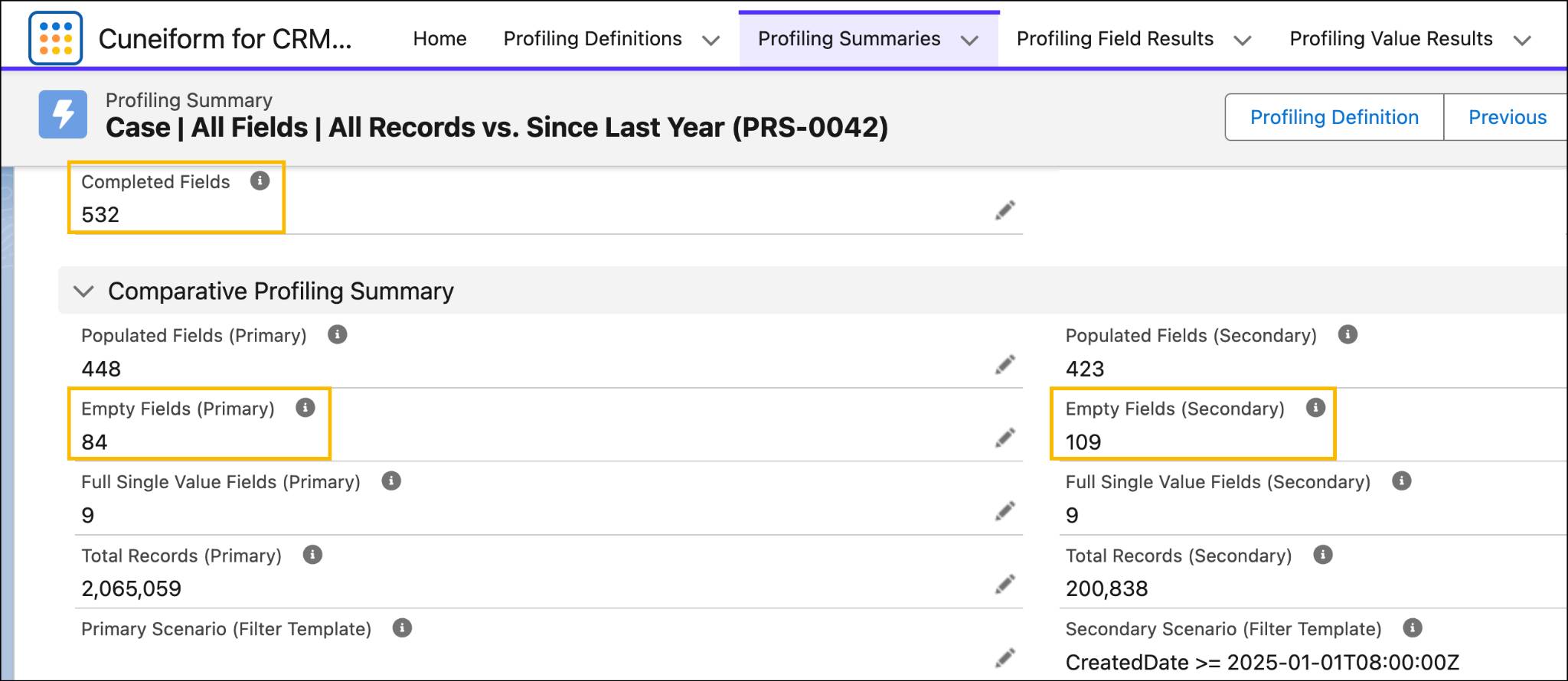
After data profiling case records, Luna discovers many fields that aren’t being used. Over the object's entire history, 84 fields were never used. Since January 1, 2025, an additional 25 fields have remained unused.
This means 104 of the object’s 532 fields—about 20%—might not be needed for future migrations, integrations, analytics, or AI use.
With this insight, Luna can guide NTO to focus on cleaning up fields that aren’t used today.
Detect and Decide: From Data Profiling Insight to Action
The goal isn’t to delete everything. The goal is to make the right decision for each element based on evidence and impact.
Cleanup Target |
How to Find It |
What to Do |
|---|---|---|
Unused fields |
Identify fields that were never populated. Validate and prioritize retiring fields that were created more than ~6 months ago and not referenced by reporting, integrations, or automation. |
Remove from page layouts and permissions, mark as Deprecated, and then delete after the dependency review. |
Abandoned fields |
Fields that were used before but not used recently, based on the created or last updated data. Identify fields and values that are no longer populated, even if they were historically populated. |
Remove from UI, mark as Deprecated, update integrations and automations to stop writing, and plan deletion after change control. |
Inactive or redundant picklist values |
Identify unused or no-longer-used picklist values by comparing value frequency against the active picklist configuration, including inactive values. For unrestricted picklists, review free-text values captured in the field, standardize them into an approved value set, and then update picklist configuration accordingly. |
Standardize values, and bulk update where needed. Deactivate redundant values, and update UI defaults and guidance. Optionally, use Data 360 transforms to present a consistent view across sources. |
Unused record types or complex layouts |
Compare record type usage, such as created or updated activity by type, and measure fields used per layout. Identify record types that exist but aren’t used by any active process. |
Consolidate record types; simplify page layouts; remove unused record types after dependency review. |
NTO Identifies Fields for Deprecation
After using data profiling to analyze the case object, Luna reviews the results for unpopulated custom fields. Her goal is to identify unused fields for deprecation.
She reviews:
-
When a field was created, to ensure that new fields are not mistakenly deprecated
-
Fields that were never used, as these are the lowest risk to be deprecated
-
Fields that were created by an admin versus by a managed package, such as namespace, as this relates to different field limits
-
The number of metadata dependencies, since she can’t delete a field without removing field dependencies
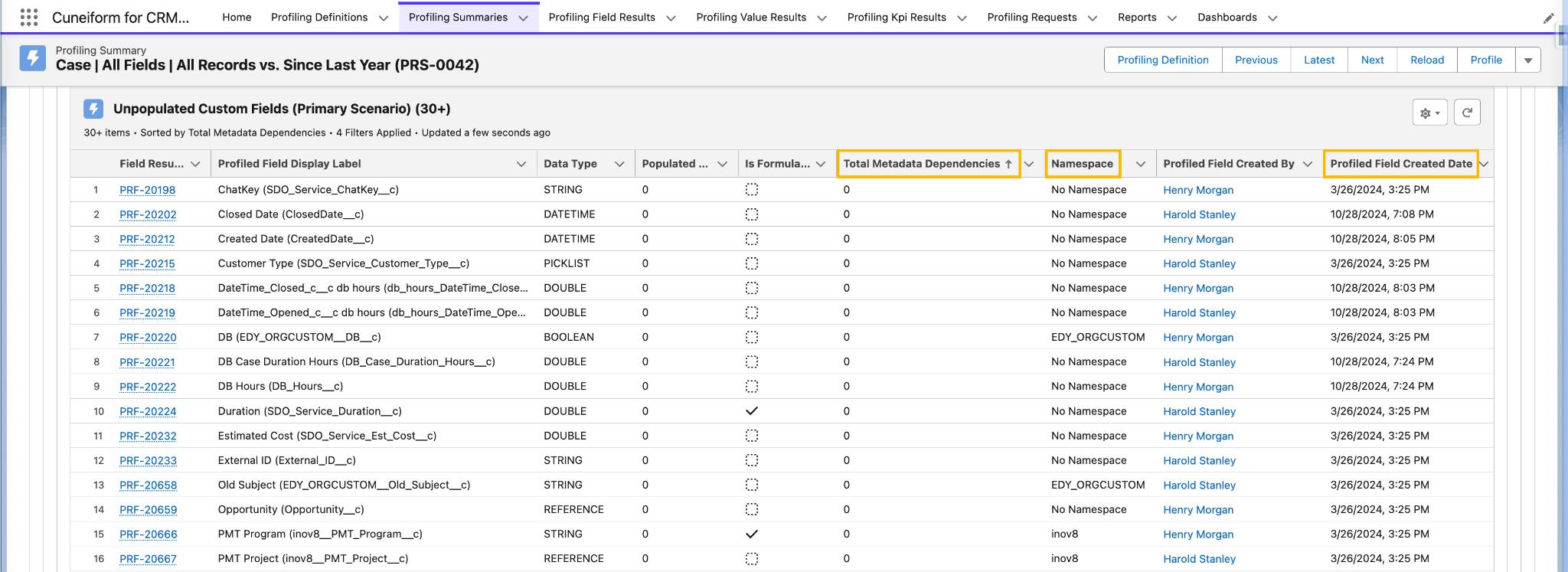
Luna groups unused and no-longer-used fields based on risk and how quickly she can remove them.
- Empty fields with no metadata dependencies
- Empty fields with metadata dependencies to resolve
- Abandoned fields with no metadata dependencies, as the archival of historical records might be required
- Abandoned fields with metadata dependencies
After she identifies an unused field that qualifies for deprecation, Luna navigates to the Object Manager in Salesforce Setup to review all references and dependencies before making a decision on removal.

Luna treats custom fields created by managed packages distinctly, as an entire package might need to be uninstalled once she verifies the application is no longer used by NTO.
Assess Under the Right Permissions
Data profiling and assessment results depend on the permissions used.
When you determine what to deprecate across the org, you typically need admin-level visibility to access the full schema and its dependencies.
However, if you’re deciding what to remove from a specific UI or process, it’s important to make the assessment under the target persona’s permissions, since their experience is what you’re optimizing.
As a best practice, deprecate, remove from user permissions, set a period of time to wait for feedback, and then delete.
Wrap It Up
Great work! When you address unreliable values, manage data lifecycle decisions, and clean up metadata, you create a stronger and more reliable data foundation.