Define an Order Decomposition
Learning Objectives
After completing this unit, you’ll be able to:
- Create technical product specifications that represent fulfillment functions.
- Explain the role of scope in technical product definitions and its impact on decomposition.
- Configure decomposition rules for product bundles with conditional logic.
Before You Start
Before you complete any steps in this module, make sure you complete the hands-on challenges in the Simple Order Orchestration with Agentforce Revenue Management module using the same Developer Edition org. The work you do in the hands-on challenges here builds on the work you complete in that badge.

Order Decomposition Overview
In the Simple Order Orchestration with Agentforce Revenue Management module, you created a simple orchestration. But what happens when the bundle grows more complex?
While basic orchestration works well for single-unit bundles, it falls short when:
- Different teams or systems fulfill products.
- Timelines differ for each product.
- You need service-level agreements or geographic rules.
That’s where Order Decomposition comes in. It breaks an order into steps and orchestrates each step independently.
For example, InfinitraBytes, a tech solutions provider, offers a complex Laptop Pro Bundle product. This advanced bundle includes a laptop, printer bundle, mouse, warranty, and an optional annual subscription for premium support.

From a customer’s perspective, it’s one purchase. From a fulfillment perspective, it’s a symphony of coordinated tasks.
-
Laptop and Mouse: Picked, packed, and shipped.
-
Printer Bundle: This is a mini-bundle. The printer and printer paper need separate handling.
-
Warranty: Registered and activated with a service provider.
To handle this complexity, Julian, the fulfillment designer at InfinitraBytes, uses Dynamic Revenue Orchestration (DRO) to break down the commercial product into multiple technical products that represent the actual, granular fulfillment tasks.
Think of it like this.
What Customer Sees |
What DRO Executes |
|---|---|
Laptop Pro Bundle (Commercial Product) |
Inventory, Subscription, Activation (Technical Products) |
Each technical product has its own orchestration path. That means:
- You can run the individual steps for each item in parallel.
- You can assign each path to a specific team.
- You get full visibility into the progress of each component.
This gives Julian and the InfinitraBytes team the flexibility to manage complex bundles while delivering a smooth experience to the customer. Follow along in your Developer Edition org as he builds it out.
Create Technical Products
To start, Julian creates three technical products with defined scopes. These scopes define how many instances of the technical products the system generates for an order, regardless of the count of its related commercial products defined in the decomposition rule.
Scope |
Purpose |
|---|---|
Bundle |
Applies to the entire bundle or a logical grouping of items. |
Order Line Item |
Applies to an individual product line item. |
Account |
Applies to services provisioned at the account level. |
Configure a technical product called Inventory Management that represents the physical handling of all bundle hardware, as well as two other technical products to manage the bundle.
- From the App Launcher, find and select Dynamic Revenue Orchestrator.
- From the App Launcher, find and select Products.
- In the Products page, click New.
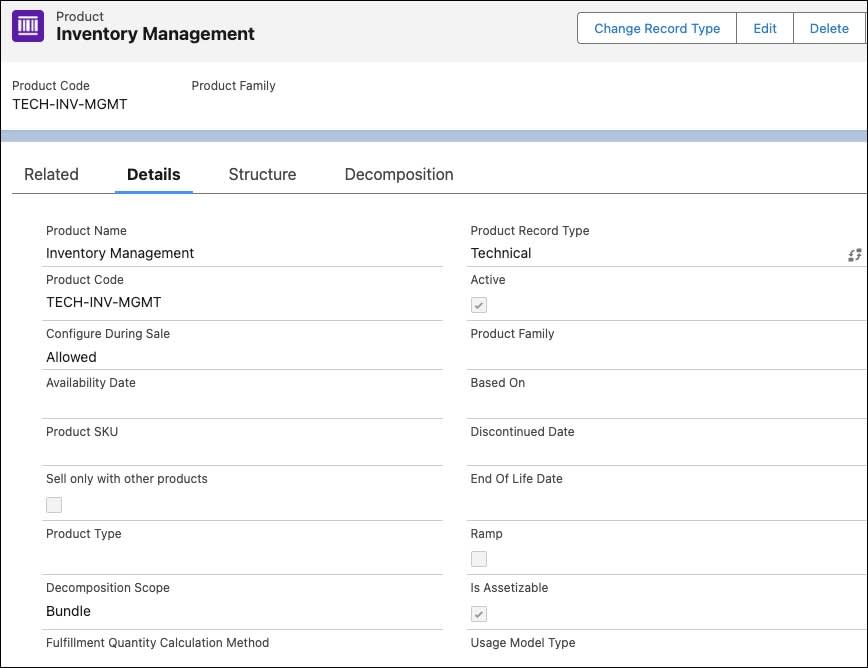
- In the New Product window, select Technical for the Record Type, and click Next.
- Add these details.
- Product Name:
Inventory Management - Product Code:
TECH-INT-MGMT - Decomposition Scope: Bundle
- Active: Select
- Is Assetizable: Select
- Product Name:
- Click Save & New.
- Repeat the steps 4-6 to create two more technical products.
Product Name
Product Code
Decomposition Scope
Active
Is Assetizable
Subscription ManagementTECH-SUB-MGMTAccount
Select
Select
Activation ServiceTECH-ACT-SVCOrder Line Item
Select
Select
- Save your work.
Your technical products are now created.
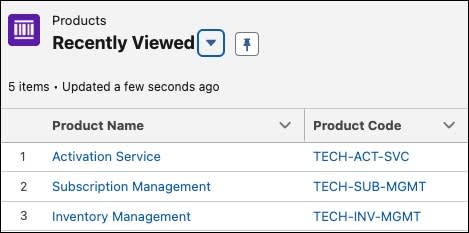
The Subscription Management product handles account-level subscription setup for services such as warranty, while the Activation Service product manages item-level activation for individual items such as Laptop or Antivirus.
Next, Julian maps Laptop Pro Bundle to technical products.
Create Product Fulfillment Decomposition Rules
Julian defines the rules that break down the commercial components of Laptop Pro Bundle into technical products. The image shows how each commercial product is mapped to the technical product using product fulfillment decomposition rules.
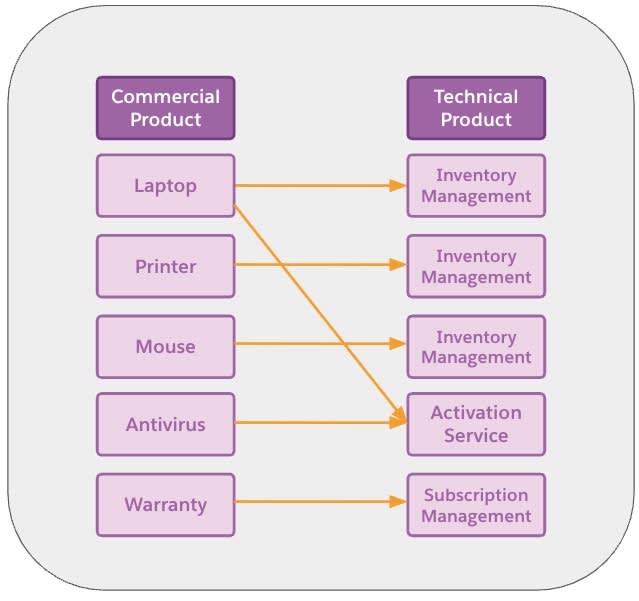
Laptop, Mouse, and Printer are physical goods that need inventory handling such as picking, packing, and shipping. Laptop and Antivirus are fulfilled through an activation service, indicating it includes a digital component such as driver setup or configuration. Warranty is routed to Subscription Management, where services such as licensing and support activation are handled. Follow along to create this mapping.
- From the App Launcher, find and select Product Fulfillment Decomposition Rules.
- Click New, and specify these details.
- Decomposition Rule Name:
Decomp Laptop Inventory - Source Product: Laptop
- Destination Product: Inventory Management
- Decomposition Rule Name:
- Save your work.
- Repeat steps 2 and 3 to create these decomposition rules.
Decomposition Rule Name
Source Product
Destination Product
Decomp Printer InventoryPrinter
Inventory Management (TECH-INT-MGMT)
Decomp Mouse InventoryMouse
Inventory Management (TECH-INT-MGMT)
Decomp Laptop ActivationLaptop
Activation Service
(TECH-ACT-SVC)Decomp Antivirus ActivationAntivirus
Activation Service
(TECH-ACT-SVC)Decomp Warranty SubscriptionWarranty
Subscription Management
(TECH-SUB-MGMT)
You find all of these records in the Product Fulfillment Decomposition Rules list view.
You have successfully mapped components of the Laptop Pro Bundle to its corresponding technical product using fulfillment decomposition rules.
Create Execution Rules
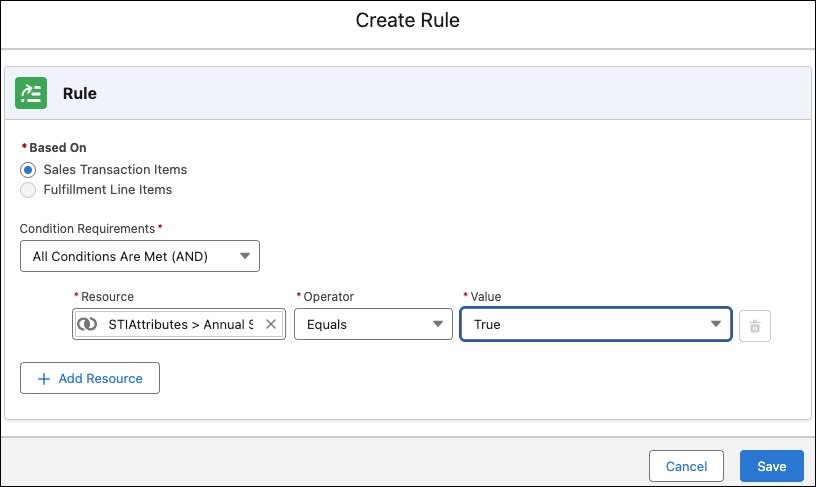
For the Warranty product, set a rule which executes if it’s part of an annual subscription.
- Open the Decomp Warranty Subscription product fulfillment decomposition rule, and go to the Execution Rules tab.
- Click Create Rule, and specify these details.
- Resource: STIAttributes>Annual Subscription
- Operator: Equals
- Value: True
- Resource: STIAttributes>Annual Subscription
3. Save your work.
This rule executes for accounts who subscribe for the annual subscription plan.
Next Up
With the technical products and decomposition rules in place, you are ready to define the orchestration plan for each of these technical products in the next unit.
To pass the challenge and move on to the next unit, make sure to click Check Challenge to Earn Points. Use the same Developer Edition org you used to complete the Simple Order Orchestration with Agentforce Revenue Management badge. Using a different org will cause the challenge to fail.