Manage Your Storefront with Business Manager
Learning Objectives
After completing this unit, you’ll be able to:
- List the key tools and capabilities Salesforce admins, merchandisers, and developers can manage and customize from the Agentforce Commerce for B2C Business Manager.
- Describe how the Agentforce Commerce for B2C toolset helps Salesforce admins set up and maintain a secure, engaging ecommerce storefront.
- List the Agentforce Commerce for B2C capabilities that help merchandisers configure personalized shopping experiences.
The Agentforce Commerce for B2C Business Manager serves as the main platform for Salesforce admins, merchandisers, and developers to configure, monitor, and enhance online storefronts. It’s designed to help businesses set up, manage, and optimize ecommerce storefront operations with tailored interactions that foster brand loyalty, increase conversions, and lower the cost of business.
Get Insights from the Business Manager Home Page
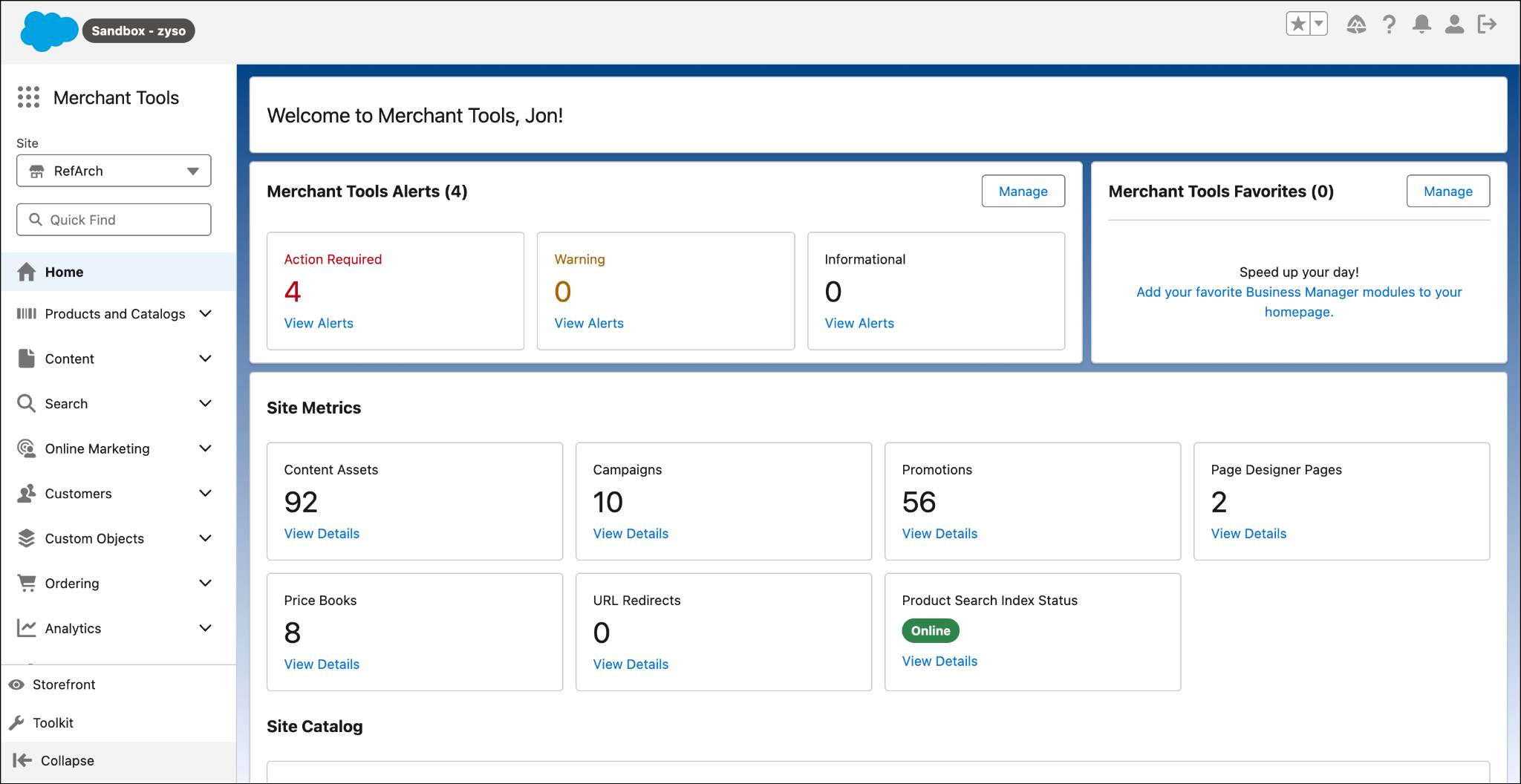
The Business Manager Home page serves as a central hub for managing your ecommerce operations. While the specific tools and features available on the Home page can vary based on your configuration and permissions, here are some of the most used Home page tools and features.
-
Dashboard: Get an overview of key performance indicators (KPIs) such as sales, orders, and customer metrics. With real-time data and trends, the dashboard helps you monitor the health of your ecommerce business.
-
Navigation menu: Give users quick access to different sections of Business Manager, such as Products, Content, Marketing, Orders, and Reports.
-
Alerts: Notify users with alerts so you can resolve potential issues before they become a problem.
-
Favorites: Compile a list of your most used Business Manager modules and get direct access without navigating the main menu.
Administer Your Storefront with Business Manager
Agentforce Commerce for B2C Business Manager offers a wide range of tools and capabilities to help Salesforce admins and developers manage and customize their ecommerce sites. Whether you’re working on site configuration, content management, security, or code deployment, these tools provide the flexibility and control you need to create a personalized, online shopping experience.
Key Features and Functions
-
Site configuration: Set global and site-specific preferences like locale, currency, and time zone. Define and manage custom site preferences to adjust the site's behavior. Define supported locales and currencies for a global audience. Set up tax rules and configurations to follow regional tax laws.
-
User and role management: Assign roles and permissions to users, ensuring secure access to different Business Manager functions. Manage user accounts and access levels to maintain security and control over site management.
-
Security and access control: Configure security settings, such as password policies and IP allowlisting, to protect the site and its data.
-
Search preferences: Configure search settings, including search indexing, synonyms, and stop words, to improve the search experience for shoppers. Define and manage search refinements to help shoppers filter and find products quickly.
-
Localization settings: Manage localization settings to support multiple languages and regions so your ecommerce site can reach a global market. Import and export translation files to localize content and provide a consistent experience for international shoppers.
-
Analytics and reporting: Access real-time dashboards to watch site performance, sales metrics, and customer behavior. Generate detailed reports to analyze site operations, such as sales trends, inventory levels, and marketing campaign effectiveness.
-
Code deployment: Manage and deploy custom code cartridges that extend the site's functionality. Cartridges include custom scripts, templates, and other resources. Use version control to manage different versions of the codebase, which permits safe updates and rollbacks.
-
Integration management: Configure and manage web services to integrate with outside systems and services. Set up and manage data feeds to import and export data between the ecommerce site and external systems.
Business Manager is a vital tool for Agentforce Commerce for B2C Salesforce admins to set up, configure, and manage storefronts effectively. Its comprehensive features give Salesforce admins the control and flexibility needed to deliver a great shopping experience for customers.
Personalize the Shopper Experience with Agentforce Commerce for B2C Merchandising Tools
The following Agentforce Commerce for B2C merchandising tools provide the flexibility and control you need to create a personalized, engaging online shopping experience.
Product and Catalog Management
-
Catalogs, categories, products: Merchandisers manage properties associated with the product catalogs, categories, price books, and site navigation to configure how customers engage with products and browse the store.
-
Product detail pages: Enrich product detail pages with modern image displays, videos, and detailed descriptions to increase sales. Merchandisers can bulk import products into the store catalog or add individual items as needed.
Content and Storefront Design
-
Page Designer: Design, schedule, and publish custom storefront pages without writing code. Build engaging layouts by dragging and dropping reusable component types created by developers. Create dynamic templates for Product List or product detail pages that automatically populate with specific inventory data.
-
Content slot configurations: Configure specific areas of the storefront, known as content slots, to show products, categories, or HTML. Apply rules to content slots that determine which content appears for specific visitors, such as showing a "Happy Birthday" banner only to qualifying users.
Marketing, Promotions, and Segmentation
-
Campaigns and promotions: Create campaigns to act as wrappers for specific customer experiences, including promotions and content slot configurations. Define schedules and qualifiers, such as coupons or source codes, to control who receives these offers.
-
Dynamic customer groups: Integrate with Data 360 to segment customers in real-time based on profile data, session behavior, or purchase history. Set groups to add shoppers as they meet specific criteria and target promotions to segments like loyalty shoppers or visitors from a specific region.
Search and Navigation (Searchandising)
-
Sorting rules: Configure sorting rules to rank search results based on active data metrics. This practice, known as “searchandising,” helps merchandisers prioritize items such as top-rated products or move low-stock seasonal items to a clearance section.
-
Store-level refinement: Enable inventory search results to include local physical store inventory, and help shoppers discover products available for immediate pickup.
AI and Personalization Capabilities
-
Einstein search: Configure Einstein search to power product recommendations. Use predictive sort to personalize product suggestions and the order of search results that are based on individual shopper behavior.
-
Agentforce Guided Shopping: Deploy agents to assist shoppers with finding products and answering frequently asked questions.
-
Agentforce Commerce insights: Review actionable analytics and identify trends in purchasing behavior. Make data-driven decisions regarding inventory and marketing, and generate promotions based on insight results.
Omni-Channel and Social Integration
-
Fulfillment options: Connect shoppers with physical store inventory and fulfillment methods. Offer shoppers a view of real-time store inventory available for in-store or curbside pickup.
-
Social media integration: Integrate third-party social media apps to personalize advertising and gain customer insights.
URL Management
-
URL redirects: Create and manage URL redirects that give users a positive experience and maintain SEO rankings when URLs change.
-
SEO-related settings: Configure and manage meta tags and canonical URLs which improves search engine visibility.
Next
In this unit, you learned how ecommerce site Salesforce admins and merchandisers use Agentforce Commerce for B2C tools and features. These capabilities enable the development of scalable, engaging sites that personalize the shopper experience and contribute to increased Average Order Contribution (AOC). Next, experience how shoppers interact with a personalized Agentforce Commerce for B2C site and the unified commerce solution.