Get Started with Baseline and Uplift Volume Predictions
Learning Objectives
After completing this unit, you’ll be able to:
- Explain the difference between baseline volume and uplift volume.
- Describe the benefits of using CRM Analytics to predict volumes.
- Summarize the initial steps for setting up CRM Analytics to predict volumes.
Before You Start
Before you start this module, consider completing the following recommended content.
Predicting Baseline Volume and Uplift Volume
Developing successful promotional strategies involves a large degree of foresight. By anticipating customer response and determining how each promotion affects the revenue, key account managers (KAMs) can make the correct decisions that lead to more profitable outcomes.
Unfortunately, KAMs don’t have the magical powers to peer into the future, but they do have some go-to measurements to estimate the financial effects of their promotions.
When a KAM is planning promotions, two sets of numbers are important in determining whether they meet their sales target: baseline volume and uplift volume.
-
Baseline volume represents the number of product units sold from an account without any promotions.
-
Uplift volume represents the number of extra product units that are expected to sell when a promotion is run.
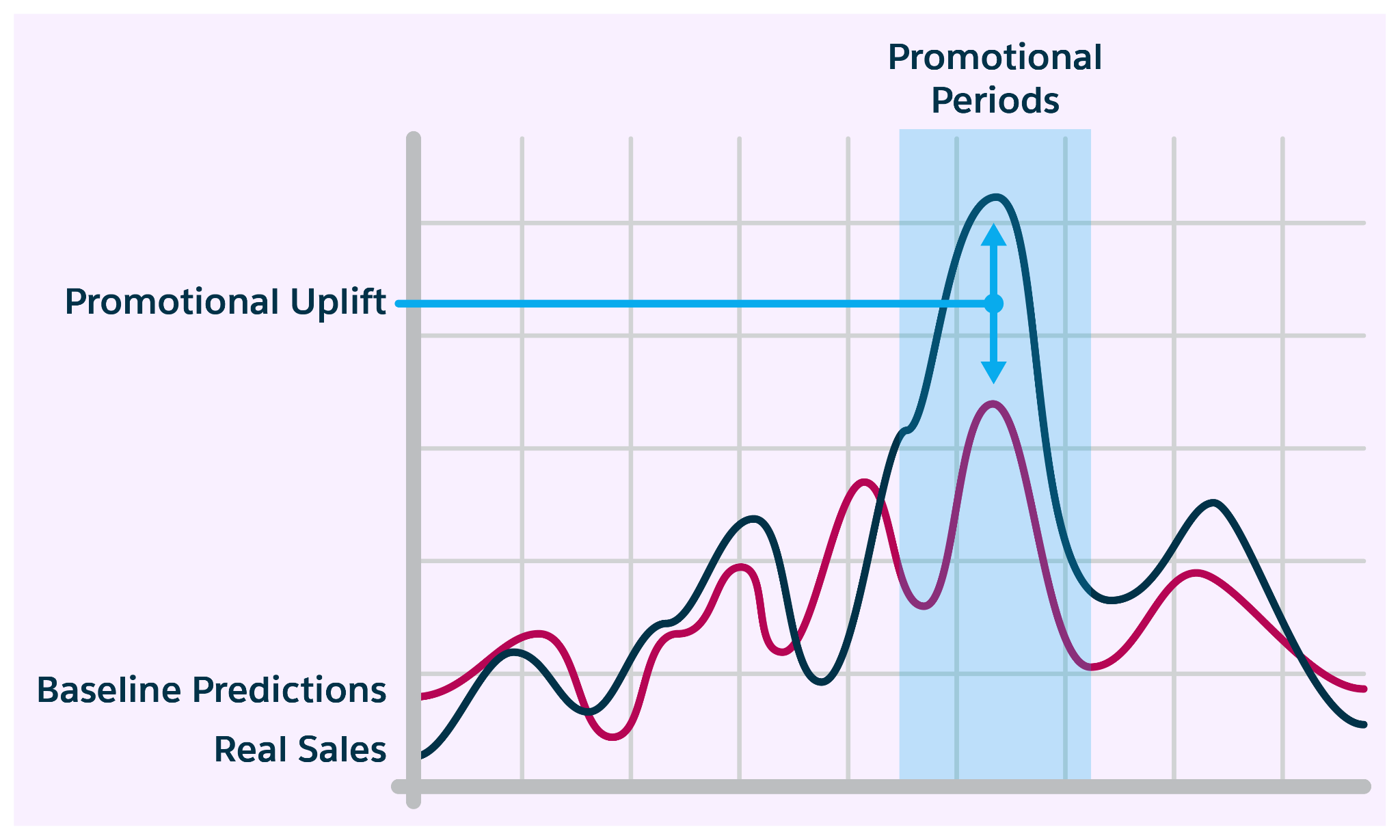
The process for determining baseline volume relies heavily on historical data, and varies greatly across organizations. While KAMs sometimes get the help of specialized demand planners, most often, they manually calculate the baseline volume using spreadsheets. Without a statistical algorithm or reliable calculation techniques, this process is tedious and error-prone.
Along with baseline volume forecasts, uplift volume prediction is just as important for determining the sales outlook, but also trickier to quantify due to additional factors.
These individual measurements are so intricate and elusive that some companies forego them altogether, which results in inaccurate forecasts and missed sales targets.
The good news is that Trade Promotion Management in Agentforce Consumer Goods is specially designed to produce quick and accurate volume predictions. Use apps and dashboards to track baseline volume and uplift volume, and get a full picture of your sales outlook for a promotion. Some businesses choose to forecast the total sales volume instead of splitting them into these separate metrics. Consumer Goods is the perfect solution for either use case.
With reliable forecasts, KAMs can be confident with their sales forecasts and they can adjust promotions to meet sales goals.
In this badge, you explore how to configure apps, dashboards, and analytics to improve your forecasting methods and output.
Baseline and Uplift Predictions in Consumer Goods
In your Consumer Goods org, use CRM Analytics (CRMA) to get a full picture of your volume forecasts. Start by creating two separate CRMA apps: one for baseline volume and another for uplift volume. Then use preconfigured recipes to generate datasets and models, which power a comprehensive dashboard.
Here’s a look at the Forecasted Baseline Sales dashboard.
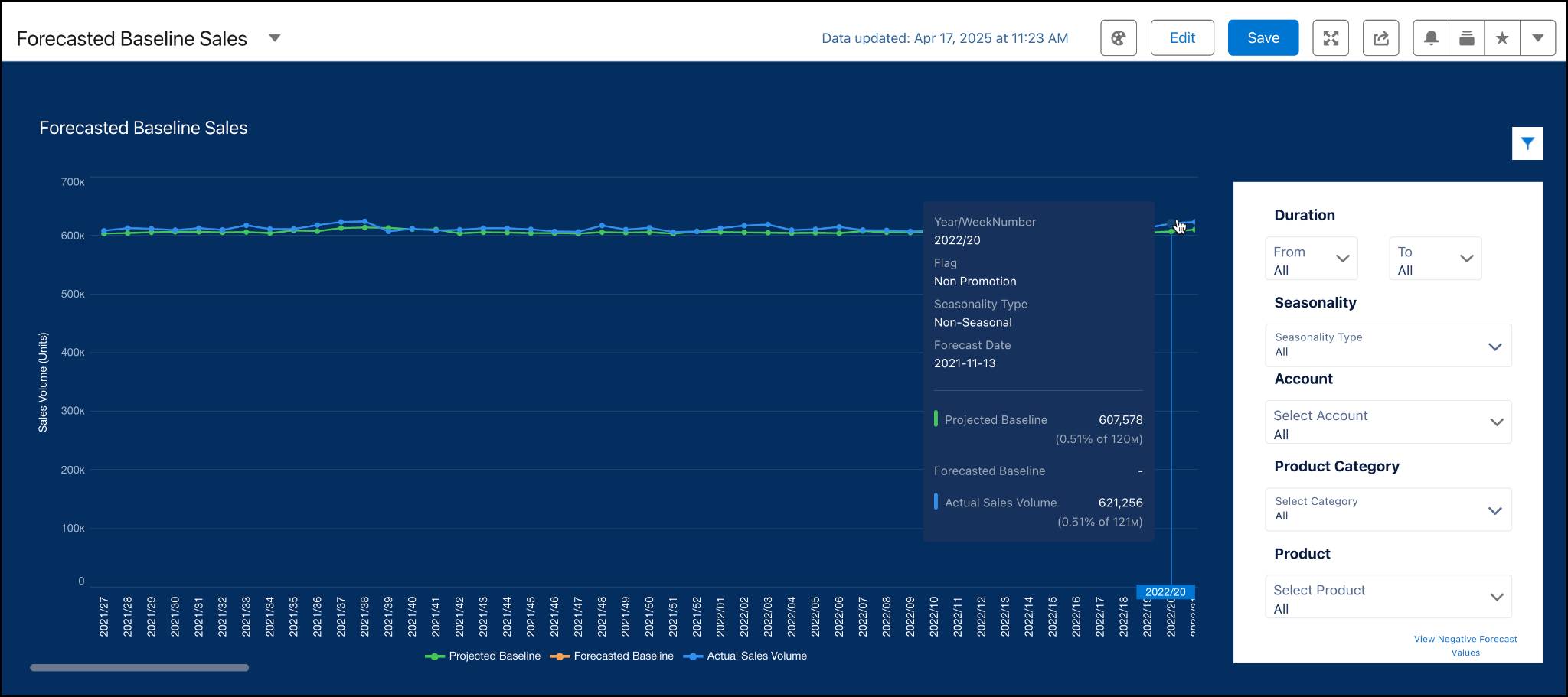
KAMs use this dashboard to view forecasted baseline volumes across products. They also see the uplift volume generated in a separate CRMA app with just a few clicks.
For example, Gustavo De Luca is the KAM for Alpine Group who manages the sales of nutrition and beverage products in Northern Trail Outfitters (NTO) retail stores.

Gustavo is laser-focused on running smooth and profitable promotions, but getting accurate volume predictions to guide his work has been a persistent challenge. He knows that more precise predictions maximize the returns from his marketing efforts.
Fortunately, he’s working with Alpine Group’s Salesforce admin, Fatima, to explore solutions that provide visibility into and improve the accuracy of his forecast numbers. Gustavo is excited to learn that Fatima is already exploring dashboards that can help him to predict product volumes during his promotion planning.
Follow Fatima as she configures the org to use these powerful forecasting tools.
Initial Setup Steps
To start your setup, first make sure that you have the relevant licenses and permission sets. Then complete these important prerequisite tasks: Define your KPIs, configure tactic templates for uplift prediction, and connect data from CRMA.
Define KPIs for Uplift Prediction
Create a KPI definition with the Uplift Prediction record type and add it to the relevant KPI set in the CRMA app. To display your uplift KPIs on a volume planning card (VPC), add the VPC as a KPI subset. To learn more about Trade Promotion KPIs, visit the Measure Your Business’ Performance with KPIs Help article.
Configure Promotion and Tactic Templates
If you earned the Trade Promotion Management in Agentforce Consumer Goods Trailhead badge, you learned that promotion templates help you to quickly create promotions. You also discovered that tactic templates store a set of commonly used promotion strategies and methods. To enable uplift volume prediction in your promotion templates and tactic templates, select TPO Enable Uplift Prediction in both the promotion and tactic templates.
For example, Fatima adds the KPIs that Gustavo requested to include in the dashboard for forecasting uplift volume.
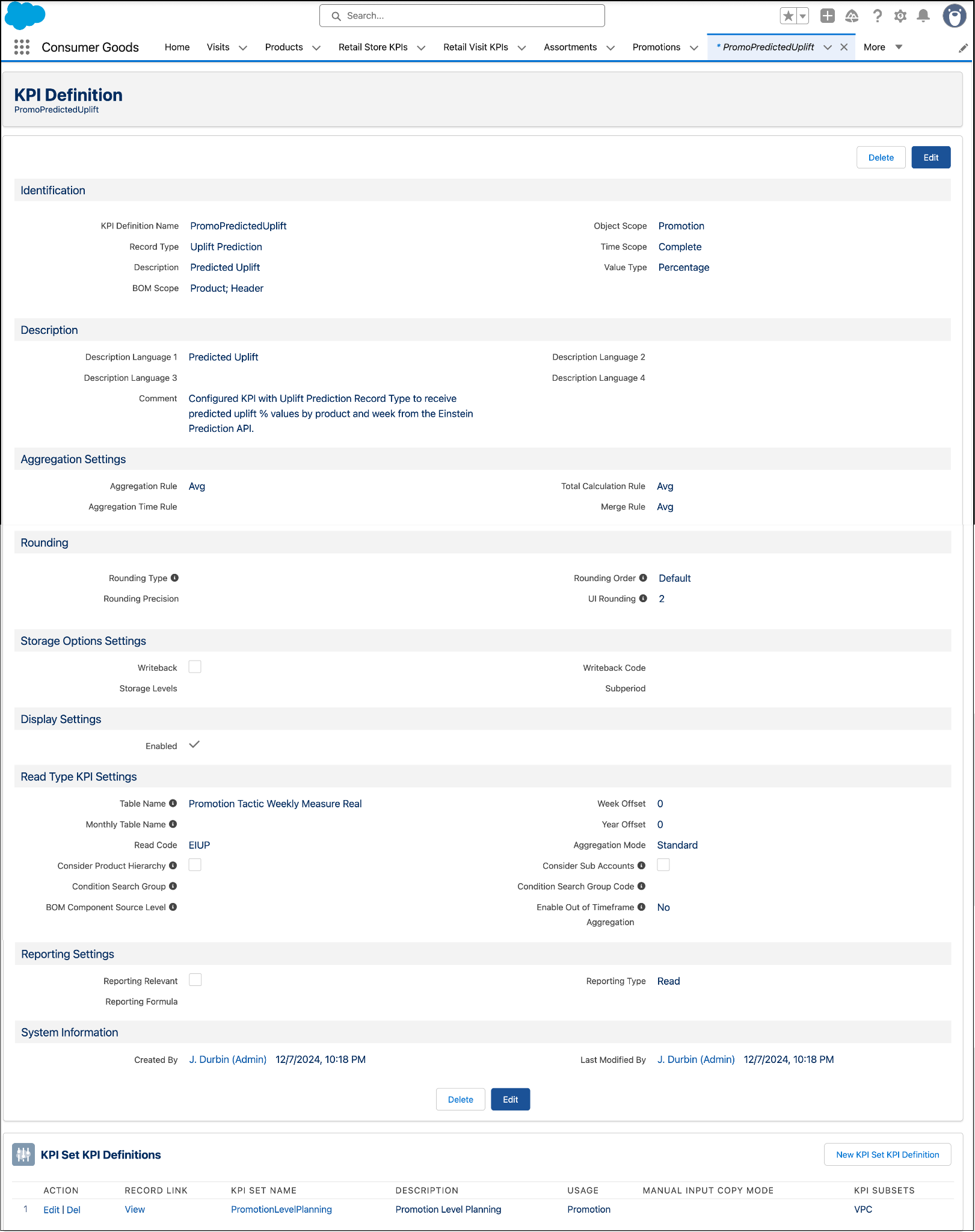
After configuring the necessary KPI definitions, Fatima then enables uplift prediction in the promotion and tactic templates.
Transfer Data from CRM Analytics to Consumer Goods Processing Service
There are two underlying processes that perform volume calculations. Uplift Prediction is a synchronous process that uses the Einstein Prediction API directly within promotions to predict uplift sales volume, while Baseline Forecasting is an asynchronous process that uses a scoring framework to generate baseline volume predictions. If you only need baseline forecasts, skip the steps for configuring uplift prediction. Instead, use MuleSoft Accelerator or a custom solution to transfer predicted volumes from CRMA to Agentforce Consumer Goods Processing Service (CGPS). For these processes to work correctly, they need the correct data.
There are various ways that you can transfer data from CRMA to CGPS. The easiest is to use MuleSoft Accelerator, which gives you the ability to seamlessly integrate data without leaving the Salesforce Platform. Use MuleSoft Accelerator prebuilt APIs, integration templates, and connectors to transfer data to the processing services.
To learn more about these initial configuration steps, visit the Help articles in the Resources section.
Up Next
In this unit, you learned about the benefits of using CRMA for baseline and uplift prediction and the first steps for setting up your own volume prediction solution. In the next unit, you explore how to set up CRMA apps to predict volume.
Resources
- Salesforce Help: Uplift Prediction
- Salesforce Help: Licenses and Permissions for TPM Revenue Prediction
- Salesforce Help: Measure Your Business’ Performance with KPIs
- Salesforce Help: Create a KPI Definition for a KPI Set
- Salesforce Help: Configure Tactic Templates for Uplift
- Salesforce Help: Leverage MuleSoft for Data Integration