Schedule Test Drives and Vehicle Services
Learning Objectives
After completing this unit, you’ll be able to:
- Explain how sales agents and customers use Automotive Cloud for test drive appointments.
- Describe how customers use an Experience Cloud site to schedule service appointments.
Appointment Scheduling in Action
Now that you know how to configure Appointment Scheduling and discovered the various components that power the tool, it’s time to see it in action.
In this unit, explore how customers and sales agents use it to book test drives and vehicle services.

First up, let’s see how a sales agent uses the dashboard to schedule a test drive for a potential customer.
Book Test Drives
When a vehicle captures the attention of a potential buyer, the next step is to get them behind the wheel. This hands-on experience greatly improves the chances of converting leads into opportunities, and eventually, into clients. By simplifying test drive appointment scheduling, you create a positive first impression and seal the deal on a new vehicle purchase.

Potential customers perform a series of steps when booking a test drive using Appointment Scheduling. Sales reps and call center agents can also schedule test drives on behalf of the customer.
Review this table to understand the details of each step of the scheduling workflow.
Workflow Step |
Details |
|---|---|
Select a Territory |
The user, who’s either the sales agent or customer, selects a service territory for a test drive based on a location, such as the customer’s address or their current whereabouts. The system displays the service territories that match both the location and the selected work type. |
Filter Technicians |
With the territory selected, the focus shifts to finding the right sales agent at the chosen territory. Automotive Cloud filters sales agents in the selected territory based on the skills required for the work type. The user then selects an available sales agent from the filtered list. |
Select a Vehicle |
The user chooses the vehicle they’d like to take for a spin so that it’s kept on reserve during the scheduled time slot. Booking in advance ensures the exact make and model is ready and available during the appointment. |
Select a Timeslot |
The user selects a time slot that’s convenient for them. Because the scheduler connects to your showroom hours of operation, timeslots, and staff and vehicle availability, you can be confident that the available appointment times are accurate and the needed personnel and assets are available for the customer. |
Confirm the Appointment |
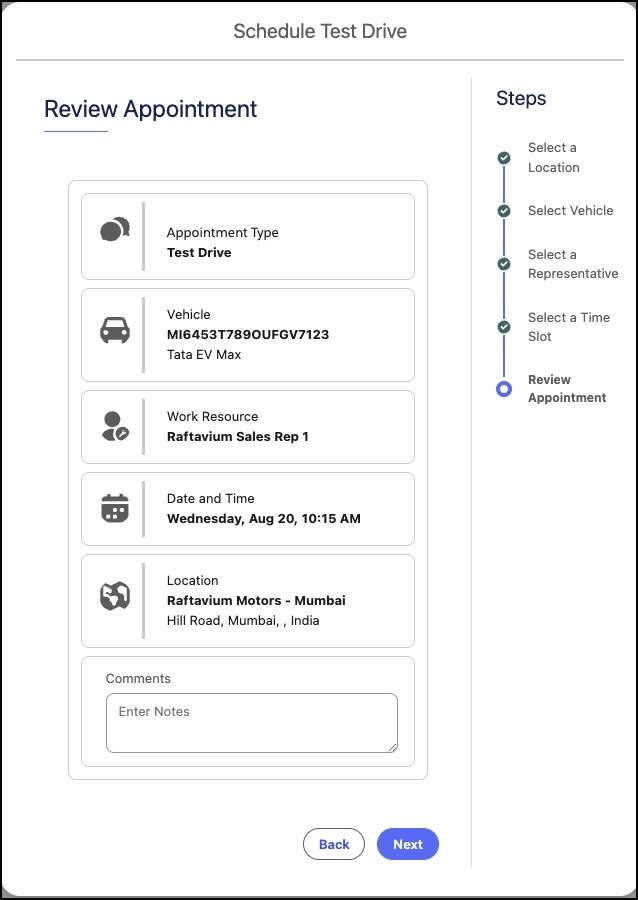
The customer or sales agent reviews the summary, verifies the information is accurate, and confirms the appointment. With this information, the showroom can now reserve the vehicle and ensure it is ready for the customer at the requested time. |
Here’s a look at the screen where the sales agent reviews the appointment details.
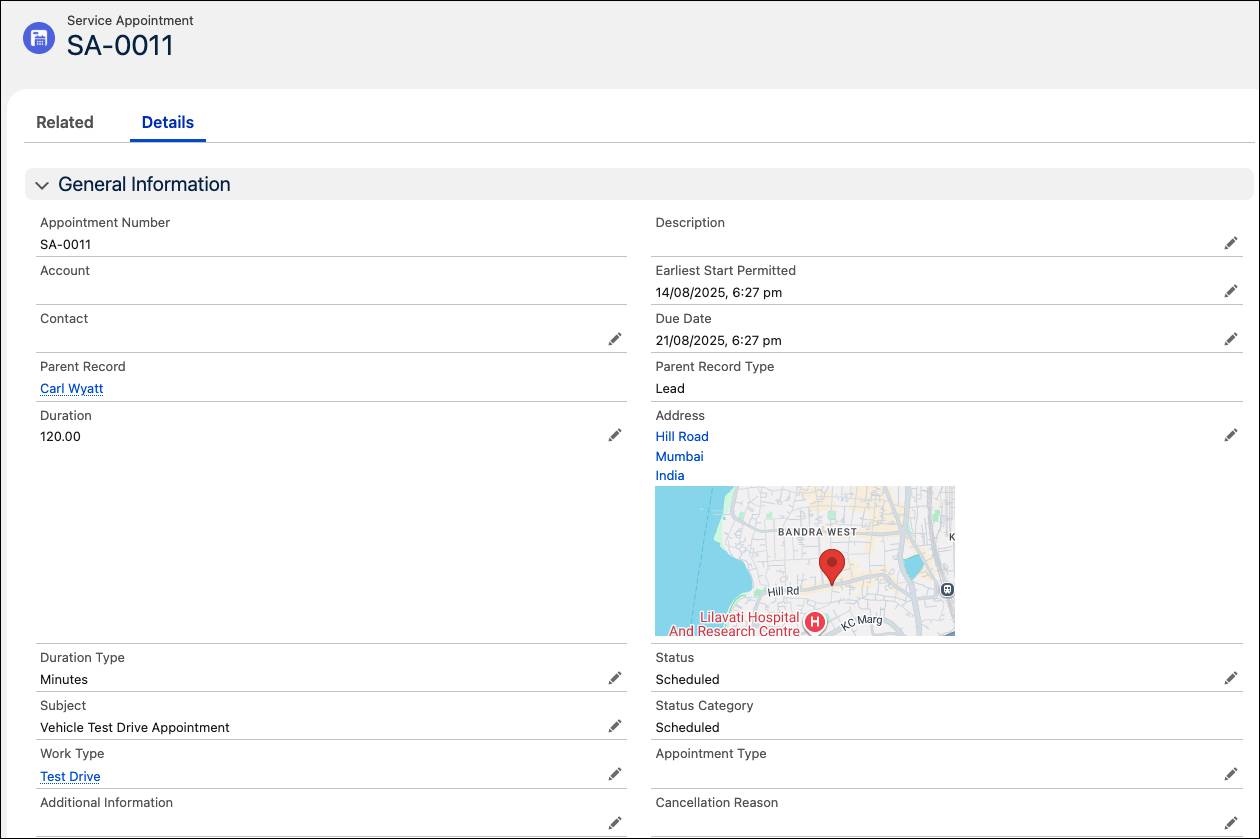
When the sales agent confirms the appointment, a service appointment record is automatically created to capture the details.
And it’s as easy as that. With Automotive Cloud, setting up critical sales opportunities and interactions is a breeze. You focus on providing quality customer engagement, instead of tedious manual processes.
Let’s find out how Automotive Cloud accelerates service appointment scheduling for vehicle health and maintenance.
Set Appointments for Vehicle Service
For auto companies, vehicle health and customer convenience are top priorities. Because cars, trucks, and SUVs play a critical role in the personal and professional lives of many customers, they expect streamlined support when something goes wrong. A seamless booking experience ensures timely vehicle care and increases customer satisfaction at a time when they may be frustrated.
With Automotive Cloud, customers can quickly self-schedule maintenance to keep their vehicles healthy, and book repairs when they encounter a sudden or ongoing issue.
So when a customer of Raftavium Motors hears a strange noise coming from one of the wheels of their car, they don’t have to waste valuable time trying to track down the right showroom or wait on the phone. Instead, they simply log into an Experience Cloud site and begin scheduling a service appointment.
The customer follows the same intuitive workflow as the sales agent did when scheduling the test drive, with a few small differences. First, the customer selects their purchased vehicle from their profile on the company website. Then, they select the work type group that corresponds to the category of service they need. For example, the customer chooses the Wheel Repair work type group. Then, from the filtered list, they select a technician whose skills match the specific work type and then select an available date and time for the service. Finally, they review and confirm the details.
After the customer schedules the service, the system sends automatic reminders to help them remember the appointment.
By avoiding the hassle of traditional booking methods, customers save time and ensure their vehicles receive prompt attention. The system’s intuitive design, coupled with features like smart service resource assignment and automated reminders, simplifies the maintenance process and enhances the overall vehicle lifespan and performance.
With Automotive Cloud, it’s easier than ever for Robin’s team to schedule service appointments and ensure a great customer experience. Raftavium Motors is on its way to becoming a competitive player in the automotive industry. So what are you waiting for? Take it out for a spin yourself.