Build and Configure Your Storefront
Learning Objectives
After completing this unit, you’ll be able to:
- Create and organize an Agentforce Commerce for B2C storefront structure.
- Design and publish a custom storefront page by using Page Designer's no-code UI.
- Define product prices by creating and assigning multiple price books to support varying pricing strategies.
- Configure navigation menus, customer groups, and content slot rules.
In this unit, you learn the basics of how to use the Agentforce Commerce for B2C system of catalog, categories, and products to organize your storefront. You also learn about some of the tools to design and manage a storefront.
Build a Storefront with Catalogs, Categories, and Products
In a Salesforce Agentforce Commerce for B2C storefront, catalogs, categories, and products all connect to form the foundation of the storefront design. This structure organizes products and shows them to shoppers in a way that is logical and engaging. Here’s a closer look at how they all work together.

Catalog
The catalog serves as the top-level container for all products and categories in a storefront. It defines the overall structure and organization of the product data. The catalog is also the repository for all product data and is essential for creating engaging, personalized shopping experiences.
Multiple Catalogs Option
An Agentforce Commerce for B2C org can have multiple catalogs to meet specific business needs.
-
Product catalog: The product catalog contains all the products that you sell. And it mirrors the organization of your inventory, fulfillment, or product management systems. The product catalog is where you edit and manage product details.
-
Storefront catalog: Use storefront catalogs for tailored storefront experiences such as regional websites or storefronts dedicated to specific customer segments.
Category
Categories are subdivisions within a catalog that group products based on shared attributes or themes. They help customers navigate the storefront efficiently.
-
Hierarchical organization: Catalogs have a hierarchical organization, with parent categories containing subcategories. For example, a Clothing category with subcategories like Men's Clothing and Women's Clothing.
-
Navigation and filtering: Categories are essential for defining the navigation structure and enabling filtering and sorting options for customers. Organize categories and subcategories into intuitive navigation menus. This helps customers navigate the site more easily and find products faster.
Product
Products are the individual items available for purchase within the storefront. Each product is associated with one or more categories in a catalog. One catalog—usually the product catalog—owns a product. You can only edit the product in the catalog that owns it. However, you can include the product in any combination of catalogs and categories in your websites. The system reflects your edits automatically in the other catalogs that include the product.
Product Settings
To show in a storefront, configure these product record settings on the General tab of the Product page.
- Assigned to a storefront category
- Searchable
- Online
- Available
Detailed Information
Products contain detailed information, such as names, descriptions, prices, images, media, and inventory data.
Product Variants
Manage variants of a product, such as different sizes or colors, or options within the product record.
Agentforce Commerce for B2C supports multiple product types and configurations. You can create these types of products.
-
Standard: A product that you sell and show by itself. They don’t have variations, such as different sizes or colors.
-
Base: A representation of all the variations of a product. For example, a shoe that comes in several sizes and colors. Your shoppers can’t buy a base product directly.
-
Variation group: A group of products that share an attribute, such as color or size. The variation group belongs to a base product. For example, a shoe comes in several colors and sizes. All sizes of the shoe that come in blue are a variation group.
-
Variation: A specific variation of a main product. For example, if the shoe is the main product, then a variation product is the shoe, in size 10, and the color blue.
-
Set: Multiple products that you show together, which shoppers can buy either together or separately. For example, an accessories kit that includes a hairbrush, comb, and mirror is a product set if shoppers can also buy the individual products separately.
-
Bundle: Multiple products that are only sold as a group. For example, a gaming bundle includes a video game console and several games; shoppers can’t buy the console or games separately.
-
Option: Optional accessories and upgrades that come with a product, yet have a separate price and display name, and no thumbnail image. They aren’t separately orderable or searchable. An example is warranties for different time periods.
Business Manager
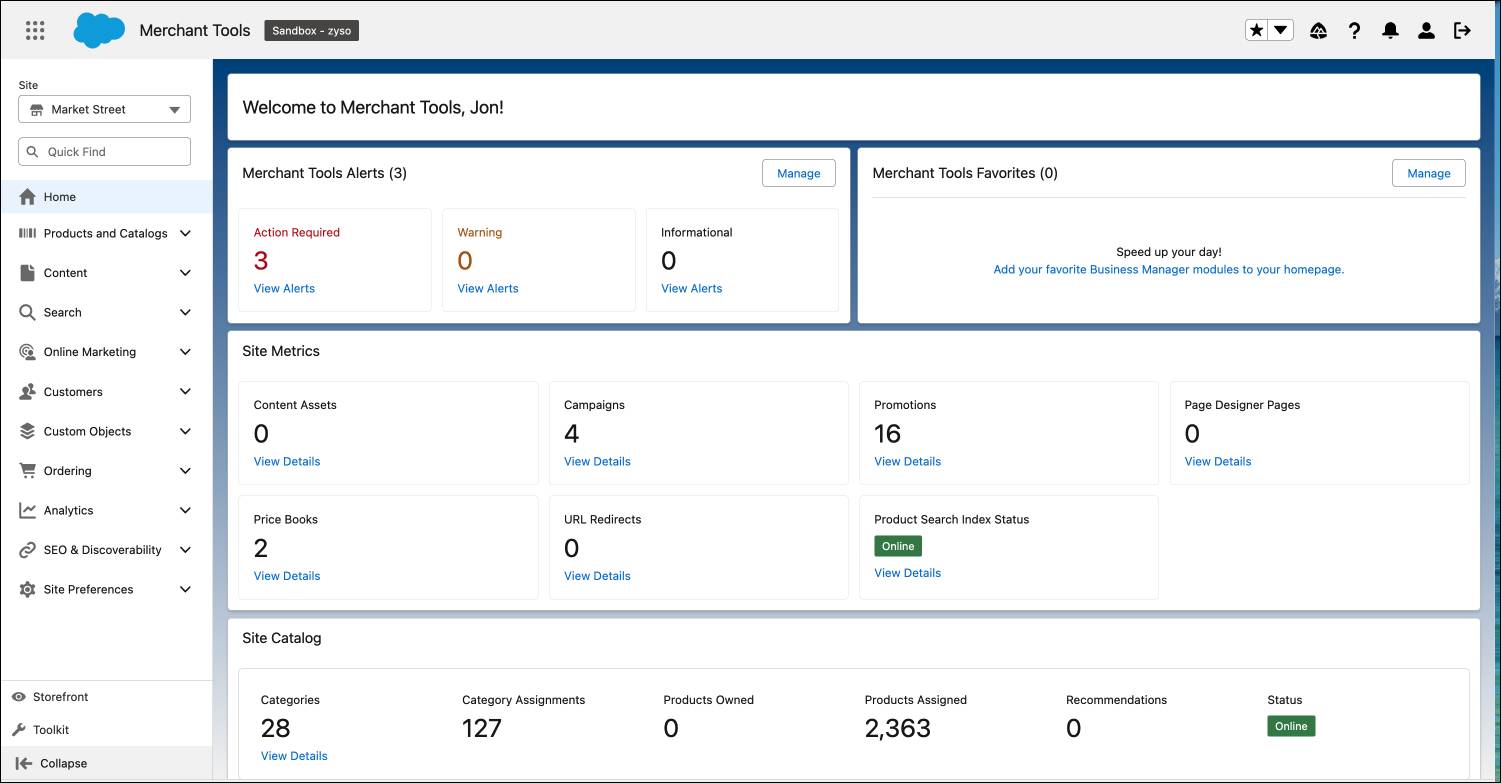
You use Agentforce Commerce for B2C Business Manager to create, manage, and edit catalogs, categories, and products. Business Manager is the hub of your merchandising operations and is designed to automate many merchandising tasks and enhance productivity.
Design and Manage the Storefront
Through the Business Manager interface, you can directly control the merchandising aspects of your ecommerce site. Business Manager includes design and configuration tools, and product management tools. With these tools, you can design and deploy sites that align with your brand and shopper’s needs.
Content Assets and Content Slot Configuration
Agentforce Commerce for B2C supports a wide variety of content assets, including HTML text, graphics, and videos. You can add or remove content assets to enhance the storefront. This helps in maintaining a visually appealing and informative site.
To use content assets effectively, you configure specific areas of the storefront, known as content slots. Content slots use rules that determine which content appears for specific visitors, such as showing a Happy Birthday banner only to qualifying users.
By using content slots, you can show shoppers featured products or promotional banners on a scheduled or permanent basis. You can also add attributes to assets to customize content to customer preferences. This application of content slots enhances customer engagement by showing them content that aligns with their interests.
Page Designer
Merchandisers use Page Designer to create, manage, and optimize web pages for their storefronts. With Page Designer you design, schedule, and publish custom storefront pages without writing code. Build engaging layouts by dragging reusable component types created by developers. Create dynamic templates for product list or product detail pages that automatically populate with specific inventory data.
Build Pages
Create a Custom Page
Use the no-code user interface (UI) to create custom pages tailored to specific campaigns, promotions, or seasonal events. The UI makes it easy to add components such as banners, product carousels, and promotional content directly on the page.
Make Quick Adjustments
Make quick adjustments to align with marketing strategies, and keep your storefront dynamic and relevant.
Engage with Dynamic Content
Page Designer supports dynamic content that you use to personalize the shopping experience with target promotions for different customer segments. For example, you can use Page Designer to configure a content slot to show specific promotions or product recommendations based on customer behavior, location, or preferences. This personalization enhances customer engagement and increases the likelihood of conversions.
Define Pricing with Price Books
Price books are how you define prices for products. A price book contains price definitions for a group of products, based on a currency. As the central repository for product pricing information, price books play a critical role in the design and functionality of an Agentforce Commerce for B2C storefront. Merchandisers manage price books to make sure that shoppers get accurate and contextually relevant prices during their shopping experience.
Agentforce Commerce for B2C price books support multiple pricing strategies with the creation of multiple pricing tiers.
-
Volume pricing with price tables: Offer quantity discounts. For example, each product in the price book has multiple price tables that define prices for varying quantities.
-
Sale pricing with multiple price books: Create multiple price books for sales and promotions. For example, two price books, the list price book and the sale price book. A business uses the list price book throughout the year except during the holidays when they use the sale price book.
-
Multicurrency storefronts: Create a price book for each currency the storefront supports. The currency selected in the shopping session determines the price book used.
-
Multiple price books to multiple storefronts: Share price books across regional storefronts. For example, three storefronts share two price books, list price, and sale price.
You can integrate price books with promotional tools and rules as well. This integration helps you adjust prices based on predefined conditions, such as seasonal sales, bulk purchase discount, or limited-time offers.
Though you define price books for your entire organization rather than for a specific storefront site, you can assign a price book to one or more storefronts in the organization.
Set Up Site Navigation and Customer Engagement
As a merchandiser, you play a pivotal role in shaping how customers interact with your storefront. By strategically configuring various elements, you help create an engaging personalized shopping experience.
-
Configure navigation: Organize categories and subcategories into intuitive navigation menus that guide customers through the storefront efficiently. A well-planned navigation strategy makes product categories and key pages easily accessible to shoppers. This helps customers navigate the site more easily and find products faster.
-
Engage with personalization: Use customer groups and content slots to deliver personalized product recommendations and promotions. Personalization increases the relevance of the shopping experience for each customer.
-
Establish dynamic rules: Define rules for slot configurations and customer group targeting. This enhances the relevance of content, and makes sure that customers see the most pertinent products and promotions.
Next Up
This unit showed how catalogs, categories, and products create your storefront foundation. Shoppers find products through logical site navigation established by categories and subcategories. Page Designer builds product pages without code, delivering dynamic content that personalizes the shopping experience. Next, you learn how to engage shoppers using campaigns and promotions.