Run a Grid Design Workshop
Learning Objectives
After completing this unit, you’ll be able to:
- Describe what a grid design workshop is.
- Identify the best time to hold this meeting in a typical project timeline.
- Explain how to validate your design recommendations against grid design best practices.
- Describe when and why you need to document client feedback.
Get Ready for Your Grid Design Workshop
You’ve met with your client, conducted an initial discovery, and created some clearly defined Slack Enterprise grid design options for them. At this point, you’ve:
- Designed two to three options that meet your client’s needs and follow best practice guidelines.
- Outlined the benefits and considerations for each option.
- Identified a recommended option and the rationale behind it.
With these recommendations in hand, you’re ready to take the next step: running a grid design workshop for your client.
The purpose of a grid design workshop is to educate your client on grid design components and best practices and then walk them through your grid design recommendations. Your approach should be educational and advisory. You want to inform your client on the principles of good grid design so that they can properly evaluate and respond to the models you provide. Make sure that key stakeholders attend this session so that they understand the implications of each grid design model–what each model means for the implementation, administration, and user experience.
Let’s take a closer look at these details.
Who Should Be Present?
Assemble a cross-functional Enterprise Grid design project team composed of the executive sponsors, Slack product owners, and representatives from each key department or business unit. This team brings the diverse perspectives you need to create the optimal grid design.
When you assemble the team, consider how and by whom the final grid design will be approved. Determining this up front saves time after the grid has been designed and minimizes delays in its launch.
How Long Is the Workshop?
We recommend that you schedule 60 minutes for your grid design workshop. This gives you time to introduce grid design best practices, review two to three grid design options for your client, discuss your recommended option, and learn if the selected approach meets the client’s criteria. Sometimes a follow-up session is needed if your client requests more time to review the presented options.
Where Does the Workshop Fall in a Typical Project Timeline?
The grid design workshop should occur after you’ve had a chance to conduct initial discovery with your client. It can be helpful to conduct a policies and settings session around the same time as your grid design workshop. This ensures that your client becomes familiar with all the intricacies of setting up workspaces in Slack. The grid design should be decided upon, or almost finalized, before you conduct a channel strategy session.

Your Presentation
You’ve gathered the client’s team for your grid design workshop. To start, before you present the options you’ve prepared, give your client an overview of grid design best practices. Then, when you present your recommendations, show your client how they align with these best practices, outline the benefits of each option, and call out additional considerations so your client can make an informed decision.
For example, you might point out that a centralized model with one global workspace lacks granular control over certain settings or admin processes such as a data retention policy. As the subject matter expert, you’re responsible for guiding them through the evaluation process and ensuring they’ve evaluated all the benefits and considerations of each option. You also need to meet them in the middle if they want to change the proposed designs… which leads us to the next point.
Document Their Questions and Concerns
During this review, listen carefully and respond thoroughly to your client’s feedback and questions to ensure they understand the models you provide. You want to make sure that they’re adequately prepared to make a selection–hopefully by the end of this workshop. Guide the client to evaluate each model for its sustainability, end user experience, and admin workload. And be sure to document their feedback so you can thoughtfully incorporate it into the final product.
Test Your Design
Before you conclude the grid design workshop, pressure test the option they select against the questions we’ve provided. Does the selected option follow these best practices?
-
Context switching: Does the design enable 80% of an employee’s time to be spent in a primary workspace?
-
Workspace sprawl: Are workspaces created out of necessity, not as substitutes for channels?
-
Noise: How often will employees be confronted with conversations beyond their sphere of interest and role?
-
Future proof: Will the design work for the organization in six months? Twelve months? Eighteen months?
-
Cross-collaboration: Do multiworkspace channels reflect the needs of users?

You’ve accomplished a lot in your grid design workshop. But before you close the meeting, encourage your client to promote alignment around their final design selection by helping them identify the stakeholders who need to sign off and setting a clear sign-off deadline.
Next, see how a grid design workshop plays out in an example scenario.
Service Engagement Example
Let’s say you hold a grid design workshop for a large, recently merged tech company. You present the company with three design options and your recommended model.
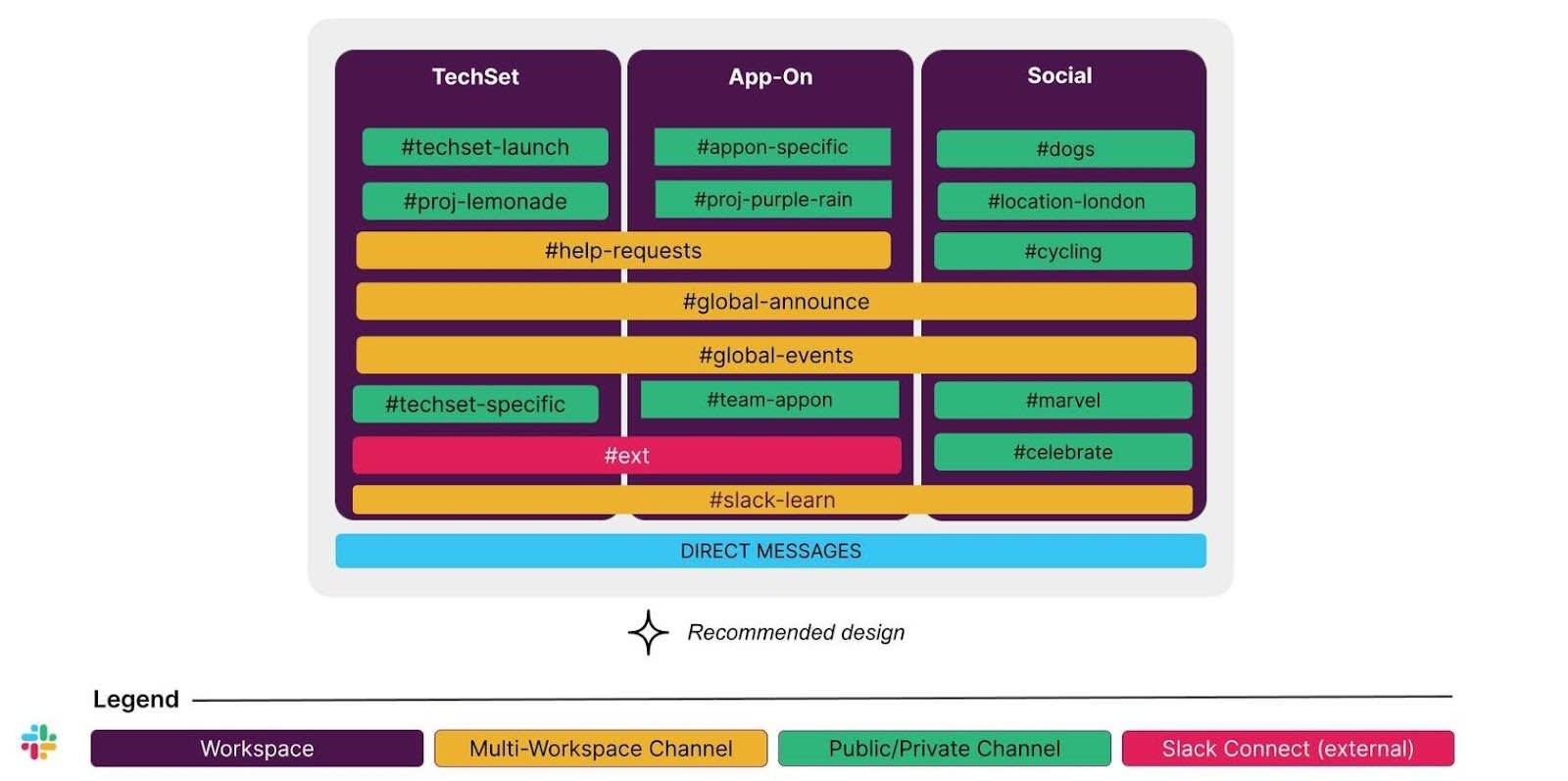
The workshop includes a discussion around whether they want to add an external workspace to promote context switching when working with partners and vendors outside their organization and to consolidate all external connections in one workspace. Ultimately, they decide that it isn’t necessary at this time. While they want to enable Slack Connect, they feel a lot of change management is needed before there will be enough adoption of Slack for external collaboration to warrant a separate workspace.
The company decides to move forward with your recommended design as is. So you pressure test this design with them before wrapping up the workshop. See the following validations.
Best Practice 1: Context Switching
Does the design enable 80% of an employee’s time to be spent in a primary workspace?
Validation:
With their recent acquisition of a smaller company, work streams are in flux. The current plan is for the work of both companies to remain separate for the foreseeable future while the organization audits redundancies and builds an integration plan.
By creating separate workspaces for the merged companies, employees of both organizations are allowed to spend most of their time in their organization’s workspace.
Best Practice 2: Workspace Sprawl
Are workspaces created out of necessity?
Validation:
The two companies have different setting needs in Slack, so they each need their own workspace. The final design recommends the minimum number of workspaces based on their unique needs.
Best Practice 3: Noise
How often will employees be confronted with conversations beyond their sphere of interest and role?
Validation:
Again, because the work of the two companies will remain largely separate for the foreseeable future, separating them into their own workspaces means less noise for employees–meaning they won’t be exposed to channels that are irrelevant to them.
Best Practice 4: Future-Proof
Will the design work for the organization in 6 months? Twelve months? Eighteen months?
Validation:
The client is confident that this design will work for them for the next 12 months, as they have a lot of work to do before any significant reorganizations occur due to the acquisition. However, because so much is in flux, they’re uncertain what the organization will look like in 18 months. Therefore, they feel more confident moving forward with a fairly simple design rather than further distributing workspaces.
Best Practice 5: Cross-Collaboration
Do multiworkspace channels reflect the needs of the users?
Validation:
While the two companies will work relatively separately for the time being, it’s important to still create one company culture. So the org-wide channels like #global-announce, #global-events, and #slack-learn can help promote one shared experience across all employees regardless of where they came from.
As for the teams that will start collaborating across the two organizations earlier on, multiworkspace channels can be set up to connect the members from each workspace.
Recap
In this unit, you explored how to prepare and run a grid design workshop. You also learned how to document client feedback and validate the chosen design against best practices. Next, learn how to provide an executive summary and plan for the future.