Get to Know Omnistudio Flexcards
Learning Objectives
After completing this unit, you’ll be able to:
- Describe Omnistudio Flexcards.
- List the scenarios for using Flexcards.

Before You Start
Before you start this module, make sure you complete this content. The work you do here builds on the concepts and work you do in that content.
Meet Omnistudio Flexcards
Omnistudio Flexcards are declarative, reusable UI components in Salesforce that show contextual information and provide quick actions without you having to write code. Think of Flexcards as interactive cards that you can embed in various parts of Salesforce, such as Lightning App Builder pages, Community pages, external sites, and even Omniscripts.
Here’s a record page for Billy Bing, the customer of an energy and utilities company. The Flexcards are highlighted.
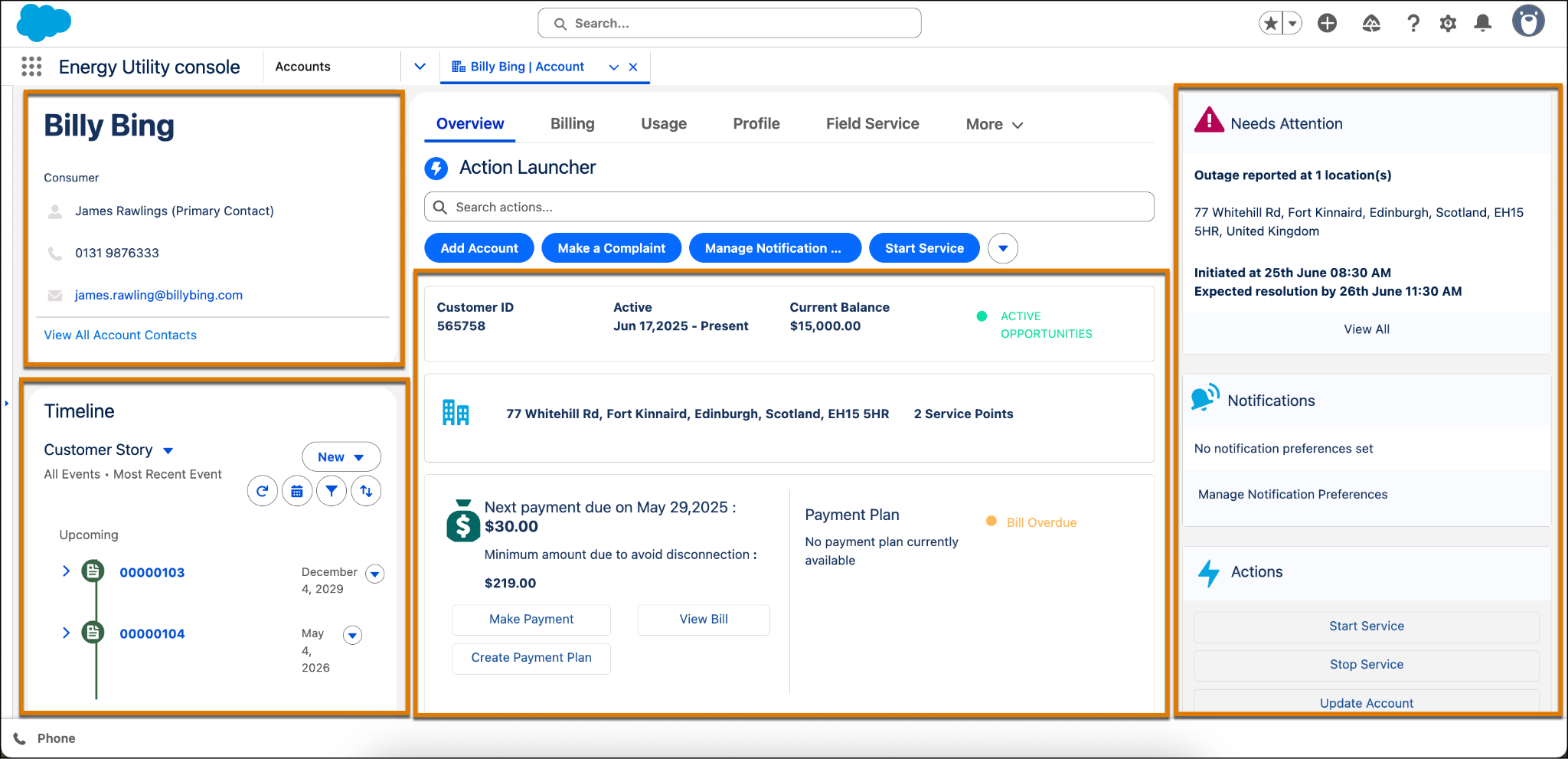
Notice the Flexcard with Billy Bing’s contact details, including the primary contact, phone number, and email address. Another Flexcard shows a timeline and customer story, including upcoming contracts.
Action Launcher provides Omniscript actions, such as Add Account, Make a Complaint, Manage Notifications, and Start Service. Clicking an action opens an Omniscript guided process. The other Flexcards show customer account and payment details, address, and payment information.
Another set of Flexcards show outage reports, notifications, and Omniscript actions.
In this module, you learn more about Omnistudio Flexcards and when to use them. Explore key Flexcard features, the elements available in the Flexcard Designer, and best practices for setting up and styling your Flexcards. First, review some of the scenarios for using Flexcards.
When to Use Omnistudio Flexcards
Omnistudio Flexcards help you create rich and dynamic user interfaces for a variety of situations. Read about some typical business challenges and how Flexcards solve them.
Challenge |
Scenario |
Solution |
|---|---|---|
Scattered customer data in multiple systems |
A service rep wants a comprehensive view of a customer's history, including recent orders from an external ecommerce system, support cases from Salesforce, and details from a billing system. |
Use Integration Procedures to combine data from multiple sources, such as Salesforce objects and external APIs. Then show this data on several Flexcards to provide a 360-degree view of the customer. |
Display contextual and actionable Information |
An insurance rep requires a policyholder's key details to quickly perform actions like renewing a policy and file a claim. Ideally, the rep wants to do this from a single home page or a record page. |
Display key data points in a Flexcard and include buttons that trigger Omniscripts, Integration Procedures, and other actions. This makes the data actionable and reduces clicks. |
Open guided processes from UI |
A loan officer needs a quick way to see a loan applicant’s status and start a specific workflow, like a verification process, from the applicant’s record page. |
Embed buttons or links in a Flexcard that open a guided Omniscript. This Omniscript then guides the user through a series of steps to complete a business process. |
Display complex or unrelated data |
A healthcare provider wants to see a patient's historical medical data, which includes unstructured notes and related-party information, on a single screen without endless scrolling. |
Design Flexcards to present all of the complex, related, or even unrelated data in a visually appealing and organized way. Use elements like flyouts, tabs, and collapsible sections to do this. |
Simplify the user interface |
A company has a very complex Account page with hundreds of fields on a single layout. The sales team only needs to see key metrics and recent activities. |
Create a simple Flexcard that highlights only the most critical information. Then place it on the Account page, replacing or supplementing the standard page layout. This declutters the UI and improves the user experience. |
Display real time and event-driven data |
A dispatcher wants to monitor the live status of vehicles on a map, with real-time updates as a vehicle's location changes. |
Connect Flexcards to the Salesforce Streaming API to show real-time data updates, which is perfect for dashboards and monitoring screens. |
Provide omnichannel experience |
A company wants to sell its products to customers on multiple devices like desktop, tablet, and mobile phone. Also, it wants users to have a consistent and seamless experience across all devices. |
Create Flexcards to show the products and other details. Then enable the Flexcards to be available on different devices like desktop, tablet, mobile, and Experience Cloud sites. |
In essence, Flexcards solve the problem of data fragmentation by providing service reps and other users with a unified, contextual, and visually appealing view of customer information and related actions.
What’s Next
In this unit, you learned the basics of Omnistudio Flexcards. You also discovered some scenarios for using Flexcards. In the next unit, dive deep into the Omnistudio Flexcard layout components and features.