Bundle Data 360 Configurations into a DevOps Data Kit
Learning Objectives
After completing this unit, you’ll be able to:
- Explain the purpose of a data kit in the DevOps lifecycle.
- Create a DevOps data kit to bundle Data 360 components.
- Identify supported components and dependencies.
Manage Deployments Efficiently
In this unit, you learn how to package Data 360 metadata using DevOps data kits, compare data kit types, and manage the dependency hierarchy for a smooth deployment. Follow along as DevOps Developer Vijay Lahiri and Systems Architect Jamal Cooks use data kits to safely move Cloud Kicks’s new loyalty program configurations from their Developer sandbox toward production.
With the Cloud Kicks sandbox successfully synchronized, Vijay must find an efficient way to move the new loyalty program configurations to production. Instead of manually re-creating 50 different data mappings, he relies on DevOps data kits. DevOps data kits let you bundle Data 360 components into a single unit for repeatable, auditable, and safe promotion across environments.
Package Configurations Once, Deploy Anywhere
Data kits are the containers for your Data 360 configurations. For Vijay, avoiding dependency errors during deployment is the primary goal.
For enterprise teams, data kits are not just a transport mechanism; they act as release artifacts. They bundle related configurations, ensure dependency order is respected, and create audit trails for deployments. As a best practice, Vijay follows these guidelines while creating data kits.
- Include release naming conventions (for example,
v1.2-loyalty-enhancement).
- Review the publishing sequence order of the data kit components.
- If you create a new data space in the sandbox org, ensure the data space name exists in the target org.
- Tag releases tied to production deployment dates.
Compare Standard and DevOps Data Kits
Before bundling the loyalty program configurations, Vijay must choose the correct data kit type for his architecture.
Data Kit Type |
Purpose |
Audience |
|---|---|---|
Standard |
AgentExchange solution packages |
Salesforce Partners |
DevOps |
Internal environment migration |
Enterprise architects and DevOps |
The distinction between data kit types is crucial. A standard data kit is explicitly designed for packaging solutions to be installed by external partners, such as a Salesforce partner listing an application on the AgentExchange. This process focuses on solution delivery.
Conversely, the DevOps data kit is your enterprise-grade tool for internal metadata management. Its purpose is to facilitate the controlled, repeatable promotion of configuration changes—like new identity rules or calculated insights—between your own organizational environments (for example, from a Developer sandbox to a UAT sandbox, and finally to production). By choosing the DevOps data kit, you signal that the bundled components are part of a structured, audited deployment pipeline, not an external solution.
Bundle Your Configurations
To safely move the new loyalty program metadata, Vijay creates a DevOps data kit. When working in a Data 360 sandbox, you can bundle several core metadata components into your data kit. The supported components include:
-
Data streams: The schema and source details for your ingested data.
-
Data model objects (DMOs): The standard and custom data models you map your streams to.
-
Calculated insights: The SQL-based logic used for tasks like loyalty scoring.
-
Identity resolution rules: The matching and reconciliation logic for Jamal's unified profiles.
-
Segments: The audience criteria defined for your targeted marketing efforts.
Vijay follows these steps to bundle the configurations.
- In your sandbox org, go to Setup, and select Data Cloud Setup.
- Under Developer Tools, select Data Kits.
- Click New, and select DevOps Data Kit.
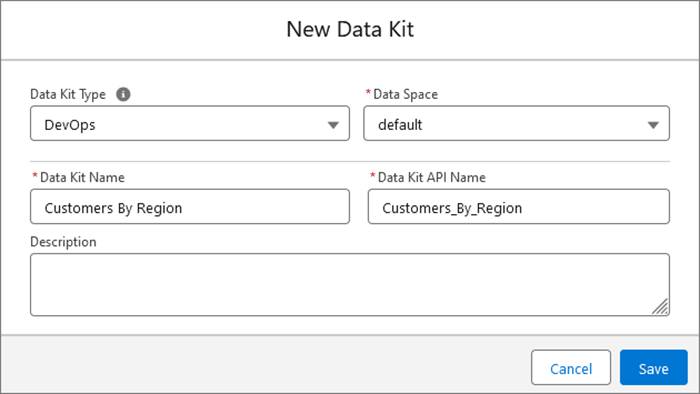
- Select a data space.
- Enter the data kit name.
- Click Save.
Manage the Dependency Hierarchy
The dependency hierarchy is critical for deployment success. When Vijay builds his data kits, he manages the dependency hierarchy by following a strict order.
- From the Data Kit page, select your data kit and add your supported components.

-
Lay the foundation with streams: Add your Amazon S3 or CRM data streams first. By selecting the data stream, Data 360 intelligently pulls in the associated data lake objects (DLOs).
-
Connect the pipes with mappings: When you add your data model objects (DMOs), always select the Include Mappings checkbox. This ensures that your raw ingested data knows exactly which part of the unified data model it belongs to the moment it lands in the target org.
-
Audit the publishing sequence: In the Data Kit page, audit the publishing sequence to prevent missing dependency errors. If a segment depends on a calculated insight, ensure the calculated insight is set to deploy before the segment.
- Once your components and dependencies are confirmed, click Save.
What’s Next
You’ve successfully bundled your Data 360 configurations into a portable DevOps data kit. In the next unit, you learn how Jamal and Vijay choose the right multi-tool deployment strategy to move these kits into their target environments.