Set Up Underwriting Rules
Learning Objectives
After completing this unit, you’ll be able to:
- Explain the purpose of stage models in the insurance quoting lifecycle.
- Describe how underwriting rules automate and simplify the stage management process.
- Create and configure underwriting rules for quote approval using Digital Insurance.
Stage Management in Insurance
In insurance, quotes and policies follow a structured lifecycle—from initial submission to final approval. Each stage serves as a checkpoint to validate compliance, assess risk, and ensure alignment with business goals. Without clear governance, manual handoffs and inconsistent evaluations can lead to delays, errors, and compliance gaps.
With stage management in Digital Insurance, insurers can define and automate this lifecycle. Stage management uses stage models to map out the lifecycle of quotes, policies, or other records.
A stage model consists of two key elements.
-
Stages: Checkpoints or steps in the process (Draft, Submitted, In Review, Approved)
-
Stage transitions: Pathways that define how a quote moves between stages
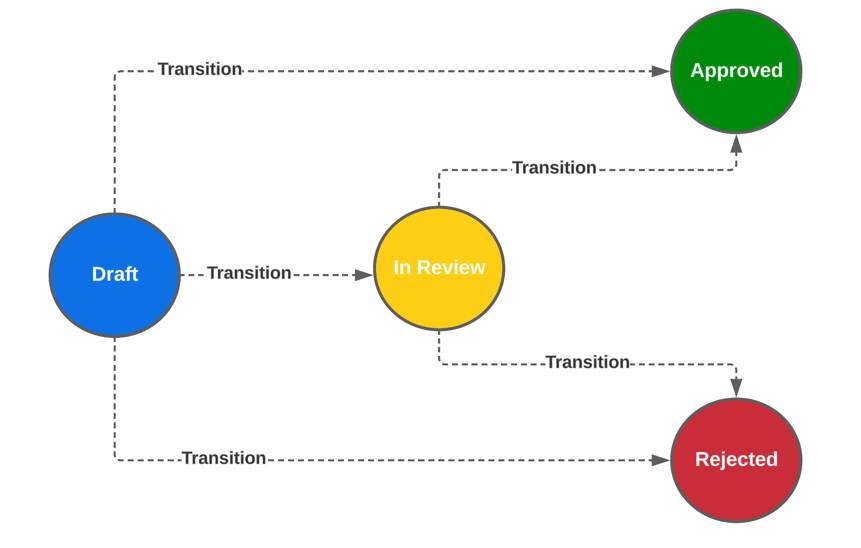
These stage models provide the flexibility to tailor workflows to different product lines, ensuring a consistent and efficient approval process. Once stage models are active, they display as a series of chevrons at the top of record pages. This enables agents and underwriters to track each transaction’s status in real time.

Stage transitions can be automatic or manual, but rules add efficiency and precision by ensuring transitions happen under the desired conditions. These rules help:
- Automate approvals when quotes meet certain conditions.
- Trigger manual reviews for high-risk applications.
- Standardize underwriting workflows to improve accuracy and compliance.
For example, a low-risk auto quote can automatically move from Draft to Approved, while a high-risk quote might be flagged for review before progressing further.
By integrating rules into stage management, insurers eliminate inefficiencies, reduce manual intervention, and ensure quotes progress smoothly.
Underwriting Rules and Stage Management
With Digital Insurance, underwriting rules serve as the primary way to govern how quotes move through the approval process. These rules automate risk-based decisions at the product level, so each quote follows the correct approval path. For example, an auto policy might require a driving history review, while a homeowners policy checks property details.
Since stage transitions depend on risk evaluation, underwriting rules play a critical role in guiding the quote through the approval process.
Justus wants to configure underwriting rules. His first goal:
- Automatically approve low-risk auto quotes if a driver has fewer than two accident points and notify the customer via email.
Set Up the Framework
Before configuring underwriting rules, Justus completes these one-time setup steps to establish a structured approval process.
- Enable Stage Management in org settings.
- Define stage models with lifecycle stages.
- Create a Rule Library to store underwriting rules.
- Define actions for rule evaluation outcomes.
- Add the Underwriting Rules Lightning Web Component (LWC) to the product details page.
- Ensure the quote object can call the Underwriting Rules API for real-time evaluations.
For step-by-step setup instructions, refer to this article.
With those steps complete, let’s follow as Justus configures the underwriting rule for low-risk auto quotes.
Define the Rule Details
Justus navigates to the Underwriting Rules tab of the Auto Silver product and clicks New Rule.

The New Rule workflow opens and Justus configures some basic rule details, including the object type, record type, and the transition step that the rule applies. He adds these details.
-
Object Type: Quote
-
Record Type: Master
-
Transition Step: Draft To Approved
-
Status: Draft
-
Name: Low-Risk Accelerated Auto Approval

Set the Rule Conditions
After defining the rule details, set the conditions that determine whether the rule evaluates as true or false. The conditions make sure that underwriting decisions are based on objective, predefined criteria.
Justus applies the rule to the Auto Silver product and then defines these conditions to trigger automatic approval.
-
Resource: Driver
-
Attribute: Driver Accident Points
-
Operator: Less Than
-
Value: 2

Although this example only has one condition, underwriting rules can evaluate up to five conditions to create more complex risk assessments.
Configure Rule Actions
Rule actions specify what happens when the underwriting rule is triggered. These actions enable insurers to automate approvals, trigger additional workflows, or require manual reviews.
Actions are executed using automated flows, which you configure in advance. To add an action:
- Specify the Evaluation Type (True or False).
- Name the action to describe its purpose.
- Select Automated Flow as the action type.
- Enter the Flow Definition API Name to call the correct process.
Justus configures two actions for the low-risk approval rule.
- If the rule evaluates to true (the driver has two or fewer accident points), the quote automatically transitions to Approved. It also triggers an email notification to the customer, informing them of their approval.
- If the rule evaluates to false (the driver has more than two accident points), the quote transitions to In Review and the user receives an email notifying them of the review.

After reviewing the rule, Justus saves and activates it. When you activate the rule, it’s executed during quote evaluations.
Define Condition Logic
Underwriting rules are organized into rule groups based on object type and transition step. How does this help? Multiple rules get evaluated within the same process, and all relevant risk factors are considered before approving or flagging a quote.
For example, the new auto rule displays within the Quote, Draft to Approved rule group on the Underwriting tab of the Auto Silver product.
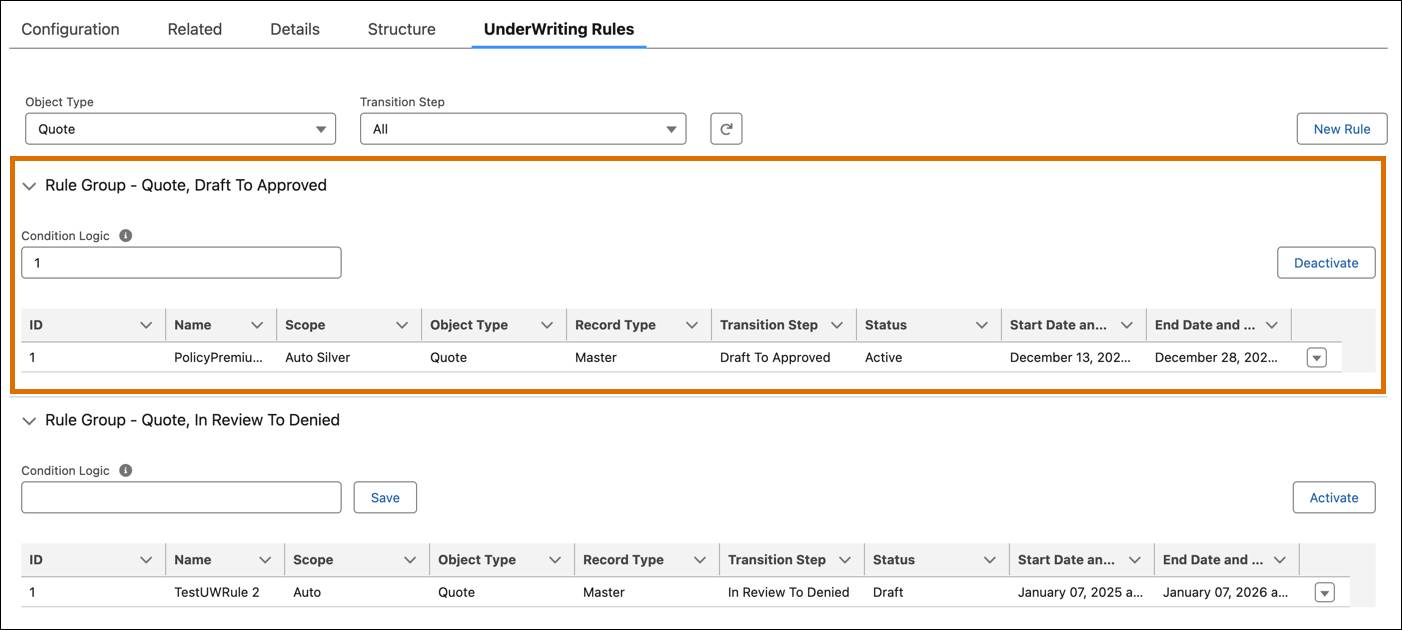
When multiple rules exist within a group, you can configure condition logic to determine how they interact. This is done using sequence numbers and logical operators.
For example, Justus adds a second rule to the Draft to Approved transition.
-
Condition: Approve if the driver has more than 10 years of driving history and no major accidents.
Within the rule group, he sets the Condition Logic to:
-
"1 OR 2": The quote automatically transitions to Approved if either rule evaluates as true.
-
"1 AND 2": Both conditions must be met for approval.
Once satisfied, Justus activates the rule group. Activation applies to the entire rule group, but individual rules within the group retain their own active/inactive status.
Delight Customers with Rules
With underwriting rules in place, insurers can confidently automate approvals, ensure compliance, and streamline the quoting process. Whether it's fast-tracking low-risk applications or flagging complex cases for review, these rules create a structured, predictable experience that enhances both efficiency and accuracy.
Cumulus Insurance’s approach illustrates just one example of how stage management keeps insurance workflows running smoothly. But the impact of well-designed rules extends far beyond underwriting. By applying these rules strategically, insurers accelerate decision-making, reduce manual workload, and improve policy accuracy—all while delivering a seamless, intuitive experience for both customers and agents.
Let’s take a step back and reflect on the rules we’ve covered throughout this module with Justus.
-
Qualification Rules ensure customers see only the products they’re eligible for.
-
Configuration Rules define how those products behave during quoting.
-
Product Underwriting Rules guide transactions through approvals with risk-based automation.
With a solid foundation in rule-driven automation, you’re now equipped to enhance insurance workflows with precision and efficiency. Ready to take your expertise even further? Explore the Resources section for advanced implementation strategies, best practices, and additional setup guidance.