Get to Know Code Extension
Learning Objectives
After completing this unit, you’ll be able to:
- Define Code Extension and its role in the Data 360 ecosystem.
- Identify when to use Code Extension compared to native tools.
- Explain where Code Extension runs in Data 360.
Explore Code Extension
While Data 360 provides powerful native tools (low-code and no-code tools) for data manipulation, certain complex business requirements need the flexibility of a programming language natively executed through batch data transforms. Code Extension bridges this gap by allowing you to run custom Python code securely within Data 360 to perform complex, business-specific transformations.
Code extension gives you the flexibility to create batch data transforms using custom logic that the native visual transform builder doesn’t. For example, you need windowed percentiles on engagement data, such as email opens and site visits, and text similarity on lead notes to match your ideal customer profile. With Code Extension, you can create batch data transforms that use Python libraries, such as scikit-learn and difflib, in your custom transform logic to calculate windowed percentiles and text similarity.
The Code Extension Workflow
The code extension workflow spans local development, sandbox validation, and production deployment. Developers author and debug code locally, then deploy to Data 360 sandbox. Users with a Data Cloud Architect permission set manage code execution, monitoring, and migration in Data 360 environments.
You must manually assign and audit appropriate governance tags on target DLOs (data lake objects) or DMOs (data model objects) that your code extension scripts create or update. This ensures compliance with your organization’s governance data policies. Automatic tag propagation for target objects is going to be supported soon.
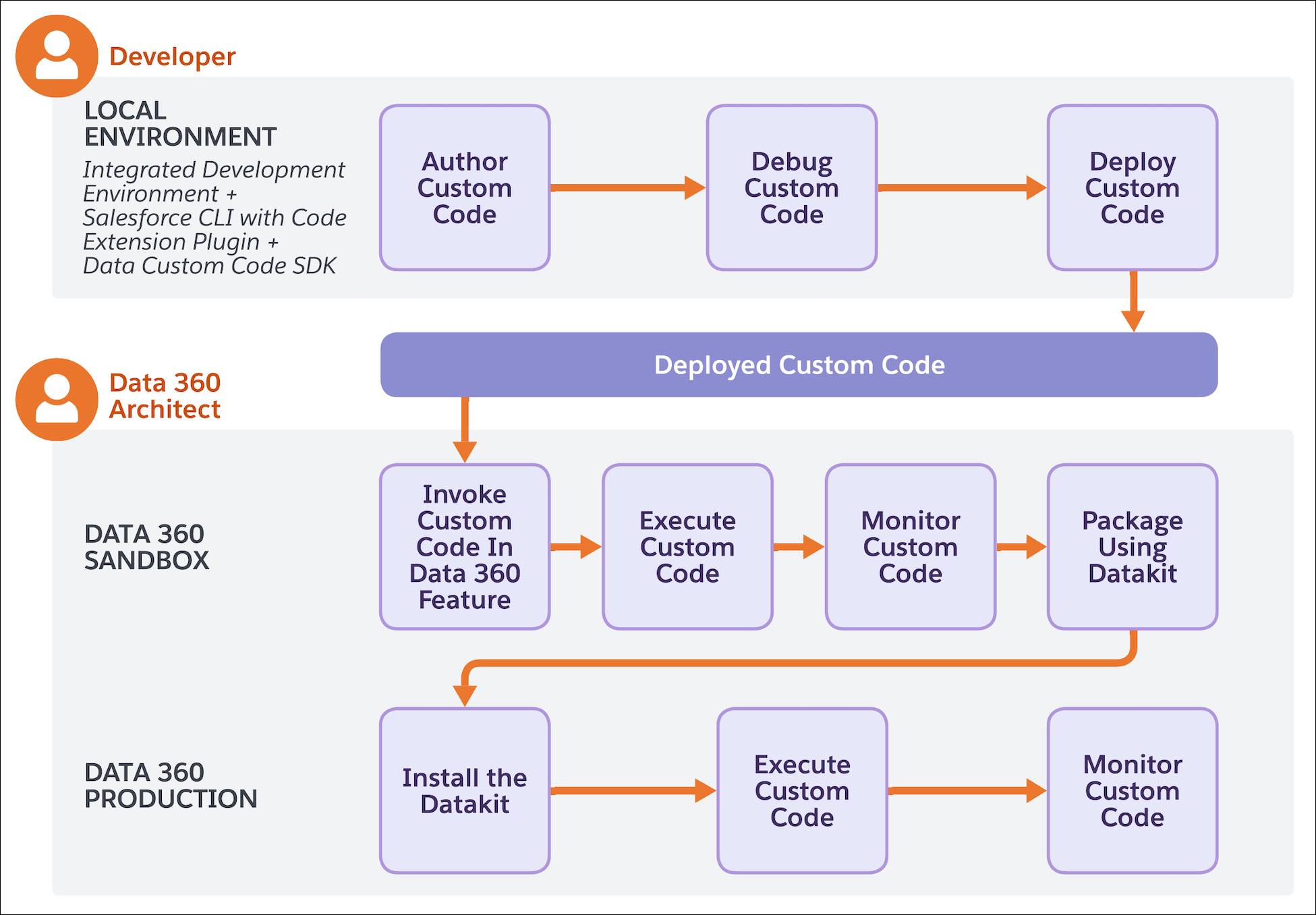
How Code Extension Integrates with Data 360
Code Extension integrates with Data Transforms in Data 360 so you can apply custom logic to advanced transformations. You invoke Code Extension from Data Transforms, and Data 360 executes your code in isolated compute.
Use Case: Bloomington Caregivers—Vaccination Outreach and Prioritization
Bloomington Caregivers wants to prioritize outreach to patients who need vaccinations. Staff must find patients who haven’t had a COVID vaccine or seniors over 60 who are still missing a dose. Instead of manually reviewing records, the care team uses segments built in Data 360, for example, “COVID vaccine needed” and “Seniors 60+ missing vaccine.” This allows them to run campaigns from the UI and reach the right patients without leaving Data 360.
Vaccination records are stored as raw XML in Data 360. Native Data 360 tools (joins, filters, and standard transforms) cannot parse XML or reshape it into the structured data needed for segments and reporting. Because the data format is unusable for building segments, the team faces manual work to identify patient needs. A developer uses Code Extension to write a script that reads the XML, extracts the necessary fields (patient name, age, vaccination history), and writes the output as structured rows into a data lake object. An architect runs the script in Data 360 and then uses the output to build segments for targeted outreach.
By using Code Extension, Bloomington Caregivers is able to turn raw XML into actionable structured data inside Data 360, enabling care teams to build segments and run vaccination outreach campaigns without leaving the platform or moving data out.
Next Up
Now you know the basics of Code Extension and a use case. In the next unit, learn how to author and validate Code Extension locally.