Maximize Your IT Team with AI and Swarming
Learning Objectives
After completing this unit, you’ll be able to:
- Explain how to start a collaborative swarm in Slack to resolve complex incidents.
- Use Agentforce to help fulfillers summarize channels and update records automatically.
Give Your Agents a Command Center in Slack
You learned about the toggle tax for employees, but for IT reps or fulfillers, the constant context-switching is severe. They’re constantly switching between the Salesforce console to update records, email to chase approvals, and Slack to chat with everyone. It’s a recipe for burnout and slow resolution times.
The Fulfiller Hub changes everything. It turns Slack into a command center where IT reps can manage their entire workload without ever leaving a chat window.
Manage Your Ticket Queue in Chat
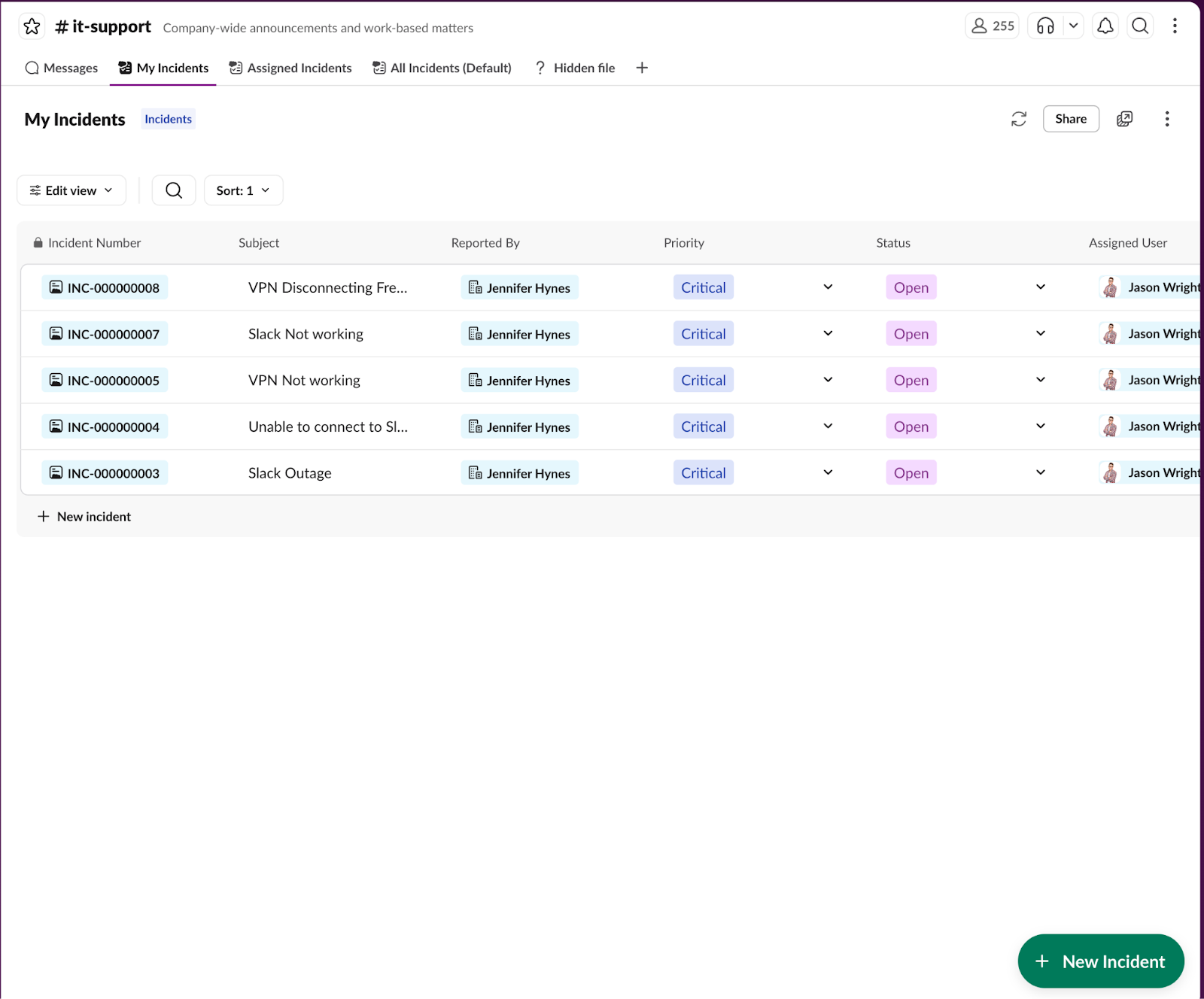
Instead of refreshing a browser tab to see new tickets, IT reps use Salesforce list views in Slack to view their assigned work instantly.
-
View and update: IT reps can see a list of their open incidents, check priorities, and update statuses like moving a ticket from New to in progress directly from Slack.
-
Triage faster: When a new case or incident arrives, an IT rep can claim it, reassign it, or add notes immediately.
Solve Complex Issues Together with Swarming
Some problems are too big for one person to solve. When a major incident hits—like a widespread VPN outage—you need to bring in experts from networking, security, and maybe even engineering. In the past, this meant frantic emails or Slack DMs. With Agentforce IT Service, you use collaborative swarming.
At Orivian Global Holdings, IT reps use swarming to resolve major incidents. Instead of a conference call chain or endless email threads, they click one button to instantly launch a dedicated Slack channel that brings in the right experts from across the organization to solve the problem.
Start a Swarm Instantly
Let's look at a real-world scenario. Imagine Bob, a fulfiller, notices a spike in tickets about VPN connectivity. He suspects a major outage.
-
One-click setup: Instead of creating a new Slack channel manually and inviting people one by one, Bob clicks Begin Swarming directly from the incident record.
-
Automated channels: Agentforce IT Service automatically creates a dedicated Slack channel for this specific incident, such as #incident-vpn-outage-01-03.
-
Bring in the experts: Bob adds the right experts—like Matt, the major incident manager, and Akira from the network team—right into the channel. They get caught up on the incident details immediately.
The situation room is created instantly, ensuring everyone has the same context and can start solving the problem right away.

Let AI Handle the Triage and Note-Taking
What is the biggest headache with swarming? It's documentation. After an hour of intense troubleshooting in Slack, someone usually has to scroll back through hundreds of messages to summarize what happened and update the official record.
Agentforce IT Service acts as your intelligent scribe. It automates this busy work so your team can stay focused on the fix.
Summarize Swarms Automatically
Once the VPN issue is resolved, Matt doesn’t need to spend 20 minutes writing a report. He simply asks Agentforce IT Service to: “Summarize this incident for me.”
Agentforce IT Service analyzes the entire Slack thread, extracts the key details like timeline, root cause, steps taken, and generates a concise summary. Matt can review it and post it directly back to the Salesforce Incident record with one click.
Accelerate Root Cause Analysis
For deeper problems, Agentforce IT Service can do even more. It can analyze related incidents and historical data to suggest a root cause analysis (RCA). For example, Zoe, a problem manager, picks up the ticket after the swarm. She asks Agentforce IT Service for an analysis. AI reviews the swarm chat and related system logs to suggest that a “recent faulty code patch” was the culprit.
Accelerate Approvals with One Click
Finally, speed isn’t just about fixing things; it’s about unblocking people. When an employee requests a new laptop or access to a sensitive system, that request often sits in a manager’s inbox for days. With Agentforce IT Service, approvals happen in the flow of work.
-
Instant notification: The manager receives a Slack notification the moment the request is made.
-
One-click action: The notification is an Adaptive Card with Approve and Reject buttons. The manager can approve the request while waiting for their coffee, without logging into a portal.
Streamline Operations with a Unified Workflow
By moving the fulfiller experience into Slack, you aren’t just making things easier—you’re fundamentally changing the metrics that matter.
Task |
The Old Way |
The Slack and Agentforce IT Service Way |
|---|---|---|
Manage Workload |
Toggle between email, chat, and ticketing system. |
Single view: View and update incidents directly in the Slack Fulfiller Hub. |
Collaborate on Outages |
Send frantic emails and ad-hoc chat groups with no context. |
Swarming: Instantly create linked channels with the right experts and live record data. |
Document Solutions |
Manually read through chat logs to write summaries. |
AI summarization: Auto-generate resolution notes and update the record. |
Find Root Causes |
Manually investigate logs and disparate tickets. |
AI analysis: Scan related records and chats to suggest root causes instantly. |
Approve Requests |
Delay approvals by putting off emails (“I'll get to that email later.”). |
Instant approval: Click one button in Slack to reduce approval times to minutes. |
Get Started Fast
In Unit 2, you learned how Slack and Agentforce IT Service transforms the employee experience. This unit showed how Agentforce IT Service supercharges productivity for IT reps. But how do you actually turn this on? Do you need a team of developers and 6 months of time?
No, you don’t! In the next unit, you learn how Salesforce Go makes setup a breeze.