Create Channels with Purpose
Learning Objectives
After completing this unit, you’ll be able to:
- Describe the benefits and best practices of standard channel naming conventions.
- Explain the basic criteria for naming channels.
Establishing a thoughtful channel creation process is key to a consistent user experience in Slack. By defining channel purpose and audience, and implementing standardized naming conventions, you can maintain an organized workspace where users can quickly find the information they need.
Learn the Benefits of Channel Naming Conventions
Let’s review some of the ways that naming channels can help users in the flow of work.
- Keep conversations on topic.
- Make it easy to find new channels.
- Allow for quicker access to critical information and people.
- Keep the channel sidebar organized.
- Allow users to quickly determine if a channel already exists, or if it needs to be created.
- Establish guidelines for a consistent user experience.
Follow Channel Creation Best Practices
When guiding your client through channel strategy creation, use information gathered in discovery to provide examples for them. For example:
- Is it a help channel where users can ask questions?
- Is it focused on a specific project or product?
- Is it for announcements?
Three best practices for channel creation to keep top of mind include:
-
Search first: Before creating a new channel, first search to ensure a channel for this topic doesn't already exist. This helps reduce channel redundancy.
-
Clarify the purpose: After creating a new channel, make sure to include a channel topic or description so members are clear of the purpose for the channel. This helps members know when to use the channel and when conversations should be held elsewhere.
-
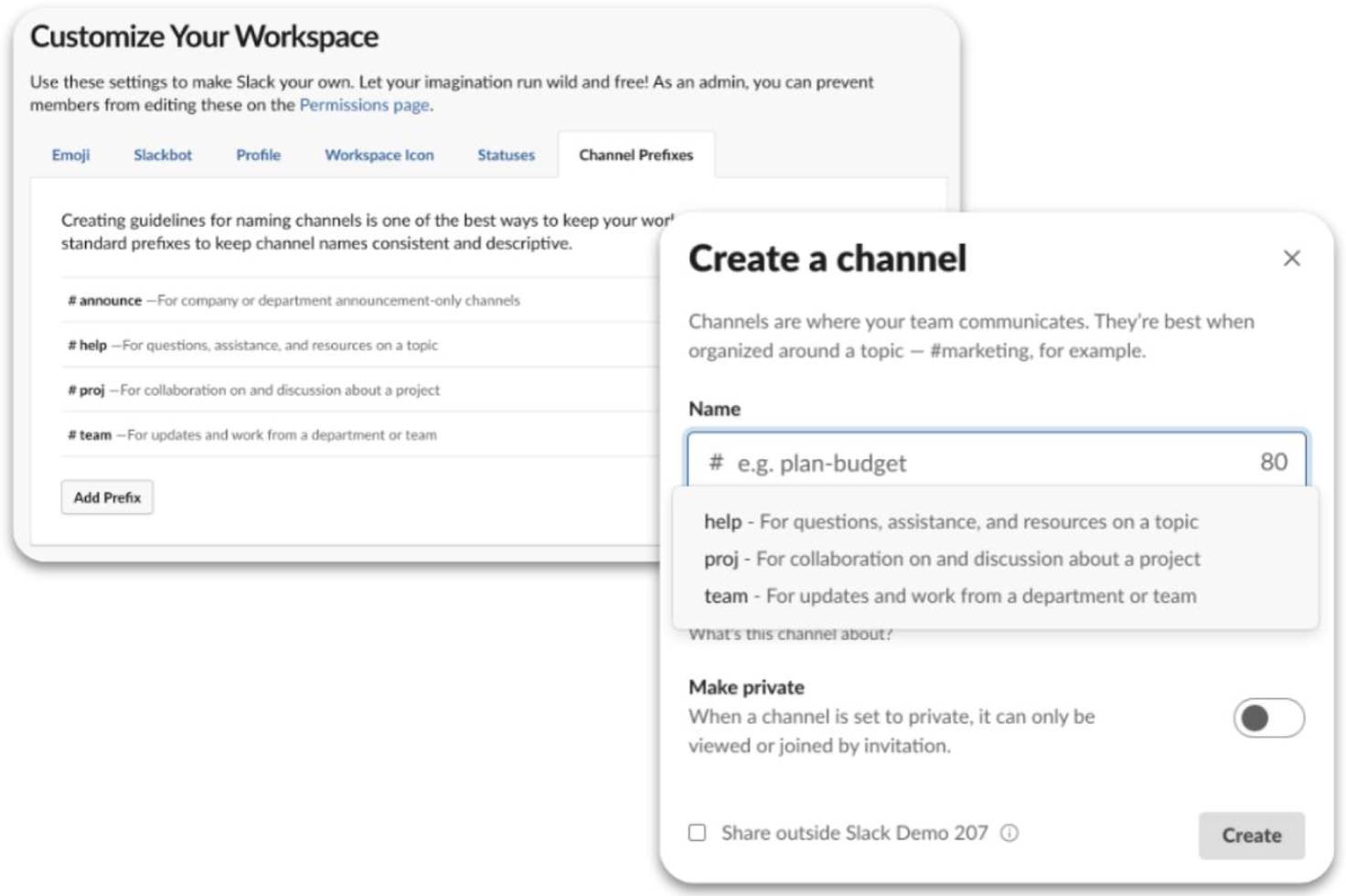
Follow naming conventions: Workspaces quickly fill up with lots of channels. To help ensure that members can find relevant channels, customers should set channel naming conventions. Populate their grid design with channels that reflect their agreed-upon naming conventions to help them visualize how work will come together in Slack. Learn more about naming conventions next.
Use Channel Naming Criteria
Channel names are an important foundation for a consistent and clean user experience. While there isn’t one correct set of naming conventions, sharing some guidelines with your clients will help tailor the criteria to meet their needs.
All channel names must adhere to the following:
- Channel names can be up to 80 characters, including spaces.
- Only lowercase letters, numbers, dashes, and underscores are allowed. No other punctuation or special characters are allowed.
- Use a dash as a delimiter between prefixes, not an underscore. This helps create visual consistency for users.
Setting naming conventions helps users quickly identify channel purposes. By default, channels are listed alphabetically, so use a clear formula and share it with everyone to ensure consistency. Pin the naming standards to a #help-slack channel for easy access. Prepopulating common prefixes in workspaces also guides users toward best practices when creating new channels. We recommend using the specific formula outlined in the next section for all users to ensure consistency in channel creation and searchability.
Choose a Prefix
A good channel name should begin with a prefix that denotes the purpose of the channel. A hyphen should separate the prefix from the qualifier that follows, which is a unique identifier that further describes the intent of the channel. Establishing prefixes with descriptions helps reduce confusion and the potential for channel redundancy. The following tables show common prefixes and their descriptions.
Common Prefixes |
Description |
Example Channels |
|---|---|---|
#announce- |
Channels for announcements only. |
#announce-global #announce-sf #announce-learning |
#ama- |
Ask Me Anything channels, where employees can hear from executives and team members on pertinent topics. |
#ama-exec #ama-account-team |
#allhands- |
Channels used to facilitate questions, updates and post recordings for all-hands meetings. |
#allhands-global #allhands-sales |
#ext- |
Channels used for collaboration with external organizations through Slack Connect. |
#ext-product-launch-event |
#erg- |
Channels for employee resource groups (ERGs) to hold discussions. |
#erg-women #erg-veterans |
#help- |
Channels that offer cross-functional support, where employees can go with a specific request. |
#help-slack #help-it #help-finance |
#proj- |
Channels where project specific work takes place. |
#proj-logo-rebrand #proj-echo-go-live |
#team- |
Channels for specific team discussion. These channels may be private if teams need a closed space to collaborate. |
#team-marketing #team-finance |
#training- |
Channels used to educate employees. |
#training-hr #training-onboarding |
Add a Qualifier for Specificity
After identifying the prefix for the channel, the next section of the standard naming convention should be a qualifier that provides more specificity. Qualifiers vary by organization, but can include the location, department, client, project, or service that the channel is focused on. The following table shows examples of qualifiers added for specificity.
Channel Name |
Description |
|---|---|
|
#team-marketing #help-marketing |
Marketing is the department qualifier. |
|
#announce-us #announce-canada |
Country is the location qualifier. |
While the prefix defines what type of channel, the qualifier provides a distinction.

Deliver a Positive Onboarding Experience
Once you establish a channel naming convention and clarity on when to create a channel, it’s important to give users a good onboarding experience. When your client launches Slack or when new users are onboarded, they should use default channels to ensure all users have access to fundamental channels, like announcements and help channels. See below for recommended default channels.
Default Channel Recommendations
Channel Name |
Channel Type |
Description |
|---|---|---|
#announcements- global |
|
A general announcements channel that only allows certain members to post news. All other employees can read questions or comments on announcement posts. |
#slack-101 |
|
A channel that welcomes all employees to Slack. It should include Slack tips and tricks, and ad-hoc training announcements. |
#help-slack |
|
A help channel for all Slack-related questions. It should include pinned FAQs, tutorials, and other Slack support resources. |
#plz-admins |
|
A channel for all questions and support that needs to be executed by a Slack Admin. This is dependent on the organization’s policies and settings but may include app approval requests and Slack Connect requests. You learn more about how to use a #plz-admins channel for your clients in the Governance Badge. |
|
#help-finance #help-benefits #help-biztech |
|
Channels to request help from specific departments and triage those requests. |
Wrap It Up
A well-planned channel strategy is crucial for a successful Slack implementation. By understanding channel types, settings, and best practices, you can help your clients create an organized workspace that enhances user experience and productivity. Establishing standardized channel naming conventions and thoughtful channel creation processes helps maintain a clutter-free environment where users can quickly find the information they need.