Explore Marginal Commission Rates
Learning Objectives
After completing this unit, you’ll be able to:
- Explain a sales accelerator table for marginal commission rates.
- Describe the math behind marginal commission rates.
- List the two marginal payout rule functions.
Meet Marginal Commission Rates
Salesforce Spiff is a leading sales compensation software that automates and simplifies the process of calculating and managing sales commissions. When your reps look at statements, have they ever wondered how the commission rate is calculated? The math behind some of these commission rates can be tricky, especially if your company uses a marginal payout. This is because marginal payouts can employ blended commission rates when deals cross over tiers.
Let’s consider a sample rep statement. In this example, the company uses this sales accelerator or range table to define the rate structure for their rep’s respective attainment achieved.
Name |
Lower Bound |
Upper Bound |
Return Value |
|---|---|---|---|
Tier 1 |
0 |
0.6 |
0.10 |
Tier 2 |
0.6 |
1 |
0.15 |
Tier 3 |
1 |
0.1875 |
It seems pretty straightforward. A rep can expect to receive a 10% rate if they’re between 0% and 60% attainment, a 15% rate if they're between 60% and 100% attainment, and a 18.75% rate if their attainment is above 100%.
However, if we check the statement in Spiff, there’s a line item with a commission rate of 11.87%, which wasn’t a rate defined in our accelerator table.
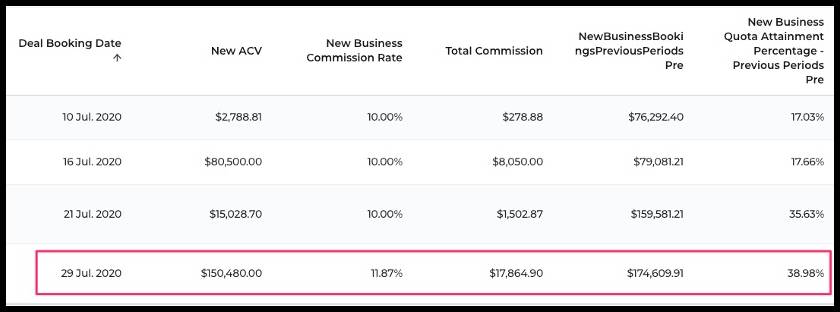
How did the rep get that commission rate? Marginal payout rules apply only the rates within each range to the sales in that range. For example, the rep was paid a 10% commission rate on sales up to 60% of their quota, then higher rates for sales beyond that rate.
In this module, you learn how to calculate marginal commission rates in Spiff. But first, let’s understand the math behind them.
Calculate Blended Commission Rates
Let’s consider the example of a rep who has a yearly quota of $447,920. This means that for her to reach the second tier of 15% commission rates, she needs to reach $267,752 of bookings (60% of $447,920). To get the 18.75% rate, she’ll have to exceed her entire yearly quota of $447,920.
To figure out where the 11.87% came from, you want to know what's happening as each deal closes, with respect to where you're in the accelerator table. For the line item with a commission rate of 11.87%, we know Emily has already earned $174,609.91 this year. You get this information from the NewBusinessBookingsPreviousPeriodsPre column. This particular deal was worth $150,480, so we need to figure out where that puts us on our accelerator table after adding it to the previously earned $174,609.91.
Because $174,609.91 has already been earned, this deal worth $150,480 brings the rep up to $325,089.91 for the year, and into the 15% commission category. However, not all of that $325,089.91 gets the 15% rate. And not all of the $150,480 from this new deal gets a commission rate of 15%. This new deal is commissioned partly at the 10% rate, and partly at the 15% rate, because it falls between the two tiers.

The previous $174,609.91 was given a 10% commission rate. From the $150,480 deal, $94,142.09 gets a 10% rate. That fills the rep’s 10% bucket up the rest of the way, because adding $174,609.91 to the $94,142.09 takes her to $268,752. That leaves $56,337.91 for the 15% commission rate. Here’s the math:
- $94,142.09 x .10 = $9,414.21
- $56,337.91 x .15 = $8,450.69
- $9,414.21 + $8,450.69 = $17,864.90
Adding the two amounts together results in $17,864.90, which is the total commission shown in the rep’s statement. So where does the 11.87% rate come from?
To answer this question, figure out what percentage $94,142.09 is of the $150,480 deal amount. We do the same for the remaining $56,337.91.
- $94,142.09 is 62.56% of $150,480
- $56,337.91 is 37.43% of $150,480
So, 62.56% of the deal amount was commissioned at a 10% rate, resulting in a rate of 6.256%. The math is 62.56% x 10% = 6.256%.
Another 37.43% of the deal amount was commissioned at a 15% rate, resulting in a rate of 5.615%. The math is 37.43% x 15% = 5.615%.
Add the two rates together and you get the blended rate of 11.87%! So you calculate the average of the rates based on the portions of the deal to find out the blended rate.
Marginal Payout Rule Functions
In Spiff, you get two marginal payout rule functions: mamount and mpercent. Depending on your requirements, you use either to calculate marginal commissions. Now that we understand the math behind marginal rates, let’s explore the two functions in the next unit.