Discover the IT Service Catalog and Service Processes
Learning Objectives
After completing this unit, you’ll be able to:
- Discuss the importance of standardized service delivery.
- Describe the purpose of the Unified Catalog and how it’s used.
- Explain how to set up and deploy your catalog and service processes.
Standardized Service Delivery
The secret to a perfect IT service experience is unified information and consistent execution. Your employees need rapid support, which means being able to pinpoint and request the right solutions quickly, not sifting through scattered platforms and information libraries. By standardizing your request resolution processes and fulfillment tasks, you can help IT teams resolve common issues systematically, scale their services, and focus on solving more complex problems.
In Agentforce IT Service, employees have a comprehensive catalog of service offerings to help them quickly find and request the right solution to meet their needs. And each of these services connects to a specific, repeatable workflow for fulfilling the request. By removing the hassle and uncertainty from service request and delivery processes, you set your IT staff and employees up for lasting success.
In this unit, you dive into the foundational pieces of request management. You explore how the Unified Catalog, service processes, and underlying components simplify IT operations and speed up resolutions.
The Unified Catalog
The Unified Catalog is a central framework for creating and consolidating all of your services and assets, also called products. Using the catalog, you can build a single repository for your IT solutions and give employees a user-friendly storefront where they can easily find and request whatever they need, including software access, hardware provisioning, password resets, and other services.
With your catalog in place, employees can:
- Browse and search offerings on the Agentic Service Portal and submit service requests.
- Chat with the Employee Agent through the portal, Slack, or Microsoft Teams to find services and submit requests.
- Submit requests from related knowledge articles for related services.
In addition to providing an improved employee experience, catalog data serves as the backbone for a structured delivery system by standardizing service request and fulfillment. That’s where service processes come into play.
Service Process Configuration
A service process is a blueprint that defines a complete, structured workflow for delivering a requested IT solution. Each process connects data, automation, AI actions, and workflows to form a reusable resolution procedure.
Each service process includes:
- Connections to data models and context attributes
- Intake forms for capturing requester information
- Fulfillment flows that define end-to-end resolution steps
- Links to associated knowledge articles
- Connected agent actions
- Product lists attachments
Your service process configuration begins in Service Designer, where you can seamlessly integrate all of these elements to drive efficient request resolution.
Here’s an image of a service process for an intake request. This process executes the provisioning of a corporate phone when an Orivian employee requests one.

The service process configuration defines the data models, attributes, intake form, fulfillment flow, knowledge articles, and other advanced options.
Next, you explore each service process configuration component, using the Orivian corporate phone service request as an example.

Anchor Entities and Attributes
For each service process in your catalog, you set a target data model, either a service request, case, or an incident, so that one of these anchor entities is generated when a user submits a request for the service. Most often, you use a service request or case record for standard requests, such as a hardware replacement or software access, and an incident record for reported problems, such as a VPN access issue.
You also define context attributes, which connect to the target object and other Salesforce entities, and custom attributes to capture necessary information related to a service request.
Include these attributes in intake forms to collect information from the requesting employee. You can organize attributes into sections, make them required, add default values, or hide attributes that only serve as background metadata.
For example, here are the Request a Corporate Phone service process attributes that the Orivian admin defines.
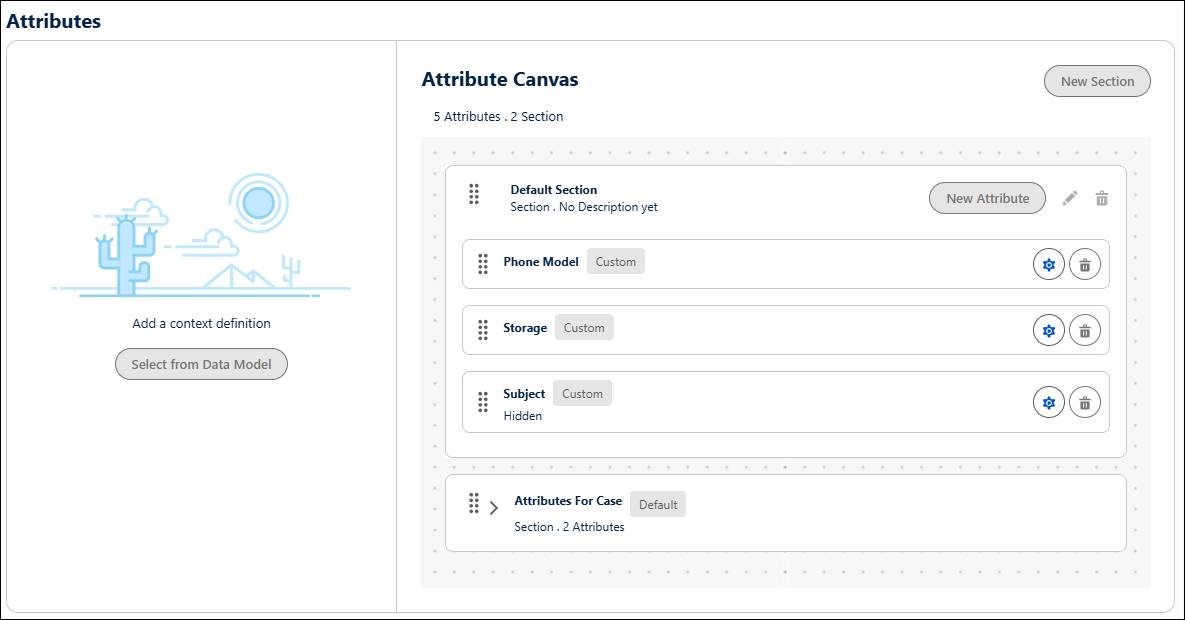
The phone service includes custom text attributes to collect additional information from the user, such as their preferred phone model and storage options. You can also include context attributes to capture data from Salesforce objects, such as the requesting employee’s first name and last name from account and contact records.
Intake Forms and Products
Intake forms capture data from the requester for efficient triage or fulfillment. You can connect an existing screen flow or Omniscript form, or quickly generate a basic form based on the attributes you define for the catalog item. Include additional logic, integrations, or validation, as needed, to ensure accurate information and request routing.
If a service process involves provisioning one or more products, include a Product Request option and attach a list of specific hardware or software assets. You can group products into sections, and choose whether the user can request one or multiple products. Then add a Lightning Web Component to your intake flow for employees to select their preferred option.
You can also organize products into categories and subcategories for better discoverability in the catalog. To learn more, view the links in the Resources section.
For the phone provisioning service, the Orivian admin creates and connects an intake form using a screen flow.

The flow uses a screen flow to capture the requesting employee’s preferences for the phone model and storage, and creates a case record to store the request.
Fulfillment Flows
Next comes automation. Service process fulfillment flows automatically manage the execution of a service request after an employee submits it. Depending on the type of service, flows can route approvals, create tasks for IT teams, provision items, and close requests upon resolution.
You can use one of two types of flows to configure your fulfillment process.
- Use a standard flow for simple processes with a series of predefined actions.
- Use Flow Orchestrator to create complex, multistage workflows that require coordination across multiple steps and departments.
Additionally, you can use Stage Management to specify the path that a request, case, or incident follows towards resolution. Set up stages with tasks and approvals, transitions, and the criteria required to move the record to each stage.
For example, here’s a simple fulfillment flow for a password reset service.

The flow sends an email to the requesting user that contains a temporary password, and creates a service request record to track the fulfillment progress.
Your fulfillment processes can contain additional steps, including routing approval requests to managers or assigning tasks to responsible IT teams based on assignment rules and Omnichannel routing. You can also set the flow to automatically close cases, requests, or incidents after completing the request. Now that’s efficient!
Knowledge Articles
Create knowledge articles to capture, organize, and share information. With knowledge articles, employees can explore known errors, workarounds, and solutions to resolve or prevent common issues, or quickly request a related service. These articles also serve as foundational data for Agentforce agents, which use this information to answer employee questions, provide solutions, and offer services within context.
For example, Orivian publishes a knowledge article to help users resolve VPN connection issues.
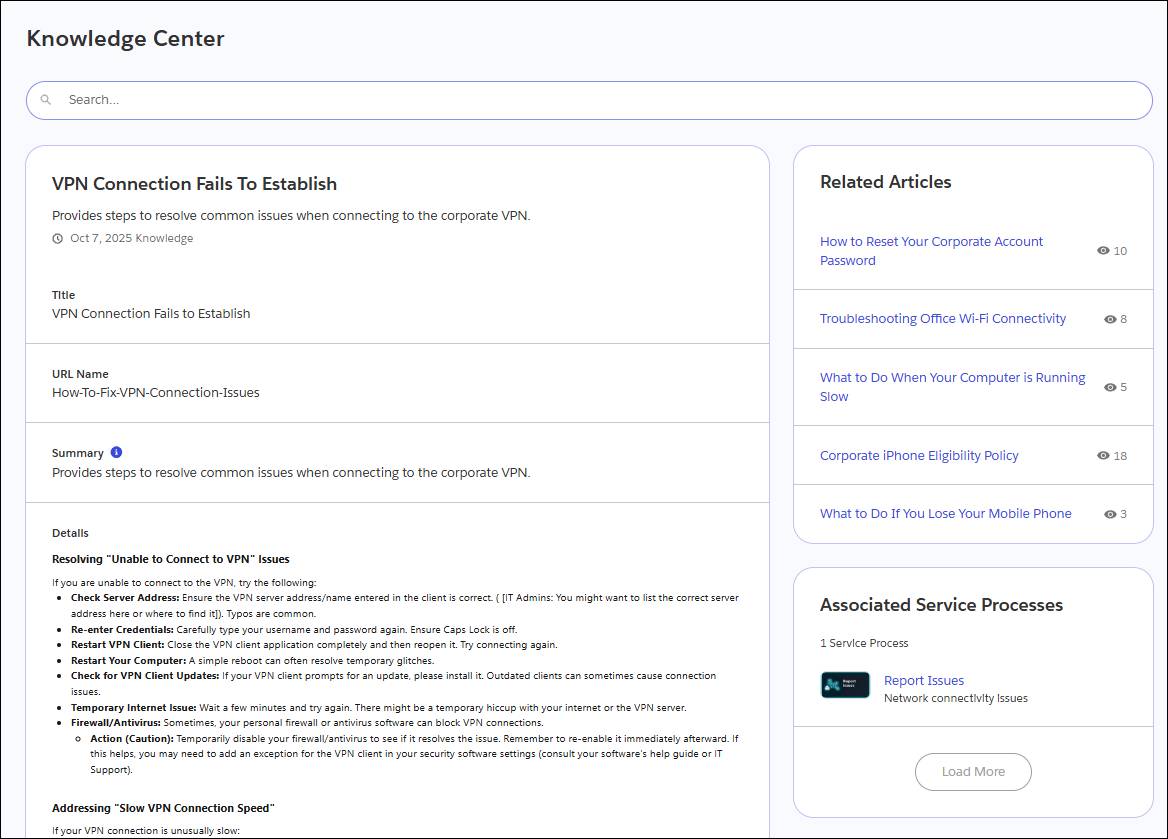
The article contains a link to an associated service process, which employees can use to report issues after performing any recommended troubleshooting steps.
Agent Actions
Connect an agent action so that AI support agents can trigger the correct service process to assist employees. With this connection in place, the system automatically generates a flow and an invokable action to facilitate the execution of the service process.
To enable catalog items in conversations with AI agents, use preconfigured actions that discover the user’s intent, pick the right catalog item, and receive inputs conversationally for most catalog items. For example, if the user asks for an email ID to be created for a new employee, they can simply ask Agentforce for the ID. The agent then finds the correct catalog item and collects the necessary inputs to complete the intake form and fulfill the task. Then, it creates a record to store and track the request.
To learn more about configuring your AI agents, visit the Help docs listed in the Resources section.
Deploying the Catalog
Agentforce IT Service includes a comprehensive set of prebuilt service catalog items to help you quickly set up your catalog. You can also create custom services and assets to support your unique business use cases.
After you’ve set up your catalog and service processes, deploy it to the channels your employees use, which might include the Agent Service Portal, Slack, or Microsoft Teams. You can also add an Action Launcher component to incident, service request, or other records so that IT staff can quickly launch service processes on behalf of employees.
In this unit, you discovered how the Unified Catalog provides a single source of truth for your services, and service processes define the underlying workflows to resolve requests. By integrating anchor entities, intake forms, fulfillment flows, knowledge articles, agent actions, and products into each of your services, you can keep employees on track and minimize disruptions to their work.
Now that you’ve learned about the underlying structure, you’re ready to see request management in action. In the next unit, you explore the lifecycle of a service request from the perspectives of an employee seeking support and the IT service rep who fulfills the request with unprecedented efficiency.