Help Potential Applicants Find Loan Products
Learning Objectives
After completing this unit, you’ll be able to:
- Explain how potential applicants find loan products through a self-service portal.
- Describe how the Loan Product Assistance Agentforce agent guides potential applicants to their best loan option.
- Explain how the Loan Calculator component helps potential applicants refine loan options and understand payment details.
The Correct Product for the Applicant
Before applying, potential loan applicants first explore the range of loan products available and then decide which is suitable for them. This exploration is a critical first step to help them select your institution over other options.
Digital Origination for Lending offers several self-service features to help potential applicants without requiring valuable time from your team.
In this unit, you learn about using lending features to:
- Set up a self-service portal with Experience Cloud.
- Provide conversational loan information with Agentforce.
- Generate loan estimates to potential applicants with the Loan Calculator component.
First, explore Experience Cloud portals.
Self-Service with Experience Cloud
Start with the included Experience Cloud site template to set up a self-service portal for potential applicants. By using the portal, potential applicants can browse your loan products organized into catalogs, categories, and subcategories that you use in Product Catalog Management.
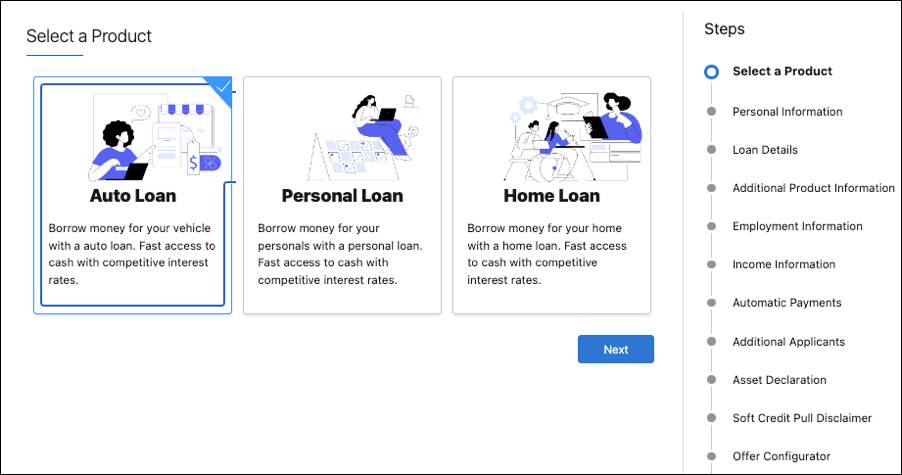
To make each product easy to find and explore, the Experience Cloud template includes the Product List Page and Product Detail Page Flexcards to show loan details. Set these Flexcards to be visible to unauthenticated guest users so even potential customers without an account can view product details.
To be more selective about which loan products to show to specific potential applicants, use Product Qualification Rules with Business Rules Engine. Product qualification rules filter which products an applicant, broker, or loan officer can access and show only eligible loan products and categories. Set rules based on criteria relevant to the applicant, such as their location or income, or information about a broker or loan officer, such as location.
If your potential applicants need a little extra help finding the best product, Agentforce can answer their questions and compare options.
AI-Powered Loan Product Assistance
Digital Origination for Lending works with the prebuilt Loan Product Assistance template for Agentforce to automate routine loan product inquiries.
The Loan Product Assistance template helps you quickly configure a customer-facing agent that helps potential applicants find and assess loan options, such as mortgages, auto loans, or personal loans. The template's included topics, actions, and instructions work together to return loan product categories, details, and programs to answer your potential applicants’ questions about loan options.
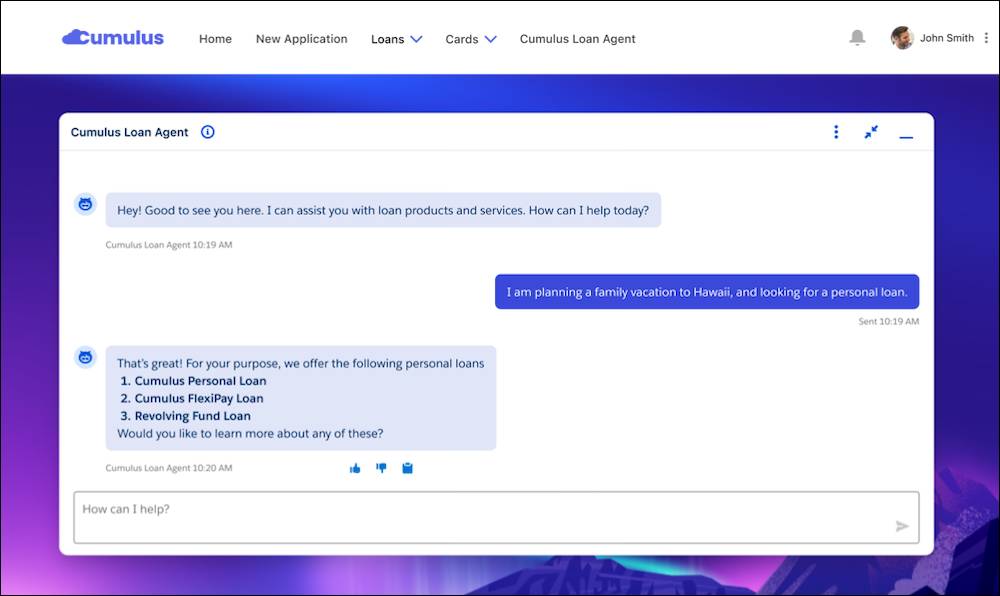
For example, imagine that a potential applicant wants to know about all auto loan options you offer before applying for a loan. The potential applicant can ask the agent about those options by using plain language. When the agent returns a list of options, the potential applicant can ask for more details about products, terms, and available offers, and even ask the agent to compare products against each other.
By the end of a potential applicant’s conversation with the agent, the potential applicant feels confident about the best product for their needs. Plus, the potential applicant made their choice without taking valuable time from your loan officers, who can focus on more high-value personal interactions.
Self-Service Loan Estimate Calculations
If a potential applicant wants even more details, they can use information from their conversations with the Agentforce Loan Product Assistance agent to refine their options by using the Loan Calculator component on your Experience Cloud site.
The Loan Calculator component is a flexible, educational tool for potential applicants to understand loan details as they explore loan products. The tool helps potential applicants determine how much they can afford to borrow based on loan amount, tenure, repayment schedule option, and extra payments.
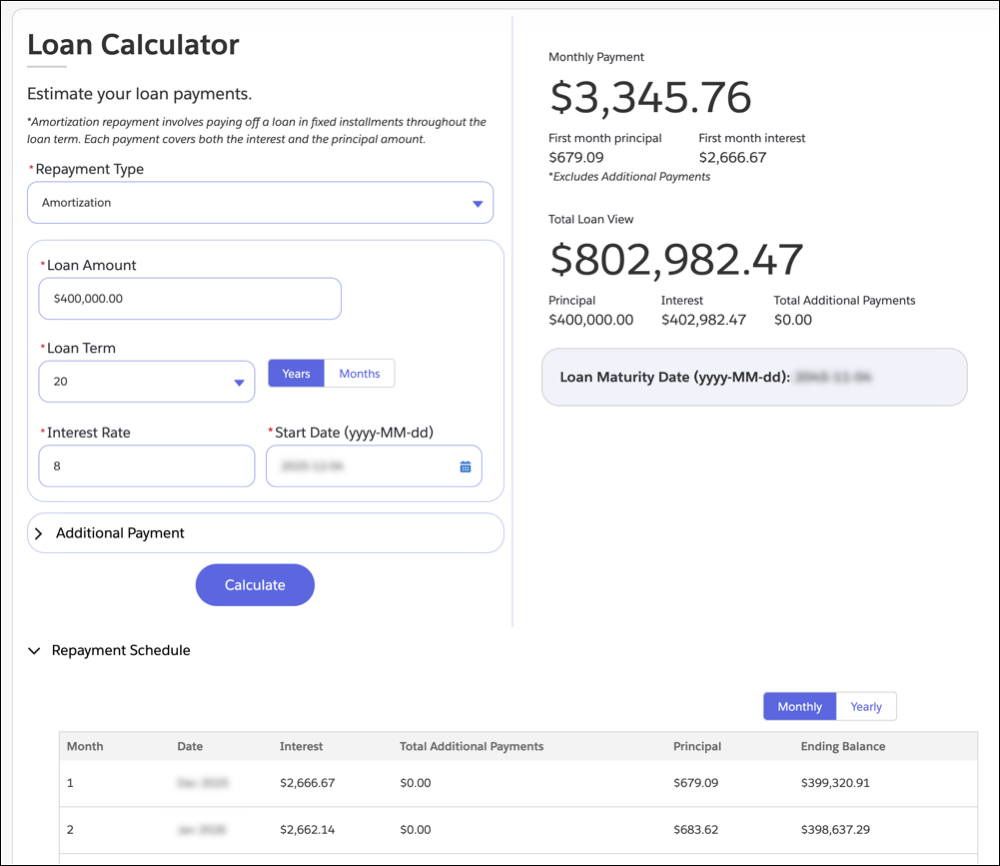
With the calculator, potential applicants can determine estimated loan payments and view potential amortization schedules, payment schedules, and interest rates. Potential applicants can even factor in extra recurring or single payments to understand the impact extra payments have on reducing a loan’s term or monthly payments. The calculator also supports complex repayment options, such as step-up, step-down, bullet, and balloon structures.
The Loan Calculator component isn’t only for potential applicants, though. Add the calculator to Salesforce records pages so that your relationship managers and loan officers can use it for quick estimates while working with applicants.
What’s Next?
In this unit, you learned that Digital Origination for Lending provides self-service tools for potential applicants to find loan products. These tools include:
- An Experience Cloud site template to browse loan options
- The Loan Product Assistance template for Agentforce to answer questions about products
- A Loan Calculator to refine options and understand payment details
Potential applicants, your team, and brokers can use these tools to find the best loan product for each potential applicant.
Now you understand how potential applicants decide to become applicants. The next unit shows you how to collect loan applications.