Manage Data Import and Connections
Learning Objectives
After completing this unit, you’ll be able to:
- Identify integration options for unifying disparate customer data.
- Summarize how these tools work together to connect Agentforce Financial Services to information outside of Salesforce.
Unlock Data with Prebuilt Integrations
So far in this module, you learned about the data models that capture important information about your clients, their financial, accounts, your day-to-day work, and more. Now, it’s time to explore how these data models work with your other systems through data integrations.
Agentforce Financial Services works with many data integration options that both your business and IT team can use to move faster toward your goals.
These integration options bring data from other systems together in one platform to provide a complete view of your customers. For example, integrations can populate and update objects such as Financial Account and Financial Account Transaction with real-time data from your core banking systems so you always have the most accurate view of a client’s finances.
How does this work? Take a look at this diagram that shows data integration tools working together to help a financial institution find client needs, open financial accounts, provide customer service, and assess client financial wellness.
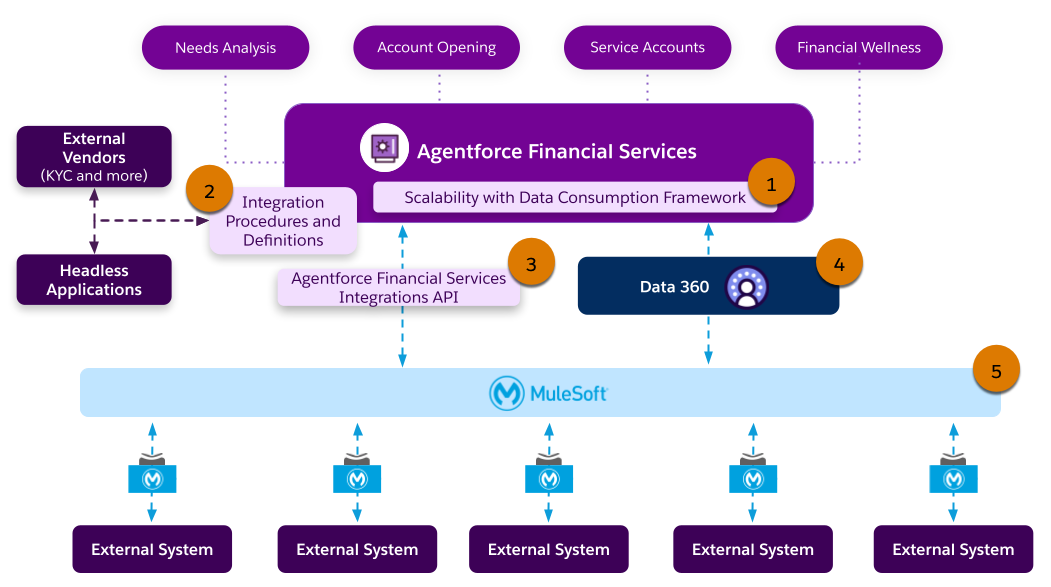
There’s a lot going on here. Focus on the numbered key integration tools in the diagram.
-
Data Consumption Framework (1) coordinates and scales high-volume data integrations.
-
Integration Procedures and Integration Definitions (2) get data from different systems with no-code or low-code tools in a single call.
-
Integrations APIs (3) accelerate your integrations with prebuilt, industry-standard endpoints.
-
Data 360 (4) unifies disparate data sources to make them accessible to your users.
-
MuleSoft Direct for Agentforce Financial Services (5) helps admins connect Salesforce to external systems such as their core banking.
In this unit, you learn about each of these data integration tools and how you can use them to connect Agentforce Financial Services’s purpose-built data models with the data in your institution’s other systems.
Meet Data Consumption Framework
Any Agentforce Financial Services integration with another system can start with the Data Consumption Framework.
Data Consumption Framework is a tool that helps your reps access the latest information from other systems without leaving Salesforce. It works with other Salesforce data products to provide comprehensive data access and unlock information across systems. In short, it provides a scalable way to integrate data for better real-time performance.
It simplifies the setup of integrations with third-party providers for processes such as risk assessment and screening during integrated onboarding. It also enables high-performance API calls to external banking systems for tools such as Service Process Automation.
How does it do this? You can configure it to use external service or Apex-based integrations, as well as MuleSoft or third-party integrations. It includes built-in Apex classes that can be defined without code. Plus, you can prevent delays with asynchronous API call-outs with Lightning Web Components, Flows, and Omnistudio Flexcards and Omniscripts. The Integration Orchestration tool helps, too, with advanced decision-making with Business Rules Engine to generate an integration plan.
For example, your team needs up-to-the-minute details about financial account transactions. Using the Data Consumption Framework, MuleSoft integration, and Flexcards components, you can show your users real-time account and financial account and transaction details from your external core banking system.
See Data Consumption Framework in Salesforce Help for details.
Build with Integration Procedures and Definitions
Integration Procedures and Integration Definitions provide seamless connectivity and automation with internal and external systems, and work seamlessly with the Data Consumption Framework.
An Integration Procedure, part of the Omnistudio suite of tools, can get, save, and manipulate data. They’re especially useful when you want to access and transform data from third-party sources when no user interaction is required. Integration Procedures can run multiple actions in a single server call for efficiency, too.
Use Integration Procedures to process inputs and outputs within Integration Definitions, which specify how data is sent to and received from external services. They provide a framework for connecting with external endpoints quickly and efficiently. You can call Integration definitions from invocable actions within Salesforce Flow or from integration procedures within Omnistudio Omniscripts or Flexcards.
For example, in the Agentforce Financial Services Digital Origination for Lending product, Integration Definitions and Integration Procedures get data from external service providers throughout the loan origination process. These tools help with bank account verification, employment verification, and anti-money laundering risk screening. To learn more about Integration Procedures, complete Omnistudio Integration Procedure Fundamentals in Trailhead.
Explore Financial Services Integrations API
Underlying many of these integrations is the Financial Services Integrations API, an open API that significantly accelerates your integration projects.
The API is aligned with the Banking Industry Architecture Network (BIAN) model, a standardized framework designed to improve integration in the financial services industry. Because the API is included in Agentforce Financial Services, you don’t need to build, maintain, and operate your own, which saves time and costs.
For details and lists of endpoints by function, see Agentforce Financial Services Integrations API in Salesforce Developers.
Unify Your Data with Data 360
If you want to go beyond integrations and truly unify your data, add Data 360 to Agentforce Financial Services.
Salesforce Data 360 ingests, harmonizes, and analyzes streaming and batch data. It helps organizations unlock meaningful and intelligent experiences across Customer 360 applications and beyond.
In Agentforce Financial Services, Data 360 connects and integrates client data to give you a unified view of your clients. It acts as a central hub, connecting and ingesting data from disparate systems and sources. It collects and combines interaction, behavioral, and transactional data so that your users truly understand their clients’ needs with a complete 360-degree view of their financial situation.
Plus, Data 360 helps to power advanced features such as Agentforce and Einstein to capture AI-driven insights and automation across the financial services lifecycle.
For details, see Data 360 for Agentforce Financial Services in Salesforce Help.
Connect with MuleSoft Direct for Agentforce Financial Services
MuleSoft Direct for Agentforce Financial Services integrates Agentforce Financial Services with core banking and other external systems, delivering data to Data 360 and Salesforce. This add-on helps financial institution admins and developers deliver solutions faster with prebuilt solutions for business-critical operations.
It enables access to real-time data and insights, improving performance for service reps and agents. For example, it works with Data Consumption Framework to give users real-time financial account details and transactions from external core banking systems.
How? MuleSoft Direct provides no-code and low-code connections to external systems built on the Mulesoft Platform. With just a few clicks, Salesforce admins can set up integrations with MuleSoft Accelerators, enabling streamlined data exchange between systems. Developers can also customize the integrations, tailoring the experience to meet specific business requirements.
To watch a demo of the solution, visit Deep Dive: MuleSoft Direct for Agentforce Financial Services (signup required).
Wrap Up
In this module, you learned that Agentforce Financial Services includes robust data models to capture and represent your clients financial status and needs, as well as your day-to-day work.
You explored the Financial Account Data Model, which tracks financial instruments, transactions, and assets, and examined various business-line-specific data models for areas such as financial deal management, branch management, insurance, and lending. You also learned how supporting data models can support everyday tasks such as client onboarding, information collection, consent management, relationship tracking, and customer service.
In this final unit, you gained insight into data integration options within Agentforce Financial Services, including the Data Consumption Framework, Integration Procedures and Definitions, the Agentforce Financial Services Integrations API, Data 360, and MuleSoft Direct for Agentforce Financial Services. You saw how these tools facilitate seamless data exchange with external systems, ensuring real-time information access and powering advanced features.
With what you learned here, you can now dig deeper into the data models and integrations that help your organization save time, delight clients, and grow revenue. To get some hands-on experience with the data models, sign up for an Agentforce Financial Services trial org and explore the data models.
Resources
- Salesforce Help: Data Consumption Framework
- MuleSoft Documentation: Salesforce Financial Services Setup Guide
- Salesforce Developers: Financial Services Integrations API
- Salesforce Help: Data 360 for Financial Services
- Salesforce Help: Data Models for Financial Services
- Salesforce Developers: Agentforce Financial Services Developer Guide
- Salesforce Help: Create an Agentforce Financial Services Trial Org and Explore