Onboard Customers and Collect Information
Learning Objectives
After completing this unit, you’ll be able to:
- Describe the data models for onboarding and storing customer information.
- Explain the data models that help you collect information and consent from clients.
Data Models for Specific Jobs-to-Be-Done
In the last unit, you learned about Agentforce Financial Services data models that drive key features and help specific business lines. If you look closely at the entity relationship diagrams (ERDs) of those data models, though, you notice some of the same objects come up repeatedly.
These recurring objects often belong to data models designed for jobs-to-be-done (JTBD) that cut across your entire institution. These supporting models help your team handle everyday tasks such as onboarding clients, capturing meeting notes, and managing assessments and authorizations.
In this unit and the next, you explore these supporting data models from two different vantage points in the client lifecycle. This unit focuses on the beginning of the relationship, onboarding new clients and collecting the information and consents to begin a compliant, accurate financial relationship. The next unit shifts to ongoing relationship management and service, showing how other models help sustain those client connections over time.
Onboarding and Customer Information
A complete view of your clients begins with effective onboarding. That means capturing accurate, well-structured information to personalize service, meet compliance obligations, and guard against fraud. It also means following Know Your Customer (KYC) rules from the start.
Two closely connected data models help you gather and verify this critical information.
The Integrated Onboarding Data Model
The Integrated Onboarding Data Model helps you to streamline and automate the customer onboarding process.
If you use the included record-triggered flow, the onboarding process begins when a lead becomes an opportunity. The flow creates records for three objects: Applicant, Party Profile, and Assessment.
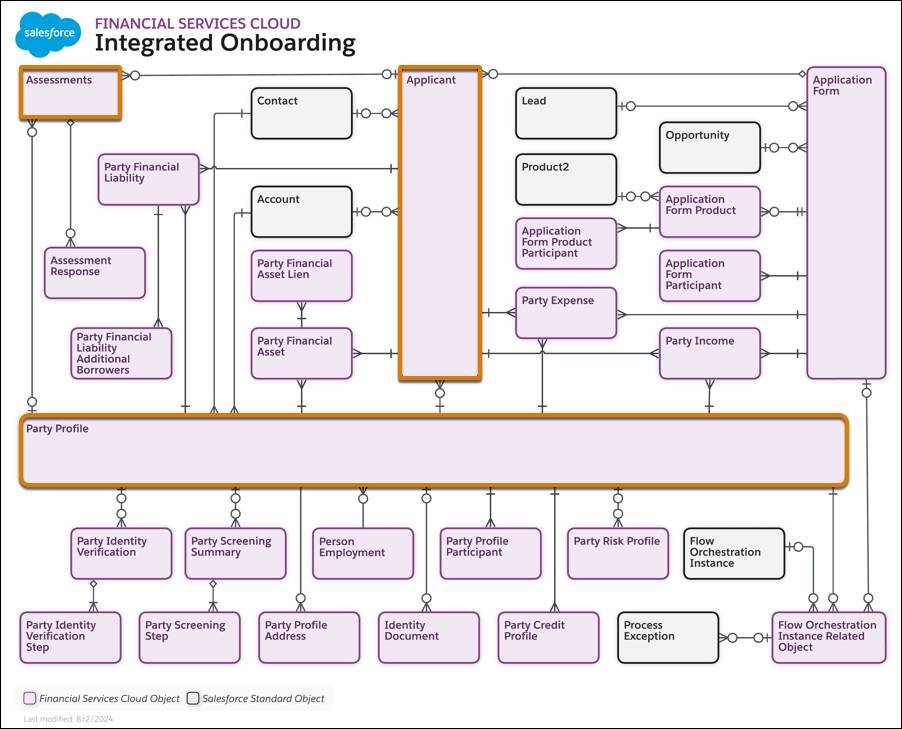
Here’s what each of these objects does.
- Applicant represents the individual or group applying for a product.
- Party Profile stores applicant’s compliance-related details, such as identity verification results, credit scores, and background check results. You learn more on this object in the next section.
- Assessment captures the results of application forms and other data collected from an applicant during onboarding.
Other related objects track other important factors such as an applicant’s assets, credit profile, employment, and more. Set your customers and users up to quickly and efficiently capture all of the client onboarding information and set up a financial account.
The Integrated Onboarding Data Model works closely with the Know Your Customer (KYC) Data model. Check that out next.
The Know Your Customer Data Model
KYC verifications are an important part of your due diligence. It’s important to know that your client is legitimate from the very beginning of your relationship to reduce fraud and compliance risks.
So the KYC Data Model is, in many ways, a part of the Integrated Onboarding data model. Party Profile, which you learned about in the last section, is the key object in this data model. Check out this screenshot of an example party profile record showing details of a customer.
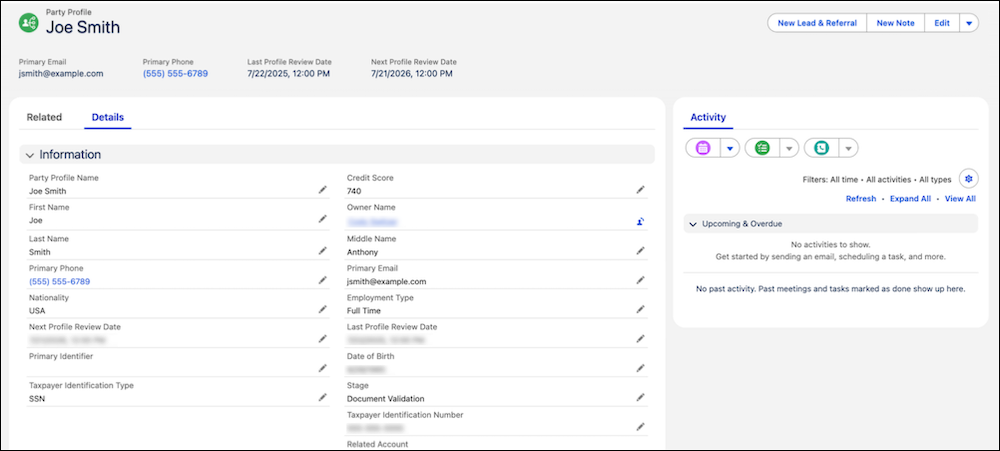
Party profiles such as this and related child objects store compliance-critical information such as identity verification and anti-money-laundering (AML) screening results. These records save time and effort for your team and clients because you can use the same party profile for future applications submitted by the same applicant after KYC verification is complete.
Collecting Information and Consent
Closely related to onboarding are the data models that help you store information about assessments and consent. These data models help you collect information and important client acknowledgments and agreements.
The Discovery Framework Data Model
Discovery Framework helps you collect and validate data with digital forms and assessments. The Discovery Framework Data Model works with Omnistudio to create reusable, compliant forms.
For example, you can set up forms to collect and validate KYC data. If you already have some client information, you can prefill that data in the fields on the assessment form for customers to update or verify. The result of the form is orderly, accurate data stored directly in Salesforce.

While Omnistudio elements manage the interactivity, the Discovery Framework Data Model provides the structure to store questions, responses, and their relationships to clients and processes.
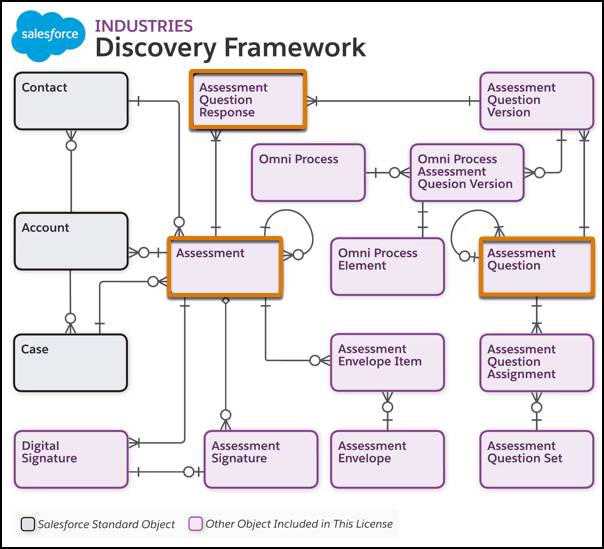
The Assessment Question object stores the questions you create for an assessment, while Assessment Question Response stores submitted client responses to those questions. Each client’s responses to a form are related to a record of the Assessment object, which connects that client’s responses and signatures, and relates them back to a contact, account, or case.
The Consent Data Model
The Consent Data Model tracks consent and disclosure documents, authorization request forms, and responses. It helps you collect and validate this data in compliance with your policies.
The key object in the Consent Data Model is Authorization Form, which stores the forms that share information with a client and request their consent. The Info Authorization Form Request object represents a specific instance of an authorization form sent to a client for their acknowledgment or consent.
The Authorization Form Consent object tracks if a client consents to an authorization request. It captures details about when and how that consent was given, and can relate to a digital signature record.
For details, check out the Privacy Consent Data Model.
What’s Next?
In this unit you learned about supporting data models that aid in day-to-day operations.
You explored the Integrated Onboarding Data Model and the closely related Know Your Customer (KYC) Data Model. You also learned about the Discovery Framework Data Model for creating digital assessment forms and collecting validated data, and the Consent Data Model for tracking client consent and disclosure.
In the next unit, the focus shifts from getting clients in the door to keeping your relationships with them strong. You explore data models that help your team document interactions, coordinate plans, and respond to service needs such as complaints, disputes, and collections.