Onboard B2B Clients
Learning Objectives
After completing this unit, you’ll be able to:
- Describe Business Client Engagement and how it captures critical business information.
- Explain how Integrated Onboarding streamlines B2B client onboarding.
Manage Business Client Engagement
In the first unit you learned the basics of the B2B-specific features of Agentforce Financial Services. In this unit, you explore the features Business Client Engagement and Integrated Onboarding that help you understand and onboard a B2B client. These two features are closely related and use some of the same tools to map and understand a business.
Working with a business often starts with understanding the people who operate and control it. So start here by exploring Business Client Engagement.
Business Client Engagement includes B2B-specific fields and data model elements for onboarding. It helps you operate compliantly and efficiently by capturing business details such as business structure, and beneficial owners and controlling parties (BOCP). How? It provides objects and fields to identify key stakeholders in any ownership structure within the Agentforce Financial Services data model. Here’s a look at the entity relationship diagram (ERD) of the Business Client Engagement data model.
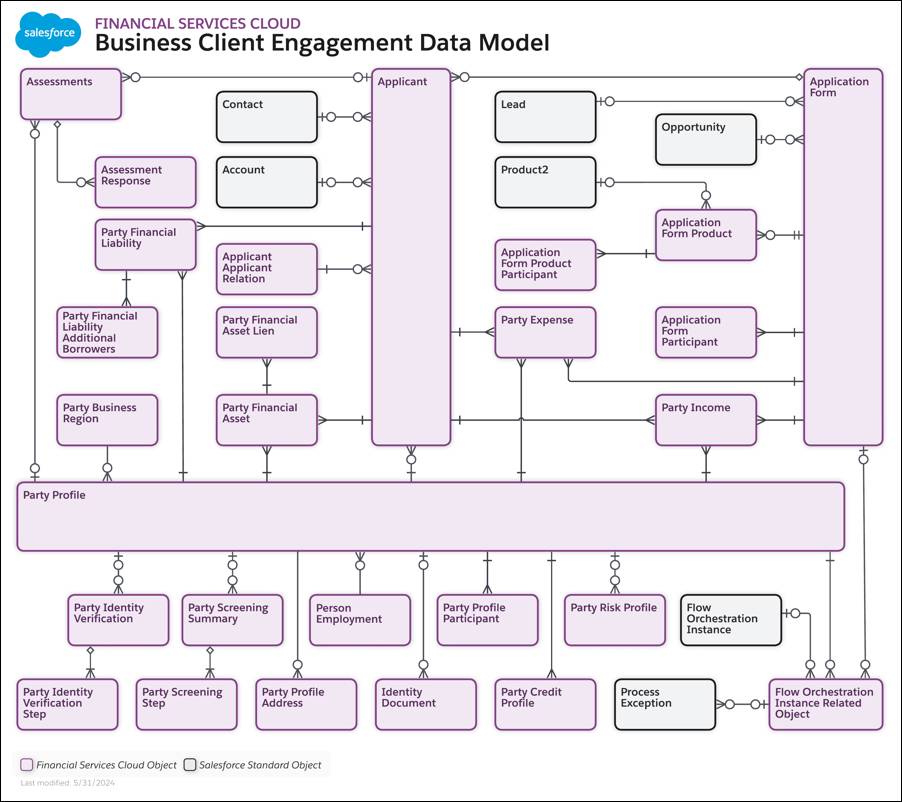
Central to the Business Client Engagement data model is the Party Profile object, key to Know Your Customer (KYC) compliance. Each party profile and its related records store details for identity checks, risk assessments, and screening checks. Included onboarding flows use the party profiles for these tasks, which often involve integrations with external data sources.
Business Client Engagement extends the individual-client model to make it a Know Your Business (KYB) model, too. Business Client Engagement adds fields such as Business Entity Name, Business Entity Country of Registration, and Business License Issuing Authority Name to the Party Profile object. It also adds the related Party Business Region object used to capture all of the regions where a business entity does business.
Business Client Engagement also uses the Applicant Applicant Relation object to capture relationships between applicants. After onboarding, that data can be moved to Account Contact Relationship and Account Account Relationship objects. These objects all contain specific fields to capture beneficial owner and controlling party details such as if an individual is a shareholder, their percentage of share ownership, and if they’re a decision-making authority for a business. See Configure Fields to Store Business Applicant Information for more details.
After you capture these details, use prebuilt Actionable Relationship Center (ARC) graph templates to visually model and understand complex business relationships and ownership chains. The prebuilt B2B Account to Account Relationship and B2B Applicant to Applicant Relationship ARC graph templates make this process easy.
Check out this example of the B2B Account to Account Relationship template in action.
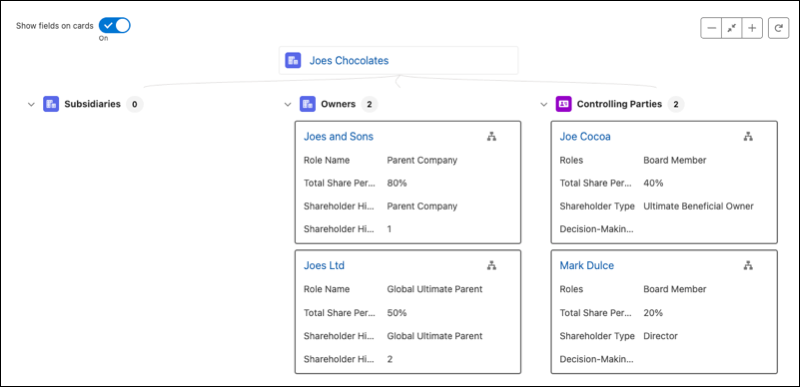
This simple example shows that there are two controlling parties for the business, its ultimate beneficial owner and a director. There’s also a parent company and global ultimate parent company in the Owners group. There are no subsidiaries.
Storing and presenting all of this information securely in Salesforce helps B2B financial professionals streamline screening checks by providing critical ownership information, saving time and effort for your team and your clients.
Streamline Onboarding
But how do you get all of this information in the first place?
Agentforce Financial Services includes the Integrated Onboarding sample app to streamline the customer onboarding process. The prebuilt sample app includes automations such as Omniscripts, Flows, Integration Procedures, and Omnistudio Data Mappers that can be deployed to your Salesforce org and customized to meet your onboarding needs for B2B clients.
Integrated Onboarding includes features to help you collect all of the KYB information you need. Explore a few of these tools.
-
Discovery Framework helps you create and manage digital assessments to collect and check client information, such as forms for B2B client information.
-
Data Consumption Framework integrates data with third-party providers for risk assessment and screening, such as checking B2B client data against external databases.
-
Document Tracking and Approvals, including Document Checklist Items, defines and tracks necessary files through the approval process, such as collecting paperwork for a business loan application.
-
Stage Management defines business process stages, transitions, and the criteria required to complete each stage of a complex business process such as B2B client onboarding.
These features all work together to collect and verify B2B client information.
What’s Next
In this unit you learned that Business Client Engagement and Integrated Onboarding are two closely related features in Agentforce Financial Services that help you understand and onboard B2B clients.
Business Client Engagement uses B2B-specific fields for objects such as Party Profile to capture business details such as beneficial owners and controlling parties, and business structure, extending the Know Your Customer (KYC) model to Know Your Business (KYB).
The Integrated Onboarding sample app, which includes features such as Discovery Framework, Data Consumption Framework, Document Tracking and Approvals, and Stage Management, helps streamline the process of collecting and verifying all necessary KYB information.
After you have that information and your B2B client is onboarded, how can relationship managers and others continue to work with the client and help them meet their goals? The answer is business relationship plans—and that’s the topic of the next unit.