Learn How Agentforce and Slack Work Together
Learning Objectives
After completing this unit, you’ll be able to:
- Identify use cases for agents in Slack.
- Find agents in Slack.
- List the actions available for an agent to take in Slack.
Before You Start
Before you complete any steps in this badge, make sure you complete the hands-on challenges in Quick Start: Connect Your Agentforce Org with Slack using the same Agentforce Developer Edition org. The work you do in the hands-on challenges here builds on the work you complete in that badge.
Make Slack the Home for Agents
Magic happens when you bring AI-powered agents into your Slack workspaces. These intelligent agents enhance productivity and collaboration for your employees by automating routine tasks and providing contextually relevant support where they already spend their day—in Slack.

Benefits of Integrating AI-Powered Agents and Slack
-
Improved contextual relevance: AI-powered agents tap into Slack’s conversational data to provide more accurate and contextually relevant responses to employees.
-
Increased productivity: Employees can focus on the highest-value tasks while agents automate simpler ones in Slack. Agents act as assistants for routine tasks such as setting up channels, sending messages, and updating canvases.
-
Improved customer experience: Agents can search for and summarize information, and suggest proactive actions for your employees. This leads to faster, more personalized service for a better customer experience.
-
Trusted security: The Einstein Trust Layer in Agentforce and Slack security standards keep AI use safe and private, with features such as secure data retrieval, data masking, zero data retention, and controlled access by workspace owners and admins.
-
Combined structured and unstructured data: Slack is ideal for agents because it combines the power of structured data from your CRM and enterprise tools with unstructured data from conversations in Slack. This combination provides agents with the insights and context to drastically improve their output and effectiveness.

Think of Slack as your work operating system that brings your people, data, and systems into one place. Introduce AI-powered agents to the mix, and you've got a recipe for a cohesive experience—no more data silos, context switching, or lost communications. Employees can seamlessly engage with agents to be more productive and collaborative. Explore the various ways agents can be used in Slack.
Use Cases for Agents in Slack
Agents in Slack can support employees across many departments for a variety of use cases, improving productivity and efficiency. Here are a few examples of how you might use agents at your organization.
-
HR agents assist with onboarding new employees, answer questions about benefits, and guide career development.
-
IT agents resolve help-desk tickets and manage incident communications.
-
Service agents find experts and use past knowledge to resolve customer issues.
-
Sales agents prepare executive briefings, create proposals, and reach out to customers proactively.
-
Marketing agents improve campaigns, produce content, and develop marketing plans.
-
Legal agents simplify compliance processes and automate approvals.
-
Product and engineering agents support planning, design, development, and quality assurance efforts.
-
Supply chain management agents oversee supplier relationships, automate warehouse tasks, and improve demand forecasting.
The list doesn’t end there! Customize agents to meet the needs of any team within your organization.
Find Agents in Slack
The Agentforce Hub in Slack assists employees discover agents, understand how relevant agents are most helpful to them, and review suggested prompts for a more intuitive experience. Users can interact with agents in a single conversational thread and engage with role-specific agents like any other team member.
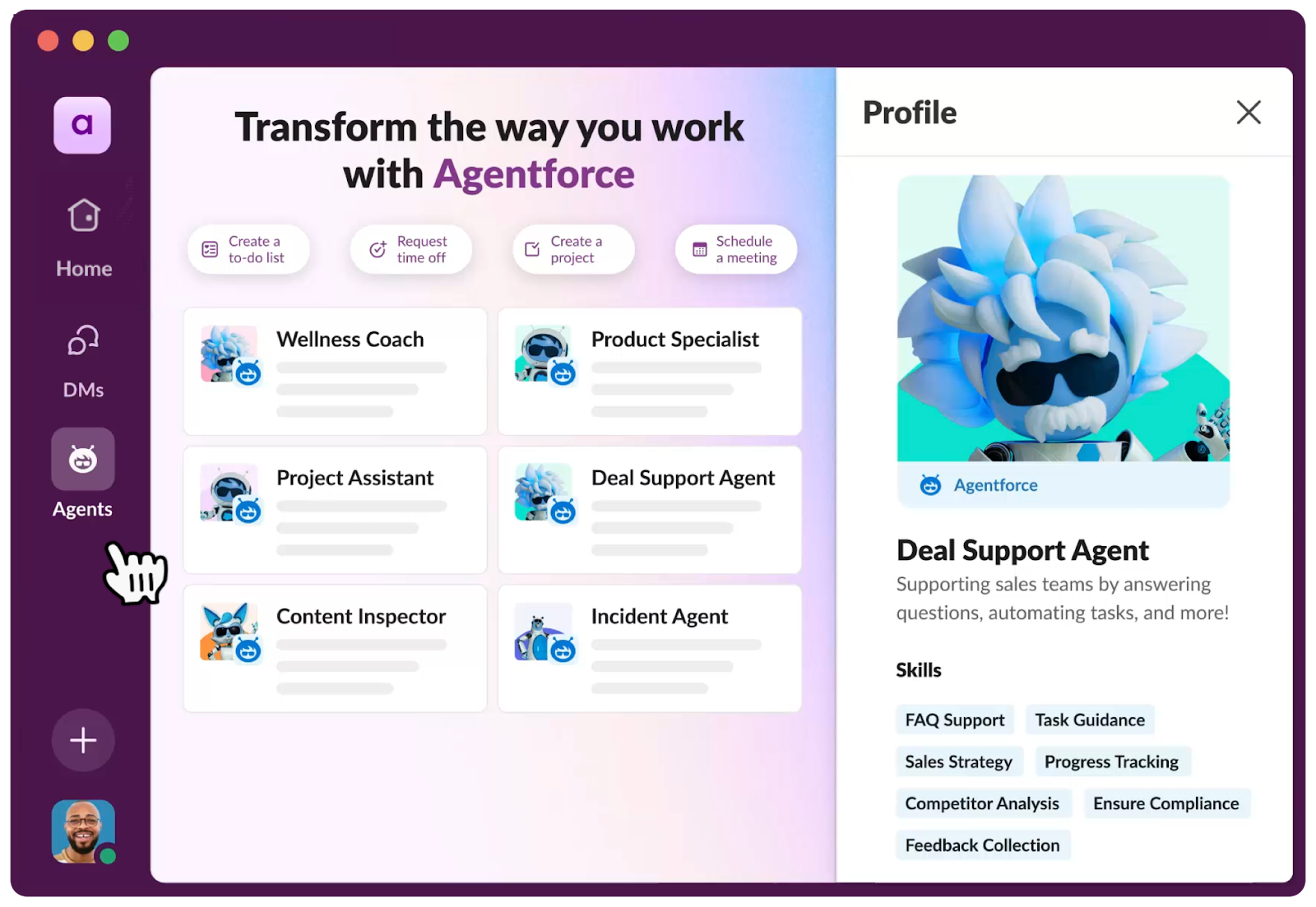
From the Agentforce Hub, users can:
-
Browse available agents: The Agentforce tab in the Slack UI provides many options for selecting available agents that meet your needs.
-
View the agent’s credentials: Each agent has a nifty little bio in the Agentforce tab, which showcases their skills and abilities.
-
Collaborate with agents like a teammate: Engage with agents via direct message (DM), either by selecting suggested prompts or asking a question directly to the agent. Agentforce surfaces that information directly from your knowledge base and other connected systems and takes action on your behalf.
Enable Agents to Take Actions in Slack
You build agents in Agentforce Studio. Agents perform specific actions or functions—also known as subagents—autonomously without human intervention. Subagents represent the topics you want your agent to handle, with a subset of actions and instructions. For example, a subagent called Deal Management might include tasks that help a sales rep find opportunities, create to-do items, and log calls while masking personally identifiable information (PII).
Slack subagents, like Slack Knowledge, provide a powerful way to simplify work and enhance productivity for Slack users. You can even create your own so you can select just the right actions and have a specific set of instructions for your agent. By adding Slack-specific subagents and actions to your agent, they can significantly improve the day-to-day operations of every employee.
What actions are available for agents to interact in Slack?
Action |
Description |
|---|---|
Create a Slack Canvas |
Create a Slack canvas document with content. |
Update a Slack Canvas |
Append content to an existing Slack canvas document. |
Look Up a Slack User |
Look up a user with a corresponding Salesforce-Slack user ID (like how you matched your Slack and Salesforce user IDs in the previous badge). |
Search Slack |
Performs search on Slack. |
Send a Slack Direct Message |
Given plain text or markdown text, send a DM in Slack with the recipient and sender users in the DM channel. |
Look Up a Salesforce Channel in Slack |
Given a Salesforce record ID, look up the corresponding record channel in Slack. |
Create a Salesforce Channel in Slack |
Given a Salesforce record ID, create a corresponding record channel in Slack. |
Create a Slack Channel |
Create a Slack channel with specific parameters. |
List Slack Workspaces |
List Workspaces in Slack. |
Archive a Slack Channel |
Archive a Slack channel, given a Slack Channel ID. |
Add Users or Agents to a Slack Channel |
Add users and/or agents based on the user’s request and permissions. |
Share a Slack Canvas |
Share a Slack Canvas with a set of users and/or channels. |
Send Message to a Slack Channel |
Send a message to a public or private Slack channel. |
Start a Slack Conversation with an Agent |
Send notifications or messages to specific Slack users in a direct message from the agent. |
Summarize a Slack Channel |
Use the Slack Search API to find relevant messages, files, and sources in a channel during a specified timeframe. |
Reply to a Slack thread |
Reply with a message in thread in a Slack channel or direct message. |

Examples of Agents Taking Slack Actions
Check out some examples of common challenges your employees might face and how Agentforce with Slack Actions can solve them.
|
Scenario
|
Solution
|
Slack Subagent Actions
|
|---|---|---|
An account review needs to be prepared for a high-profile customer. The account executive needs a summary of account info and the account team needs to be kept up-to-date. |
Use a Meeting Assistant agent to summarize the account using CRM data, and add the summary to the project team’s canvas. |
|
An employee wants to invest in a fitness watch. They need to know if the expense is eligible for reimbursement through their employee benefits. |
Use a Benefits agent to search the eligibility list and confirm which items are eligible for reimbursement. |
|
A new hire needs to find and complete required training. New training events are being scheduled all the time, which makes it difficult to keep up with the latest options. |
Use an Employee Onboarding agent to find any training sessions or enablement materials about the product in question. The team asks for any new sessions to be automatically added to their team canvas at the beginning of every month. |
|
Agents can assist in various departments, from HR and IT to sales and marketing, and can be easily discovered and managed through the Agentforce Hub in Slack. By adding Slack actions to an agent, it can work autonomously alongside your employees in Slack to get things done. In the next two units, follow the steps to build an agent in Agentforce Builder in preparation for use in Slack.
Resources
- Slack Help: Use Agentforce in Slack
- Slack Help: Set up and manage Agentforce in Slack
- Salesforce Help: Agentforce Standard Asset Reference
- Salesforce Help: Agent Actions